Welcome to Day 1 of 30 Days of AI Agents, a month of one-page notes on how agents actually work and how to build them without the hype. The plan runs in four weeks: foundations (what agents are and how they are put together), tools and ecosystem (MCP, LangChain, CrewAI, AutoGen, n8n, vector databases, LangGraph), building real systems (RAG, memory, tools, planning, multi-agent patterns, evaluation, guardrails), and production (optimization, observability, deployment, scaling). Every day comes with a save-worthy sheet. Today we start at the beginning: what an AI agent is, and what separates it from a chatbot.
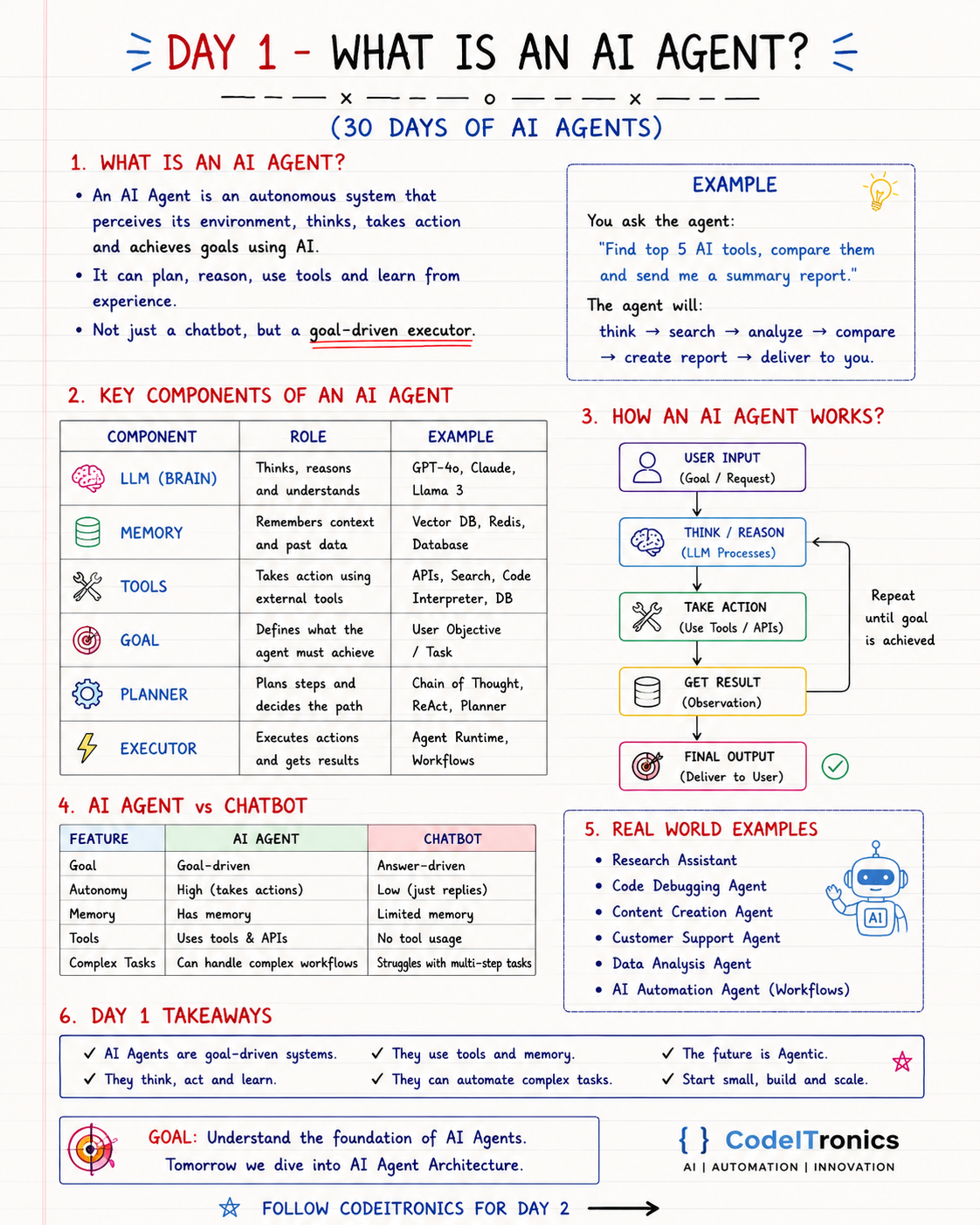
Save this sheet. The rest of this note walks through it section by section.
What an AI Agent Actually Is
An AI agent is a system that takes a goal, decides what to do next, does it using tools, looks at the result, and keeps going until the goal is met. It perceives its environment (the request, the data, the results of its own actions), reasons about it with a language model, and acts.
The short way to say it: a chatbot is answer-driven, an agent is a goal-driven executor. Ask a chatbot to "send me a summary of the top five AI tools" and you get a paragraph. Ask an agent and you should get a report in your inbox, because it searched, compared, wrote, and sent it.
One honest clarification about "learns from experience." Almost no production agent retrains its model as it runs. When people say an agent learns, they usually mean it stores useful results in memory, gets feedback, and uses that context next time. That is still valuable. It is just engineering, not magic.
The Six Components
Every agent you will see this month, whether it is built in plain Python or a framework, has some version of these six parts.
| Component | Role | Typical choices | What breaks without it |
|---|---|---|---|
| LLM (brain) | Reads the situation, reasons, picks the next step | GPT-4o, Claude, Llama 3 | Nothing decides anything |
| Memory | Holds context and past data | Conversation history, Redis, a vector DB, Postgres | The agent repeats work and forgets the user |
| Tools | Let the agent act outside the model | APIs, web search, code interpreter, database queries | It can only talk, never do |
| Goal | Defines what done looks like | The user objective or task | It loops or stops at the wrong time |
| Planner | Breaks the goal into steps | Chain of thought, ReAct, an explicit plan step | It acts randomly or takes the long way |
| Executor | Runs the actions and returns results | An agent runtime, a workflow engine | Plans never turn into effects |
The model is the only probabilistic part of that list. Everything else is ordinary software you can test, log, and constrain. That split is the first design lesson of the series: let the model interpret and decide, and let deterministic code do anything that has consequences.
How the Agent Loop Works
The core of every agent is a loop, not a single call.
User input (goal)
      |
      v
Think / reason (LLM)  <---------+
      |                          |
      v                          |
Take action (tool or API)        |  repeat until
      |                          |  goal is achieved
      v                          |
Get result (observation) -------+
      |
      v
Final output to the user
In code, stripped of any framework, it looks roughly like this (pseudo-code, but close to what real implementations do):
def run_agent(goal, llm, tools, max_steps=10):
    history = [{"role": "user", "content": goal}]
    for _ in range(max_steps):
        step = llm.decide(history, tools)        # think: answer, or pick a tool
        if step.is_final:
            return step.answer                    # goal achieved
        result = tools[step.tool](**step.args)    # act
        history.append(step.as_message())
        history.append({"role": "tool", "content": str(result)})  # observe
    return "Stopped: step limit reached"
Notice max_steps. An agent without a stopping rule is a bill without a ceiling. We will build a real, runnable version of this loop on Day 7.
A Worked Example
Take the request on the sheet: "Find the top 5 AI tools, compare them, and send me a summary report."
- Think. "Top" is ambiguous. A good agent decides on criteria first (category, pricing, adoption, recent releases) or asks.
- Search. It calls a web search tool several times with different queries.
- Analyze. It reads results, drops duplicates and marketing pages, and extracts facts per tool.
- Compare. It builds a table against the criteria it chose.
- Create report. It writes a summary with sources.
- Deliver. It calls an email or Slack tool to send it.
Each arrow in that chain is a decision point where the model can be wrong. That is why the rest of this series spends so much time on tools, memory, evaluation, and guardrails. The loop is easy. Making every step trustworthy is the work.
AI Agent vs Chatbot
| Feature | AI agent | Chatbot |
|---|---|---|
| Orientation | Goal-driven | Answer-driven |
| Autonomy | High, takes actions | Low, just replies |
| Memory | Keeps context across steps and sessions | Usually limited to the current chat |
| Tools | Calls APIs, searches, runs code | None, or very few |
| Complex tasks | Handles multi-step workflows | Struggles past one or two turns |
The line is blurry in practice. Many "chatbots" now call a tool or two, and many "agents" are a single tool call wearing a costume. A useful test: does the system choose its own next action based on what just happened? If yes, it is behaving like an agent.
Where Agents Show Up in Real Work
The sheet lists six common shapes: research assistants, code debugging agents, content creation agents, customer support agents, data analysis agents, and workflow automation agents.
Two from our own builds make the idea concrete. Our AI Agent for Inbox and Task Handling classifies, summarizes, and routes incoming email into the right workflows, which saved the team hours daily. Our Customer Support AI Triage system, built with OpenAI, the Zendesk API, and vector embeddings, auto-resolves 40% of tickets and responds instantly to the rest. Neither is a general-purpose genius. Both are narrow agents with a clear goal, a small set of tools, and a well-defined handoff to humans.
When Not to Build an Agent
Agents are flexible, and flexibility costs latency, money, and predictability. If the steps are always the same, a plain workflow is cheaper and easier to test. If you just need a one-off answer, a prompt is enough. We will make that decision explicit on Day 3. For now, the rule of thumb on the sheet holds: start small, build, and scale.
Key Takeaways
- An AI agent is a goal-driven system that runs a think, act, observe loop until the goal is met.
- Six parts show up everywhere: LLM, memory, tools, goal, planner, executor.
- Only the model is probabilistic. Put consequences in deterministic tools and code.
- "Learning" in practice means memory and feedback, not retraining.
- Start with one narrow goal, a few tools, and a step limit.
FAQs
Is ChatGPT an AI agent?
The plain chat experience is closer to a chatbot. When it browses, runs code, or takes actions across several steps on its own, it is behaving like an agent. The label depends on the loop, not the product name.
Do I need a framework to build an agent?
No. A loop, a model API with tool calling, and a few functions are enough to start. Frameworks help once you need memory, multi-step state, tracing, and many tools.
What is the riskiest part of an agent?
The actions. A wrong answer is embarrassing, but a wrong email, refund, or database write is expensive. Gate risky tools with permissions, validation, and human approval.
Up Next
Tomorrow, Day 2 covers AI Agent Architecture: how the brain, memory, tools, planner, executor, and evaluator fit together, and the stack choices behind each layer. It turns today's six components into a blueprint you can actually build from. If your team wants an agent like this built for a real workflow, get in touch.
Letters to the editor
No letters yet. Questions and counterpoints are welcome.