
Yesterday we upgraded retrieval with hybrid search, reranking, and compression. Day 5 and Day 16 covered what agent memory is and the types it comes in. Day 24 is about the economics: how to keep memory cheap, keep the context window under control, and make sure what the agent remembers is actually what it needs.
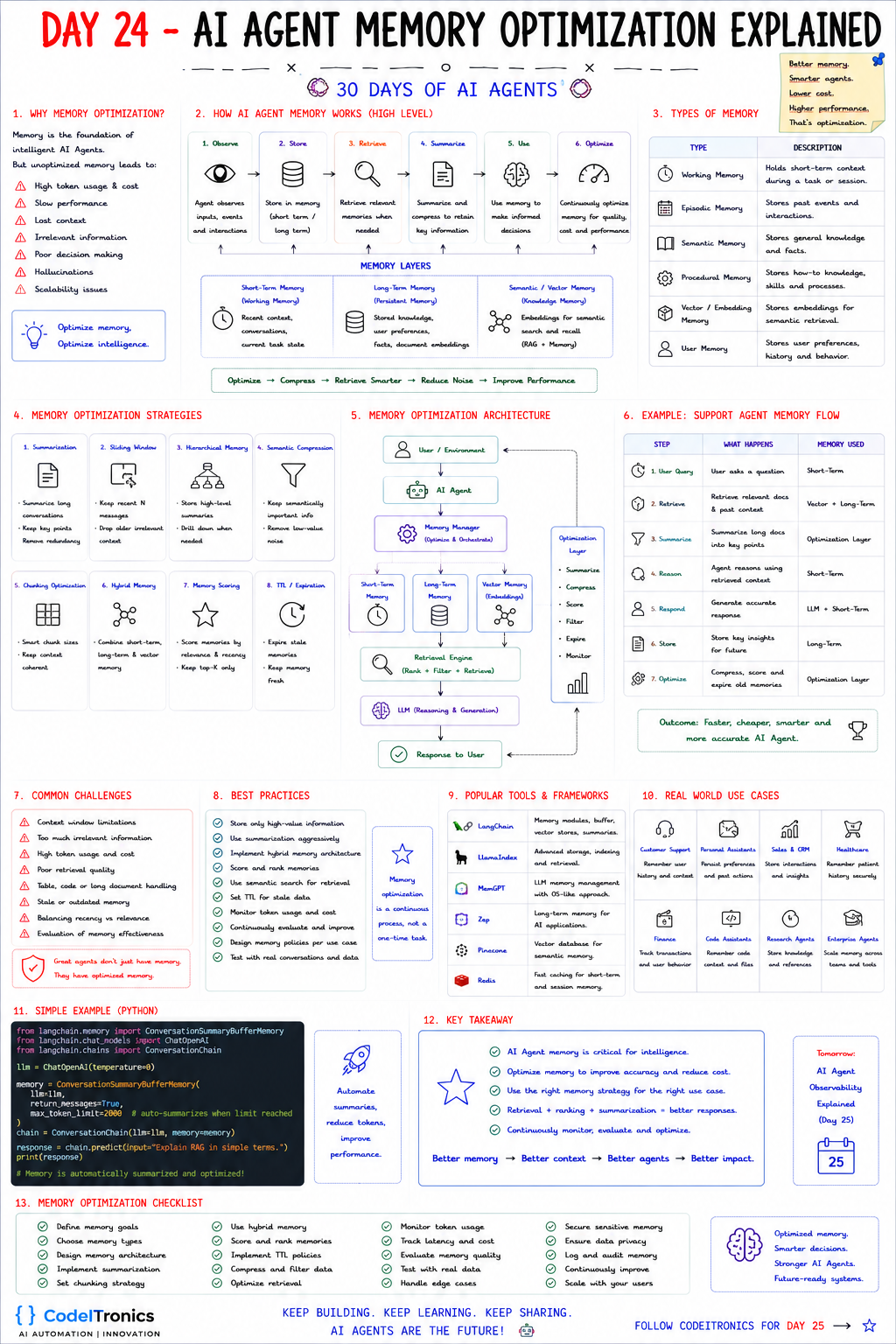
Save this sheet. The rest of this note walks through it section by section.
Why memory needs optimizing
Memory is the foundation of a useful agent, but unmanaged memory degrades it. The sheet lists the symptoms: high token usage and cost, slow responses, lost context, irrelevant information, poor decisions, hallucinations, and scalability problems.
They share a root cause. Every token of memory you put in the prompt is paid for on every call, adds latency, and competes for the model's attention. A support agent that carries a full forty-turn conversation plus ten retrieved documents into each step is paying for that history again and again, and the one sentence that matters may be buried in the middle. Optimizing memory means fewer tokens, chosen better.
The memory lifecycle
The sheet frames memory as a six-step loop: observe inputs and events, store them (short-term or long-term), retrieve when needed, summarize or compress to keep key information, use memory to make decisions, and continuously optimize for quality, cost, and performance.
Three layers carry this: short-term working memory (recent turns and current task state), long-term persistent memory (stored knowledge, user preferences, facts), and semantic or vector memory (embeddings for search and recall). The rule of thumb on the sheet sums up the job: optimize, compress, retrieve smarter, reduce noise, improve performance.
Budget the context window first
Before choosing techniques, decide how many tokens each part of the prompt may use. A large context window is a ceiling, not a target. Here is an illustrative budget for one agent step; the numbers are an example to adapt, not a recommendation:
| Slot | Example budget | Notes |
|---|---|---|
| System prompt and instructions | 1,500 | Stable, so a good candidate for prompt caching |
| Tool definitions | 1,500 | Load only the tools relevant to the current task |
| Running summary of older turns | 800 | Regenerated when the window rolls |
| Recent turns, verbatim | 2,500 | Sliding window of the last few exchanges |
| Retrieved long-term memories and docs | 3,000 | Packed by score until full |
| Reserved for the response | 1,500 | Never let memory squeeze this out |
Once the budget exists, every strategy below becomes a way to stay inside a slot. And when quality drops, you can see which slot overflowed.
Eight optimization strategies
| Strategy | What it does | Cost lever |
|---|---|---|
| Summarization | Condenses long conversations into key points | Replaces many turns with a few hundred tokens |
| Sliding window | Keeps the last N messages, drops older ones | Caps short-term memory size |
| Hierarchical memory | Stores high-level summaries, drills into detail only when needed | Loads detail on demand |
| Semantic compression | Keeps semantically important info, removes low-value noise | Shrinks retrieved text |
| Chunking optimization | Chooses chunk sizes that keep context coherent | Fewer, more useful chunks |
| Hybrid memory | Combines short-term, long-term, and vector memory | Each layer stores only what it is good at |
| Memory scoring | Scores by relevance and recency, keeps top K | Only the best memories enter the prompt |
| TTL and expiration | Expires stale memories | Keeps the store small and current |
Summarization and the sliding window usually work as a pair: keep recent turns verbatim, fold older turns into a running summary. The sheet's example uses LangChain's ConversationSummaryBufferMemory with a token limit, which does exactly this. Newer LangChain releases steer memory toward LangGraph persistence, so check what your version recommends; the pattern is the same either way.
One caution: summaries lose detail, and a bad summary is a hallucination you will keep paying for. Keep exact values such as order numbers, amounts, and dates in structured fields rather than trusting prose summaries to preserve them.
Scoring and packing memories in code
Memory scoring and the context budget meet in one small function: rank candidates, then pack until the slot is full.
import math, time

def score(memory, query_vec, now, half_life_days=14):
    relevance = cosine(memory.vec, query_vec)
    age_days = (now - memory.created_at) / 86400
    recency = 0.5 ** (age_days / half_life_days)   # halves every 14 days
    return 0.7 * relevance + 0.2 * recency + 0.1 * memory.importance

def pack(memories, query_vec, budget_tokens, count_tokens):
    now = time.time()
    ranked = sorted(memories, key=lambda m: score(m, query_vec, now), reverse=True)
    picked, used = [], 0
    for m in ranked:
        cost = count_tokens(m.text)
        if used + cost <= budget_tokens:
            picked.append(m)
            used += cost
    return picked, used
The weights encode the recency versus relevance trade-off the sheet flags as a challenge. A preference stated six months ago may still matter; a ticket status from six months ago probably does not. Tune the weights and half-life per memory type, and log used on every call so token spend becomes a metric you can watch.
The optimization architecture
User -> Agent -> Memory manager
          |-> Short-term memory
          |-> Long-term memory
          |-> Vector memory
       -> Retrieval engine (rank, filter, retrieve)
       -> LLM -> Response
Optimization layer: summarize, compress, score, filter, expire, monitor
The sheet's support-agent flow shows it in motion: the query lands in short-term memory, relevant docs come from vector and long-term memory, the optimization layer summarizes long docs into key points, the agent reasons and responds, key insights are stored for the future, and old memories are compressed, scored, and expired. The outcome is an agent that is faster, cheaper, and more accurate.
Tools in this space include LangChain and LlamaIndex for memory modules, MemGPT (now continued as the Letta project) for OS-style memory management, Zep for long-term memory, Pinecone for vector storage, and Redis for fast session state.
Measuring retrieval quality
Optimization can quietly make an agent worse, so measure what memory retrieval returns. Three checks cover most of it:
- Recall on known facts. Seed test conversations with facts the agent must recall later, then check that retrieval surfaces them.
- Noise rate. Sample prompts and count how many injected memories were irrelevant to the turn.
- Tokens per resolved task. Spend divided by outcomes, not per call, so you notice when cheaper memory causes extra turns.
The sheet's best practices tie it together: store only high-value information, summarize aggressively, use a hybrid architecture, set TTLs for stale data, monitor token usage, and test with real conversations.
Key Takeaways
- Every remembered token is paid for on every call, so optimize for fewer, better tokens.
- Set a per-slot context budget before choosing techniques; a big window is a ceiling, not a target.
- Pair a sliding window with a running summary, and keep exact values in structured fields.
- Score memories on relevance, recency, and importance, then pack to budget.
- Track recall, noise, and tokens per resolved task so savings do not cost accuracy.
FAQs
Is a bigger context window a substitute for memory optimization?
No. Larger windows raise the ceiling but not the cost per token, and models can still miss details buried in long prompts.
How often should summaries be regenerated?
When the sliding window rolls over a set number of turns or the summary slot exceeds its budget, not on every call.
Should memories ever be deleted?
Yes. Expire stale task state, honor retention and deletion policies for personal data, and keep durable preferences longer.
Up Next
Day 25 is AI Agent Observability: logs, traces, metrics, and the instrumentation that shows what an agent did, why it did it, and what it cost. If your agents are getting expensive or forgetful, talk to us.
Letters to the editor
No letters yet. Questions and counterpoints are welcome.