Yesterday we compared single-agent and multi-agent systems and called shared memory the glue that holds a team of agents together. Today we look at memory itself: the four kinds an agent uses, where each one lives, and how to design it so the agent gets more useful over time instead of more confused.
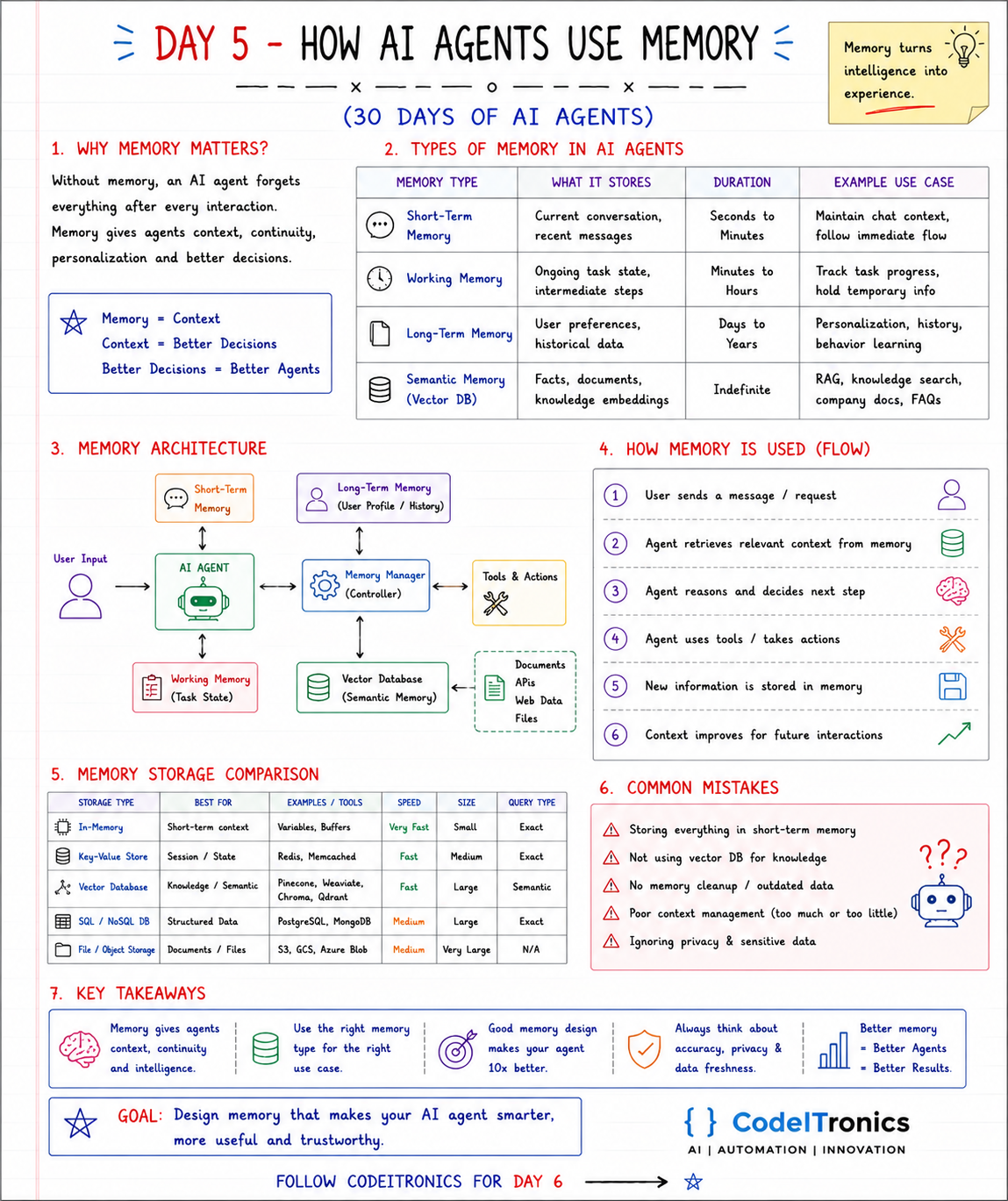
Save this sheet. The rest of this note walks through it section by section.
Why Memory Matters
Language models are stateless. Every API call starts from zero. Without memory, an agent forgets everything after each interaction: who the user is, what it already tried, what the company's refund policy says.
Memory gives agents four things: context, continuity, personalization, and better decisions. The chain on the sheet is a good summary: memory gives context, context gives better decisions, better decisions give better agents. Or, more poetically, memory turns intelligence into experience.
Four Types of Memory
| Memory type | What it stores | Duration | Example use |
|---|---|---|---|
| Short-term | Current conversation, recent messages | Seconds to minutes | Keep chat context, follow the immediate flow |
| Working | Ongoing task state, intermediate steps | Minutes to hours | Track progress through a multi-step task |
| Long-term | User preferences, historical data | Days to years | Personalization, history, learned preferences |
| Semantic | Facts, documents, knowledge as embeddings | Indefinite | RAG, knowledge search, company docs, FAQs |
These map loosely to how people work. Short-term is what you are holding in your head right now. Working memory is the notepad on your desk for today's task. Long-term is what you know about your colleagues. Semantic memory is the company wiki you search when you need a fact.
The Memory Architecture
On the sheet, the agent does not talk to each store directly. It goes through a memory manager, a controller that decides what to read, what to write, and what to forget. The manager connects:
- short-term memory (the conversation),
- working memory (task state),
- long-term memory (user profile and history),
- a vector database for semantic memory, fed by documents, APIs, web data, and files,
- and tools and actions, whose results may be worth remembering.
This indirection matters. If every part of your agent reads and writes memory however it likes, you end up with duplicated facts, stale data, and prompts stuffed with irrelevant history. One controller with clear rules avoids that.
How Memory Is Used in Practice
The six-step flow on the sheet:
- The user sends a message or request.
- The agent retrieves relevant context from memory.
- The agent reasons and decides the next step.
- The agent uses tools or takes actions.
- New information is stored in memory.
- That context improves future interactions.
Step 2 is where most of the engineering lives. You have a limited context window and a budget, so the memory manager must assemble the right context, not all of it:
def build_context(user_id: str, task_id: str, query: str, budget_tokens: int = 6000) -> list[str]:
    parts = []
    parts.append(profile_store.get_summary(user_id))           # long-term: short and stable
    parts.append(task_store.get_state(task_id))                # working: where we are
    parts += vector_store.search(query, top_k=5)               # semantic: relevant docs
    parts += chat_store.recent(task_id, limit=10)              # short-term: latest turns
    return trim_to_budget(parts, budget_tokens)                # drop lowest-priority parts first
Order matters too. Put stable, important context (profile, task state) where it will not be trimmed, and let older chat turns go first.
Choosing Storage
| Storage type | Best for | Examples | Speed | Query type |
|---|---|---|---|---|
| In-memory | Short-term context | Variables, buffers | Very fast | Exact |
| Key-value store | Session and task state | Redis, Memcached | Fast | Exact |
| Vector database | Knowledge and semantic recall | Pinecone, Weaviate, Chroma, Qdrant | Fast | Semantic |
| SQL or NoSQL | Structured data and history | PostgreSQL, MongoDB | Medium | Exact |
| File or object storage | Documents and files | S3, GCS, Azure Blob | Medium | None directly |
A practical default for small teams: Postgres for long-term memory and history, pgvector in the same Postgres for semantic memory, and Redis for session state if you need speed. One fewer database is one fewer thing to secure and back up.
Common Mistakes
The sheet calls out five, and we see all of them:
- Storing everything in short-term memory. The context window fills with old turns, cost climbs, and the model loses focus.
- Not using a vector database for knowledge. Pasting whole documents into the prompt does not scale and buries the relevant paragraph.
- No memory cleanup. Outdated facts (an old address, a changed policy) keep getting retrieved and quietly corrupt answers.
- Poor context management. Too much context confuses the model; too little makes it guess.
- Ignoring privacy and sensitive data. Memory is a database of what users told you. Treat it like one: access control, retention rules, and the ability to delete a user's data on request.
Key Takeaways
- Models are stateless; memory is what gives agents context and continuity.
- Use four distinct types: short-term, working, long-term, and semantic.
- Route reads and writes through a memory manager with clear rules.
- Assemble context within a token budget, in priority order.
- Plan for accuracy, privacy, and freshness from day one, including deletion.
FAQs
Is RAG the same as agent memory?
RAG is one form of it: semantic memory retrieved by similarity search. Agents also need conversation history, task state, and user-level facts, which are usually stored and retrieved differently.
How much chat history should I keep in the prompt?
Only what the current step needs. A common pattern is the last several turns verbatim plus a running summary of older ones.
Should agents write to long-term memory automatically?
Carefully. Let the agent propose memories, but validate them, deduplicate them, and give users a way to see and remove what is stored about them.
Up Next
Day 6 is the AI agent lifecycle: perceive, understand, plan, act, observe, and evaluate and learn, the full loop an agent runs for every goal, with a worked example and the components behind each stage. If your team needs an agent that remembers the right things and forgets the wrong ones, let's talk.
Letters to the editor
No letters yet. Questions and counterpoints are welcome.