Yesterday we laid out agent architecture: brain, memory, tools, planner, executor, and evaluator. Today we step back and ask the question that should come before any of that: do you need an agent at all? Prompts, workflows, and agents are three different tools, and picking the wrong one is the most common and most expensive mistake we see.
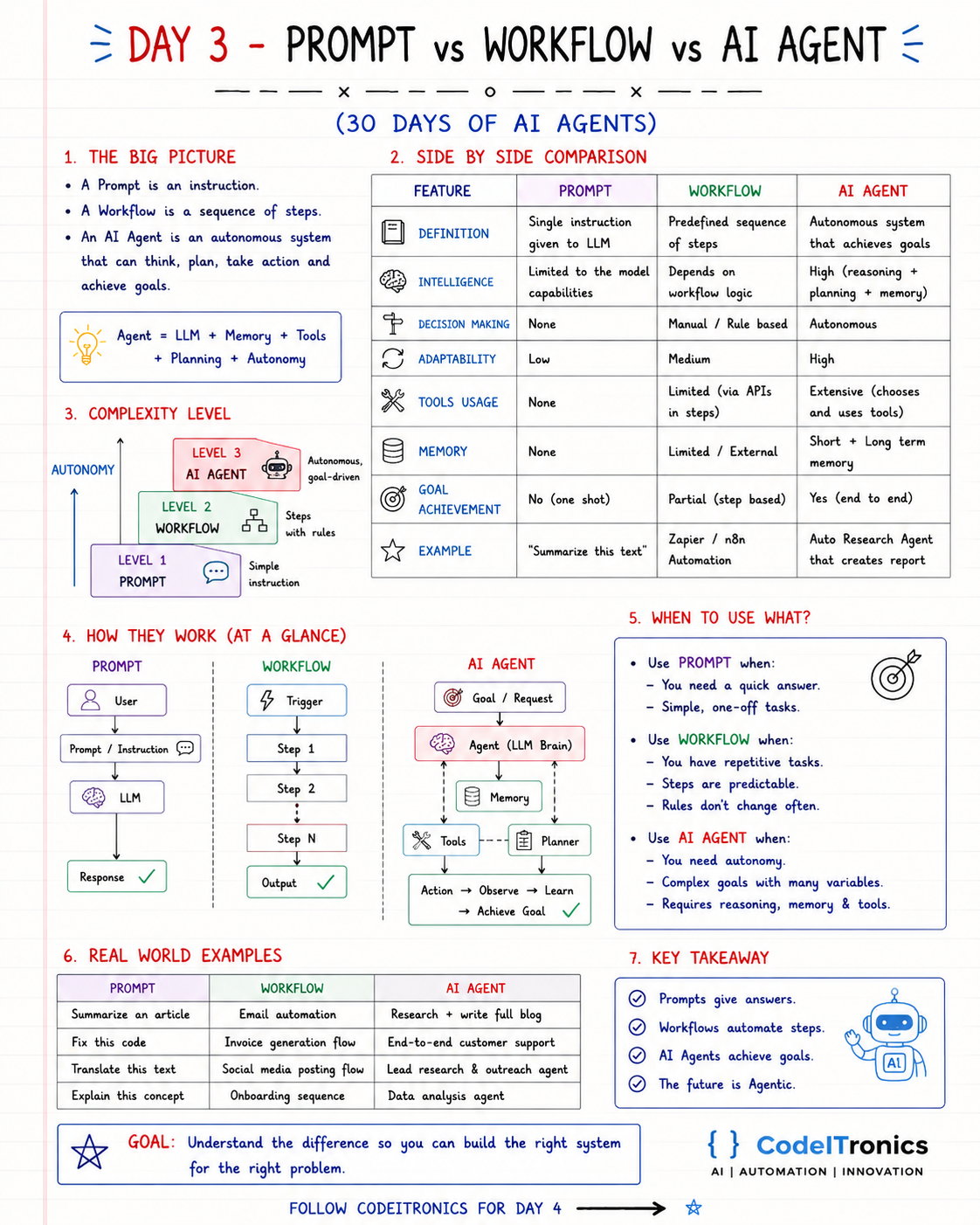
Save this sheet. The rest of this note walks through it section by section.
The Big Picture
- A prompt is an instruction. One input, one output.
- A workflow is a sequence of steps. The path is decided in advance.
- An AI agent is an autonomous system that can think, plan, act, and pursue a goal. The path is decided at runtime.
Or, as the sheet puts it: Agent = LLM + Memory + Tools + Planning + Autonomy. Remove the autonomy and you have a workflow. Remove the steps and you have a prompt.
Three Levels of Autonomy
Think of them as a ladder.
- Level 1, Prompt. A simple instruction to a model. "Summarize this text."
- Level 2, Workflow. Steps with rules, triggered by an event. "When an invoice email arrives, extract fields, create the invoice, notify finance."
- Level 3, Agent. Goal-driven and autonomous. "Research this market and write me a report."
Each step up the ladder buys flexibility and costs predictability, latency, and money. The goal is not to reach Level 3. The goal is to stand on the lowest rung that solves the problem.
Side by Side Comparison
| Feature | Prompt | Workflow | AI agent |
|---|---|---|---|
| Definition | Single instruction to an LLM | Predefined sequence of steps | Autonomous system that pursues goals |
| Intelligence | Limited to the model | Depends on workflow logic | Reasoning plus planning plus memory |
| Decision making | None | Manual or rule-based | Autonomous |
| Adaptability | Low | Medium | High |
| Tool usage | None | Limited, via API steps | Extensive, chooses its own tools |
| Memory | None | Limited, external | Short and long term |
| Goal achievement | One shot | Step by step | End to end |
| Example | "Summarize this text" | A Zapier or n8n automation | An auto research agent that writes a report |
How Each One Works
Prompt:    User -> Instruction -> LLM -> Response

Workflow:  Trigger -> Step 1 -> Step 2 -> ... -> Step N -> Output

Agent:     Goal -> LLM brain (+ memory, tools, planner)
                -> Action -> Observe -> Learn -> ... -> Goal achieved
The important difference is who draws the arrows. In a workflow, you draw them at design time. In an agent, the model draws them at runtime, one step at a time.
When to Use What
Use a prompt when you need a quick answer or a simple one-off task: summarize, translate, explain, fix this snippet.
Use a workflow when the task repeats, the steps are predictable, and the rules do not change often. Most business automation lives here.
Use an agent when you genuinely need autonomy: complex goals with many variables, where the next step depends on what the last one found, and where reasoning, memory, and tools all matter.
A quick test we use: write down the steps. If you can draw the full flowchart and it fits on one page, build a workflow. If the flowchart keeps branching into "it depends on what it finds", that branch is a candidate for an agent.
Real World Examples
| Prompt | Workflow | AI agent |
|---|---|---|
| Summarize an article | Email automation | Research and write a full blog post |
| Fix this code | Invoice generation flow | End-to-end customer support |
| Translate this text | Social media posting flow | Lead research and outreach agent |
| Explain this concept | Onboarding sequence | Data analysis agent |
Our own AI Content Automation System is a good illustration of Level 2 done well. It runs on n8n, calls LLMs at specific steps, pulls from APIs, and stores output in Google Drive. It reduced manual effort by 80%, and it is a workflow, not an agent. The model writes; the workflow decides what happens next.
Trade-offs
| Strengths | Weaknesses | |
|---|---|---|
| Prompt | Simple, fast, cheap | No memory, no autonomy, no actions |
| Workflow | Repeatable, reliable, easy to test and audit | Rigid; breaks on inputs the designer did not foresee |
| Agent | Autonomous, flexible, handles ambiguity | More complex, more costly, needs careful design and monitoring |
The Hybrid Most Teams End Up With
In real systems these levels nest. The most common production pattern is a workflow with LLM steps inside it, and an agent only where judgment is unavoidable.
# A workflow: fixed steps. The LLM fills in one of them.
def handle_invoice_email(email):
    data = extract_invoice_fields(email)     # prompt with a strict JSON schema
    if not data or data["amount"] > 10_000:
        return send_to_human_review(email)   # a rule, not a judgment call
    invoice = create_invoice(data)
    notify_finance(invoice)
    return invoice
Every line except one is deterministic. That is a feature. When something goes wrong, you know exactly which step to look at. If the "extract fields" step starts needing to look things up, ask follow-up questions, and decide what to do based on the answers, that single step can become an agent while the rest stays a workflow.
Key Takeaways
- Prompts give answers, workflows automate steps, agents pursue goals.
- Each level up buys flexibility and costs predictability, latency, and money.
- If the flowchart fits on a page, build a workflow.
- The common production pattern is a workflow with LLM steps, plus an agent only where judgment is needed.
- Pick the right level for the problem, not the most impressive one.
FAQs
Is an n8n workflow with an LLM node an AI agent?
Not by itself. If the workflow decides the path and the LLM fills in content, it is a workflow with AI steps. n8n also has agent nodes that let the model choose tools; that part behaves like an agent.
Are agents always better than workflows?
No. For predictable, repeated tasks, workflows are cheaper, faster, and easier to audit. Agents earn their cost only when the path genuinely cannot be known in advance.
Can I start with a workflow and add an agent later?
Yes, and it is usually the best way. Ship the workflow, watch where humans keep stepping in, and turn those judgment-heavy steps into agent steps.
Up Next
Day 4 compares single-agent and multi-agent systems: when one agent with good tools is enough, when a team of specialized agents is worth the coordination cost, and why more agents does not mean better results. If you are deciding between a workflow and an agent for a real process, talk to us.
Letters to the editor
No letters yet. Questions and counterpoints are welcome.