Yesterday we sorted problems into prompts, workflows, and agents. Today we look inside the agent tier and ask the next question: one agent, or a team of them? Multi-agent systems are the most hyped idea in this space, so this note is about when they actually help and what they cost.
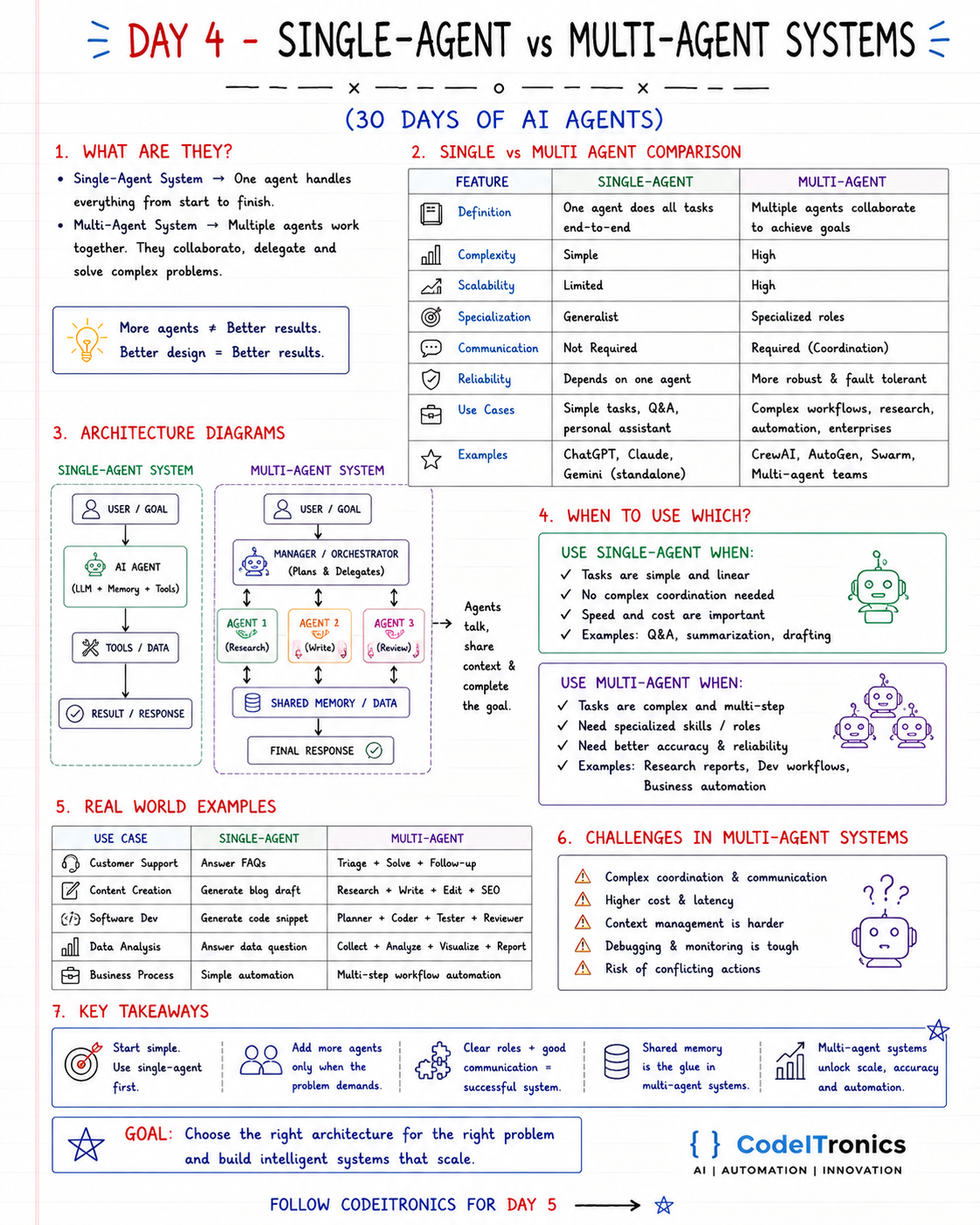
Save this sheet. The rest of this note walks through it section by section.
What Each One Is
- A single-agent system has one agent that handles the task from start to finish. One model, one prompt, one set of tools, one loop.
- A multi-agent system has several agents that collaborate, delegate, and combine their work to solve a larger problem. Usually each has a specialized role and a smaller set of tools.
The line on the sheet is the one to remember: more agents does not equal better results. Better design equals better results.
Side by Side Comparison
| Feature | Single-agent | Multi-agent |
|---|---|---|
| Definition | One agent does all tasks end to end | Multiple agents collaborate toward a goal |
| Complexity | Simple | High |
| Scalability | Limited by one context and one prompt | Scales by adding specialized roles |
| Specialization | Generalist | Specialized roles |
| Communication | Not required | Required, needs coordination |
| Reliability | Depends on one agent | Can be more robust, if designed for it |
| Use cases | Simple tasks, Q&A, personal assistants | Complex workflows, research, enterprise automation |
| Examples | ChatGPT, Claude, or Gemini used standalone | Systems built with CrewAI, AutoGen, or Swarm |
A note on reliability: multi-agent systems are not automatically more fault tolerant. They have more parts that can fail. They become more reliable only when one agent's job is to check another's work, like a reviewer catching a writer's mistakes.
Architecture Diagrams
Single agent:
  User / goal -> AI agent (LLM + memory + tools) -> Tools / data -> Result

Multi-agent:
  User / goal
     -> Manager / orchestrator (plans and delegates)
          -> Agent 1: Research
          -> Agent 2: Write
          -> Agent 3: Review
     -> Shared memory / data
     -> Final response
In the multi-agent version, the orchestrator does not do the work. It breaks the goal down, hands pieces to specialists, and assembles the result. The specialists read from and write to shared memory so they can build on each other's output.
When to Use Which
Single agent when tasks are simple and linear, no real coordination is needed, and speed and cost matter. Q&A, summarization, drafting, and most internal assistants fall here.
Multi-agent when tasks are complex and multi-step, you need genuinely different skills or permissions, and accuracy matters enough to justify a review step. Research reports, software development workflows, and business process automation are the usual candidates.
Signals that a single agent has outgrown itself:
- Its tool list has grown so long that it keeps picking the wrong one.
- Its system prompt has conflicting instructions for different kinds of work.
- You want a separate check on its output before anything ships.
- Different steps need different security boundaries (the researcher reads the web; the publisher writes to your CMS).
Real World Examples
| Use case | Single-agent | Multi-agent |
|---|---|---|
| Customer support | Answer FAQs | Triage, solve, follow up |
| Content creation | Generate a blog draft | Research, write, edit, SEO |
| Software development | Generate a code snippet | Planner, coder, tester, reviewer |
| Data analysis | Answer a data question | Collect, analyze, visualize, report |
| Business process | Simple automation | Multi-step workflow automation |
The Real Costs of Multi-Agent Systems
The sheet lists five challenges, and every one of them is real:
- Complex coordination. Agents need a protocol for who does what and when.
- Higher cost and latency. Every handoff is at least one more model call, often several.
- Harder context management. Each agent sees only part of the picture, so context has to be passed deliberately.
- Tough debugging and monitoring. When the output is wrong, which agent caused it? You need traces per agent.
- Risk of conflicting actions. Two agents can disagree, undo each other's work, or loop.
None of these are reasons to avoid multi-agent designs. They are reasons to earn them.
How to Grow from One Agent to Many
The approach that works for us: start with one agent, ship it, and split only where it struggles. When you do split, define the handoff contract before you write any prompts. Shared memory is the glue, so make it explicit and typed:
from typing import TypedDict

class ReportState(TypedDict):
    topic: str
    sources: list[dict]       # written only by the research agent
    draft: str                # written only by the writer agent
    review_notes: list[str]   # written only by the reviewer agent
    approved: bool            # set only by the reviewer
One owner per field is a simple rule that prevents most "agents overwrote each other" bugs. It also makes debugging easier: if the sources are bad, you know which agent to look at. We will build exactly this kind of state graph with LangGraph on Day 14.
Key Takeaways
- Start with a single agent. Add agents only when the problem demands it.
- More agents does not mean better results; better design does.
- Multi-agent systems cost more in tokens, latency, and debugging time.
- Clear roles and a defined handoff contract are what make teams of agents work.
- Shared memory is the glue. Give each field one owner.
FAQs
Is a multi-agent system just several prompts?
Partly. The difference is that each agent runs its own loop with its own tools and decides its own steps, and an orchestrator or protocol coordinates them.
Do multi-agent systems need different models per agent?
No. Many use one model with different instructions and tools per role. Using a cheaper model for simple roles is a cost optimization, not a requirement.
What is the minimum viable multi-agent setup?
A worker and a reviewer. One agent produces, another checks against explicit criteria. It is the cheapest way to get a real accuracy gain from a second agent.
Up Next
Day 5 covers how AI agents use memory: short-term, working, long-term, and semantic memory, where each is stored, and the common mistakes that make agents forgetful or confused. Memory is what turns a clever loop into something that improves over time. If you are weighing a multi-agent design for a real workflow, we can help you scope it.
Letters to the editor
No letters yet. Questions and counterpoints are welcome.