Yesterday we deployed multi-agent systems as real services. Today we look at the model inside them. Day 27 covers fine-tuning AI agents: what it is good for, what data it needs, how LoRA and QLoRA make it affordable, and, just as important, when you should not do it yet.
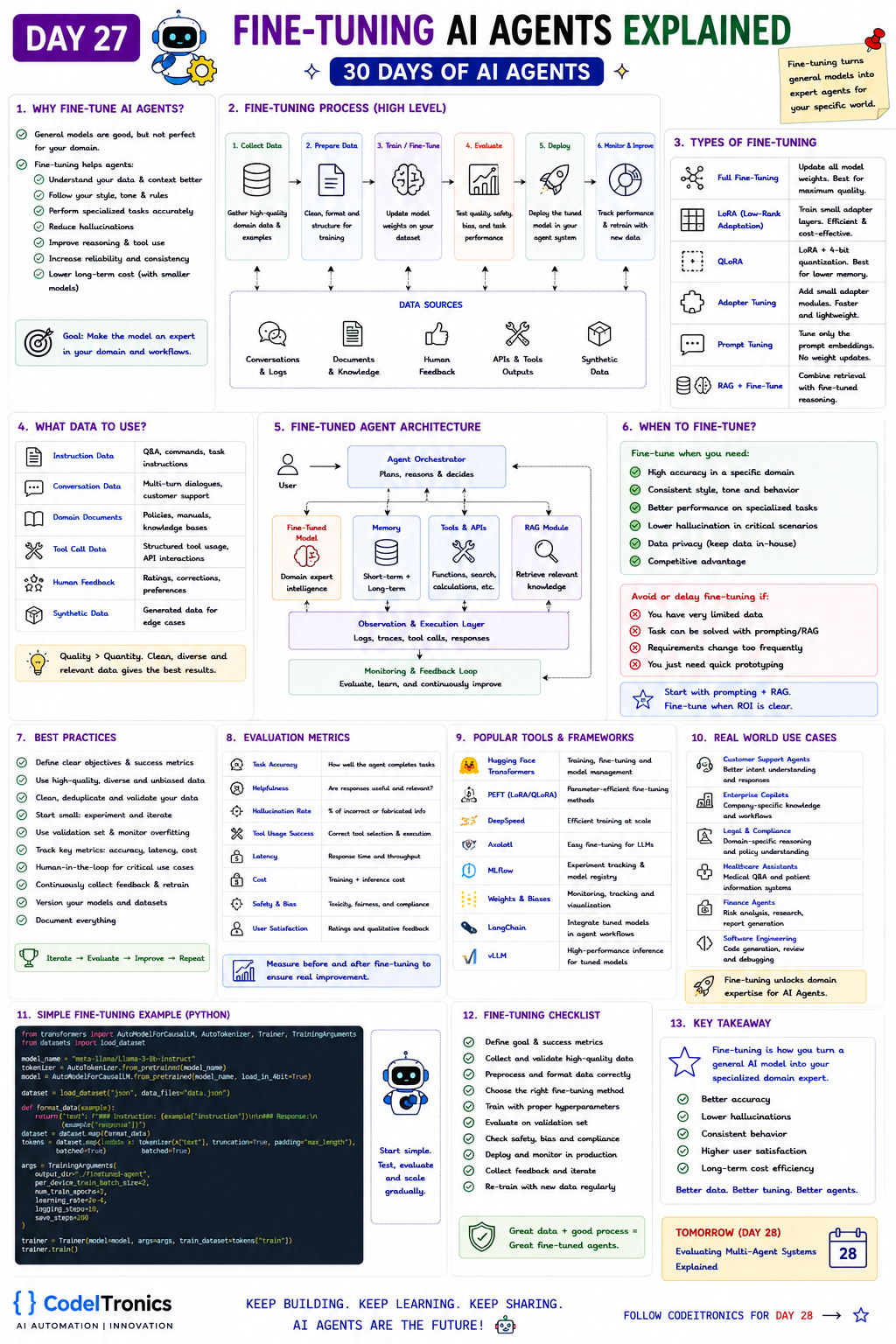
Save this sheet. The rest of this note walks through it section by section.
Why fine-tune an agent
General models are good but not perfect for your domain. Fine-tuning continues training a model on your own examples so its default behavior shifts toward what you need. The sheet lists the benefits: the agent understands your data and context, follows your style, tone, and rules, performs specialized tasks accurately, hallucinates less in narrow domains, uses tools more reliably, behaves more consistently, and can cost less long term when a smaller tuned model replaces a larger general one.
The key mental model: fine-tuning teaches behavior and format, while RAG supplies knowledge. If the agent needs to know this week's prices, retrieve them. If it needs to always produce a particular JSON shape, follow a strict escalation style, or pick the right tool among forty, fine-tuning can help.
When to fine-tune and when to wait
| Fine-tune when you need | Avoid or delay if |
|---|---|
| High accuracy in a specific domain | You have very limited data |
| Consistent style, tone, and behavior | Prompting or RAG already solves the task |
| Better performance on specialized tasks | Requirements change frequently |
| Lower hallucination in critical scenarios | You just need quick prototyping |
| Data privacy, keeping a model in-house | |
| A competitive advantage from proprietary data |
The sheet's advice is the right default: start with prompting plus RAG, and fine-tune when the return is clear. A practical trigger is when your prompt has grown long with examples and rules, the model still misses them, and you are paying for those tokens on every call. That is the point where moving the behavior into weights can pay off.
The fine-tuning process
- Collect data. High-quality domain data and examples.
- Prepare data. Clean, format, and structure it for training.
- Train. Update model weights on your dataset.
- Evaluate. Test quality, safety, bias, and task performance.
- Deploy. Put the tuned model into your agent system.
- Monitor and improve. Track performance and retrain with new data.
Data sources include conversations and logs, documents and knowledge, human feedback, API and tool outputs, and synthetic data.
Types of fine-tuning
| Type | How it works | When it fits |
|---|---|---|
| Full fine-tuning | Updates all model weights | Maximum quality, highest compute cost |
| LoRA | Trains small low-rank adapter matrices, base weights frozen | Cost-effective default for most teams |
| QLoRA | LoRA on a 4-bit quantized base model | Lower memory, fits larger models on smaller GPUs |
| Adapter tuning | Adds small trainable modules | Lightweight, swappable per task |
| Prompt tuning | Learns soft prompt embeddings, no weight updates | Very cheap, narrower gains |
| RAG plus fine-tune | Tuned model with retrieval for knowledge | Domain behavior plus current facts |
If you use a hosted model provider's fine-tuning API, these choices are mostly made for you; you supply the data and evaluate the result. The open-weight route gives you control and in-house data handling, at the cost of running training and inference yourself.
The data that matters
The sheet lists six data types: instruction data (Q&A, commands, task instructions), conversation data (multi-turn dialogues), domain documents (policies, manuals), tool-call data (structured tool usage and API interactions), human feedback (ratings, corrections, preferences), and synthetic data (generated examples for edge cases).
For agents, tool-call data is the most valuable and the most neglected. Each example shows the conversation, the correct tool choice, and well-formed arguments:
{"messages": [
  {"role": "system", "content": "You are a billing support agent."},
  {"role": "user", "content": "Refund my last order, it arrived broken."},
  {"role": "assistant", "tool_calls": [{"id": "call_1", "type": "function", "function": {
    "name": "lookup_last_order", "arguments": "{\"customer_id\": \"c_102\"}"}}]}
]}
Your production traces from Day 25 are the best source for these. Filter for runs that succeeded and were rated well, then have someone review them. Quality beats quantity: a few hundred clean, consistent examples usually teach more than thousands of noisy ones.
A QLoRA setup in code
The sheet's example loads Llama 3 8B Instruct in 4-bit and trains it with the Hugging Face Trainer. A quantized model needs adapters to train, so here is the setup step with PEFT that makes that work:
import torch
from transformers import AutoModelForCausalLM, BitsAndBytesConfig
from peft import LoraConfig, get_peft_model, prepare_model_for_kbit_training

bnb = BitsAndBytesConfig(load_in_4bit=True, bnb_4bit_quant_type="nf4",
                         bnb_4bit_compute_dtype=torch.bfloat16)
model = AutoModelForCausalLM.from_pretrained(
    "meta-llama/Meta-Llama-3-8B-Instruct", quantization_config=bnb, device_map="auto")
model = prepare_model_for_kbit_training(model)

lora = LoraConfig(r=16, lora_alpha=32, lora_dropout=0.05, task_type="CAUSAL_LM",
                  target_modules=["q_proj", "k_proj", "v_proj", "o_proj"])
model = get_peft_model(model, lora)
model.print_trainable_parameters()   # only the adapters train
From here, tokenize your dataset in the model's chat template and train as usual; the sheet's three epochs at a 2e-4 learning rate is a common starting point for LoRA. Hold out a validation set and watch for overfitting.
Where the tuned model sits in the agent
The sheet's architecture keeps the agent orchestrator in charge. It calls the fine-tuned model for domain reasoning alongside memory, tools and APIs, and a RAG module. An observation and execution layer captures logs, traces, tool calls, and responses, and a monitoring loop feeds new examples back into the next training round.
A tuned model does not replace the rest of the system. It makes one component better at its job.
Measuring whether it worked
Measure before and after on the same held-out test set, using the metrics from the sheet: task accuracy, helpfulness, hallucination rate, tool-use success, latency, cost, safety and bias, and user satisfaction. Also check for regressions on general behavior you did not train for, since narrow tuning can erode it.
Tools: Hugging Face Transformers, PEFT, DeepSpeed for training at scale, Axolotl for configuration-driven fine-tuning, MLflow and Weights and Biases for experiment tracking, LangChain for integrating the model into workflows, and vLLM for fast inference. The checklist on the sheet closes the loop: define goals and metrics, collect and validate data, choose the method, train with sensible hyperparameters, evaluate, check safety, deploy and monitor, and retrain as new data arrives.
Key Takeaways
- Fine-tuning teaches behavior and format; RAG supplies changing knowledge.
- Start with prompting plus RAG and fine-tune when long prompts still fail and cost adds up.
- LoRA and QLoRA make fine-tuning affordable by training small adapters.
- Reviewed tool-call examples from real traces are the most valuable agent training data.
- Evaluate before and after on the same held-out set, including general regressions.
FAQs
Can fine-tuning replace RAG?
Rarely. Fine-tuned knowledge goes stale and is hard to cite. Use fine-tuning for behavior and RAG for facts.
How much data do I need?
It depends on the task, but a few hundred high-quality, consistent examples is often enough to see whether it helps.
Does fine-tuning reduce cost?
It can, when a smaller tuned model replaces a larger one or removes long few-shot prompts. Count training and hosting costs too.
Up Next
Day 28 is Evaluating Multi-Agent Systems: how to measure end-to-end task success, handoff quality, coordination failures, and cost and latency across a team of agents. If you are weighing fine-tuning against RAG for a real use case, let's talk.
Letters to the editor
No letters yet. Questions and counterpoints are welcome.