Yesterday we looked at how multiple agents coordinate. Today is AI Agent Tools, the part that lets an agent actually do something. Without tools, an agent can only talk. With them, it can look things up, update systems, and take actions, which is also where most of the risk lives.
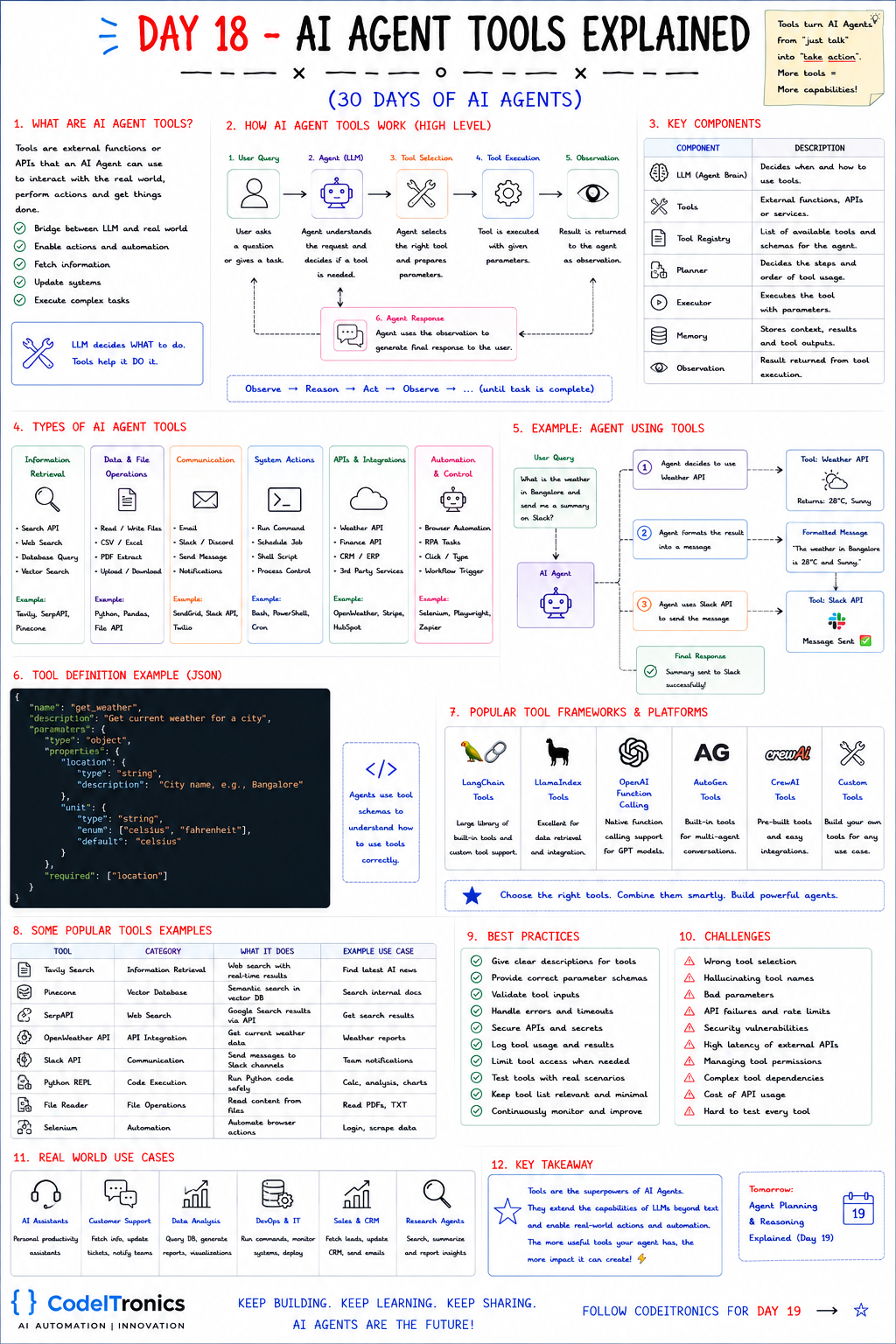
Save this sheet. The rest of this note walks through it section by section.
What a Tool Is
A tool is an external function or API an agent can call to interact with the world: fetch information, update systems, perform actions, and run complex tasks. The sheet's line is the cleanest description of the division of labor: the LLM decides WHAT to do. Tools help it DO it.
One technical detail clears up a lot of confusion. The model never executes anything. It produces a structured request ("call get_weather with {"location": "Bangalore"}"), your code runs the function, and you send the result back. Every guardrail you need lives in that gap between the request and the execution, and it's under your control.
How Tool Calling Works
The sheet's six steps:
- User query. The user asks a question or gives a task.
- Agent (LLM). The agent understands the request and decides whether a tool is needed.
- Tool selection. It picks the tool and prepares the parameters.
- Tool execution. Your code runs the tool with those parameters.
- Observation. The result goes back to the agent.
- Agent response. The agent uses the observation to answer, or calls another tool.
The cycle is Observe → Reason → Act → Observe, until the task is complete. The sheet's example: "What's the weather in Bangalore? Send me a summary on Slack." The agent calls a weather API (28°C, sunny), formats a message, calls the Slack API, and confirms it was sent. That's two tools and one loop, and it's the shape of almost every agent you'll build.
The Components Behind It
| Component | Role |
|---|---|
| LLM (agent brain) | Decides when and how to use tools |
| Tools | External functions, APIs, or services |
| Tool registry | The list of available tools and their schemas |
| Planner | Decides the steps and order of tool use |
| Executor | Actually runs the tool with the parameters |
| Memory | Stores context, results, and tool outputs |
| Observation | The result returned from execution |
The executor is where you put validation, permission checks, timeouts, and logging. Treat it like an API gateway for your agent.
Six Kinds of Tools
| Category | What it covers | Examples |
|---|---|---|
| Information retrieval | Search APIs, web search, database queries, vector search | Tavily, SerpAPI, Pinecone |
| Data and file operations | Read/write files, CSV/Excel, PDF extraction | Python, Pandas, file APIs |
| Communication | Email, chat, notifications | SendGrid, Slack API, Twilio |
| System actions | Run commands, schedule jobs, scripts | Bash, PowerShell, cron |
| APIs and integrations | Weather, finance, CRM, ERP, third-party services | OpenWeather, Stripe, HubSpot |
| Automation and control | Browser automation, RPA, workflow triggers | Selenium, Playwright, Zapier |
Sort these by risk, not just by category. Read-only retrieval tools are low risk. Communication and integration tools act on the outside world. System actions can do real damage. That ranking should drive which tools need human approval.
Writing a Tool Definition
Agents learn how to call a tool from its schema. A good one, in the JSON Schema style most providers use:
{
  "name": "get_weather",
  "description": "Get current weather for a city. Use only when the user asks about current conditions, not forecasts.",
  "parameters": {
    "type": "object",
    "properties": {
      "location": { "type": "string", "description": "City name, e.g. Bangalore" },
      "unit": { "type": "string", "enum": ["celsius", "fahrenheit"], "default": "celsius" }
    },
    "required": ["location"]
  }
}
The description does the heavy lifting. "Get current weather" tells the model what the tool does, and "use only when..." tells it when not to call it. Enums, required fields, and examples in parameter descriptions cut down on bad arguments far more than prompt tweaks do.
The Tool Loop in Code
A provider-agnostic sketch of the loop, with the guardrails in the executor:
TOOLS = {"get_weather": get_weather, "send_slack": send_slack}
NEEDS_APPROVAL = {"send_slack"}

def run_agent(messages, max_steps=6):
    for _ in range(max_steps):
        reply = llm.chat(messages, tools=TOOL_SCHEMAS)
        if not reply.tool_calls:
            return reply.text
        messages.append(reply.as_message())
        for call in reply.tool_calls:
            if call.name not in TOOLS:
                result = {"error": f"Unknown tool {call.name}"}
            elif call.name in NEEDS_APPROVAL and not approved(call):
                result = {"error": "Action rejected by reviewer"}
            else:
                try:
                    args = validate(call.name, call.arguments)   # schema check
                    result = with_timeout(TOOLS[call.name], args, seconds=10)
                except Exception as e:
                    result = {"error": str(e)}
            log_tool_call(call, result)
            messages.append(tool_result_message(call.id, result))
    return "Stopped: step limit reached."
Three details matter. Errors go back to the model as observations, so it can recover instead of crashing. Unknown tool names are caught, since models do occasionally invent them. And max_steps stops runaway loops.
Frameworks Best Practices and Failure Modes
Most stacks handle tool calling for you: LangChain tools, LlamaIndex tools, native function calling in the OpenAI API (and equivalents from other providers), AutoGen and CrewAI tools, or your own. Standards like MCP, which we covered on Day 8, let you define a tool once and use it from any compatible client. Commonly used tools include Tavily for search, Pinecone for vector search, SerpAPI for Google results, OpenWeather, the Slack API, a Python REPL for calculations, file readers, and Selenium for browser automation.
Best practices from the sheet, in the order we'd apply them:
- Write clear tool descriptions, including when not to use each tool.
- Provide correct, strict parameter schemas, and validate inputs before executing.
- Handle errors and timeouts, and return them as observations.
- Keep API keys in the executor, never in prompts.
- Limit access with least privilege, and require approval for destructive or external actions.
- Log every call with its arguments and results.
- Keep the tool list relevant and minimal. Fewer, sharper tools beat many overlapping ones.
- Test tools with real scenarios, and keep monitoring and improving them.
The failure modes to plan for: wrong tool selection, hallucinated tool names, bad parameters, API failures and rate limits, security vulnerabilities, high latency, tricky permissions, complex tool dependencies, API cost, and the difficulty of testing every tool. Our Inbox and Task Handling agent at CodeITronics is a good example of a small tool surface. It classifies, summarizes, and routes emails into workflows, and it saved hours daily because each tool does one narrow, well-tested thing.
Key Takeaways
- The model only requests tool calls. Your executor decides what actually runs.
- Tool descriptions and schemas are prompts, so write them as carefully as your system prompt.
- Return errors as observations, cap the number of steps, and catch unknown tool names.
- Rank tools by risk, and require human approval for anything destructive or external.
- Fewer, sharper tools beat a long list of overlapping ones.
FAQs
How many tools can one agent handle?
There's no fixed limit, but selection accuracy drops as tools overlap. If you have dozens, group them by domain and route to specialized agents.
Can the model call several tools at once?
Many APIs support parallel tool calls. Use it for independent lookups, and keep anything with side effects sequential.
What's the difference between a tool and an MCP server?
A tool is a single function the agent can call. An MCP server is a standard way to expose a set of tools (and other context) so any compatible client can use them.
Up Next
Day 19 covers AI Agent Planning & Reasoning: how agents break goals into steps, choose actions, and replan when results come back wrong. If you're connecting an agent to real systems and want the tool layer done safely, contact us.
Letters to the editor
No letters yet. Questions and counterpoints are welcome.