Yesterday we gave agent workflows explicit structure with LangGraph. Today is RAG (Retrieval-Augmented Generation), the technique that lets an LLM answer from your documents instead of only from what it learned in training. It brings together everything from Day 13's vector databases and is the backbone of most useful enterprise AI.
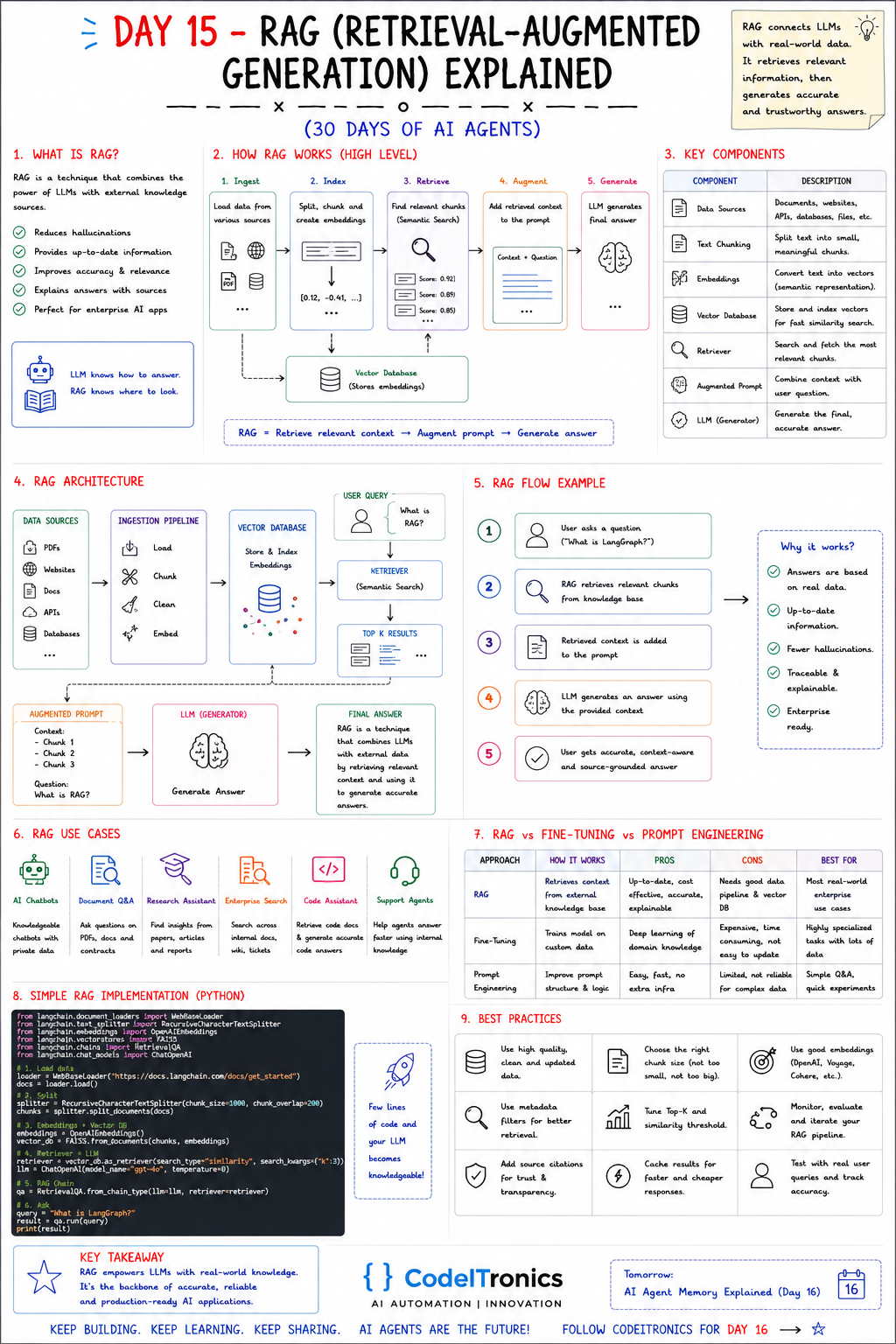
Save this sheet. The rest of this note walks through it section by section.
What RAG Is and Why It Works
RAG combines an LLM with an external knowledge source. Before the model answers, you retrieve the most relevant passages and put them in the prompt. The sheet's line says it well: the LLM knows how to answer. RAG knows where to look.
What it buys you:
- Fewer hallucinations, because the model is answering from supplied text instead of memory.
- Up-to-date information, because updating a document updates the answers. No retraining needed.
- Better accuracy and relevance on your domain.
- Answers with sources, so users and reviewers can check them.
- Enterprise readiness, because you control what the model can see.
"Fewer" hallucinations is the honest word. RAG reduces them a lot when retrieval is good and does little when retrieval is bad. Most RAG problems are retrieval problems.
The Five-Stage Pipeline
- Ingest. Load data from PDFs, websites, docs, APIs, and databases.
- Index. Split it into chunks, create embeddings, and store them in a vector database.
- Retrieve. Embed the question and run a semantic search, which returns scored chunks (for example 0.92, 0.89, 0.85).
- Augment. Put the retrieved context and the question into a prompt.
- Generate. The LLM writes the final answer from that context.
Stages 1 and 2 run offline, whenever content changes. Stages 3 to 5 run on every question. Keep that split in mind, because it's also how you scale and monitor the system.
Key Components
| Component | Role | Where it usually goes wrong |
|---|---|---|
| Data sources | Documents, websites, databases, files | Stale or duplicate content |
| Text chunking | Split into small, meaningful pieces | Chunks that cut tables or steps in half |
| Embeddings | Turn text into vectors | Mismatched or weak embedding model |
| Vector database | Store and search vectors | No metadata, so no filtering |
| Retriever | Fetch the most relevant chunks | Top-K too low or too high |
| Augmented prompt | Combine context and question | No instruction on what to do when context is missing |
| LLM (generator) | Write the final answer | Answers beyond the context |
The Full Architecture
Data sources -> Ingestion (load, chunk, clean, embed) -> Vector database
                                                              |
User query --> Retriever (semantic search) <------------------+
                    |
                    v
              Top-K results -> Augmented prompt -> LLM -> Final answer
                                (context + question)       (with sources)
The sheet walks through a single question, "What is LangGraph?": RAG retrieves the relevant chunks from the knowledge base, adds them to the prompt, and the LLM generates an answer grounded in that context. The user gets an accurate, source-grounded response.
A Minimal Implementation
Frameworks like LangChain and LlamaIndex wrap these steps, but the core of query time is short enough to write yourself, and writing it yourself shows you where the knobs are:
def answer(question: str, tenant_id: str, k: int = 4) -> str:
    hits = vector_store.search(
        embed(question), top_k=k,
        filter={"tenant_id": tenant_id},        # never search across customers
    )
    hits = [h for h in hits if h.score >= 0.75]  # tune on your own data
    if not hits:
        return "I couldn't find that in the documentation."

    context = "\n\n".join(f"[{i+1}] {h.text}\n(source: {h.source})" for i, h in enumerate(hits))
    prompt = (
        "Answer using only the context below. Cite sources like [1]. "
        "If the context does not contain the answer, say so.\n\n"
        f"Context:\n{context}\n\nQuestion: {question}"
    )
    return llm(prompt)
embed, vector_store, and llm are whichever clients you use. The sheet's version uses LangChain with a web loader, a recursive character splitter (1,000-character chunks with 200 overlap), OpenAI embeddings, FAISS, and a top-3 retriever. That's a fine starting point. The three lines that make the difference in production are the tenant filter, the score threshold, and the "say so" instruction.
RAG vs Fine-Tuning vs Prompt Engineering
| Approach | How it works | Pros | Cons | Best for |
|---|---|---|---|---|
| RAG | Retrieves context from a knowledge base | Up to date, cost-effective, explainable | Needs a data pipeline and vector DB | Most real-world enterprise use cases |
| Fine-tuning | Trains the model on custom data | Teaches style, format, domain patterns | Expensive, slow to update | Specialized tasks with lots of data |
| Prompt engineering | Better prompt structure and instructions | Easy, fast, no infrastructure | Limited with large or changing data | Simple Q&A, quick experiments |
They aren't mutually exclusive. A useful rule: fine-tune for behavior, retrieve for knowledge. If the problem is "it doesn't know our refund policy," that's RAG. If it's "it never answers in our format," try prompting first, then fine-tuning.
Use Cases and Best Practices
Typical use cases from the sheet: chatbots grounded in private data, document Q&A over PDFs and contracts, research assistants, enterprise search across wikis and tickets, code assistants that read internal docs, and support agents. Our Customer Support AI Triage build at CodeITronics is a RAG system at heart. It used vector embeddings over support knowledge to draft grounded replies, and auto-resolved 40% of tickets with instant response times.
Best practices that matter most:
- Use clean, current data. Remove duplicates and outdated versions before indexing, not after.
- Choose chunk size by content. Split on headings and sections, then tune size and overlap.
- Use good embeddings. Compare a few providers (OpenAI, Voyage, Cohere and others) on your own queries.
- Filter with metadata. Filter by tenant, product, date, and permission level.
- Tune top-K and thresholds. Too few chunks misses the answer, and too many buries it.
- Cite sources. It builds trust, and it makes wrong answers easy to trace back to a bad chunk.
- Cache. Repeated questions shouldn't pay for retrieval and generation twice.
- Evaluate with real queries. Build a test set of real questions with known answers, and track retrieval hit rate separately from answer quality.
Key Takeaways
- RAG = retrieve relevant context, augment the prompt, generate the answer.
- Most RAG failures are retrieval failures, so measure retrieval on its own.
- Tenant filters, score thresholds, and an explicit "not found" path make RAG safe to ship.
- Fine-tune for behavior and retrieve for knowledge.
FAQs
How many chunks should I retrieve?
Start around 3 to 5, then tune on a test set. Add a reranker if you need more recall without flooding the prompt.
Does RAG eliminate hallucinations?
No. It reduces them when retrieval is good. Instructions to answer only from context, plus citations, reduce them further.
When does RAG stop being enough?
When answers need multi-step reasoning across sources or actions in other systems. That's where agentic RAG comes in, with an agent deciding what to retrieve and when.
Up Next
Day 16 goes deep on AI Agent Memory: memory architectures, what to write and when to retrieve it, summarization, and how agents should forget. If you're planning a RAG system over your own documents, let's talk.
Letters to the editor
No letters yet. Questions and counterpoints are welcome.