Yesterday we covered memory: the four types an agent uses and how a memory manager assembles context. Today we put memory, tools, and reasoning into motion with the full agent lifecycle, the loop an agent runs for every goal. As the sheet says, an AI agent never just answers. It goes through a lifecycle to reach the goal.
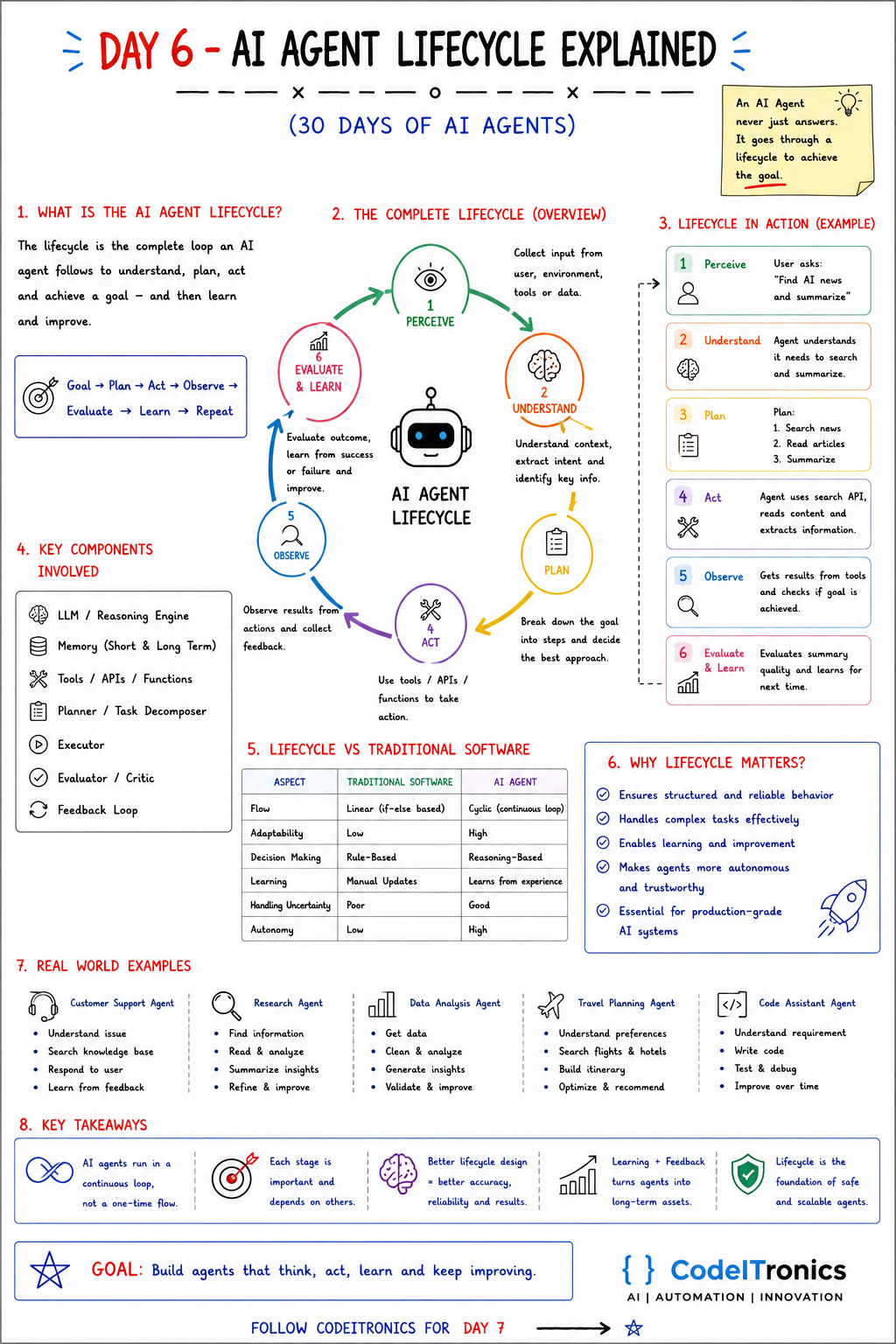
Save this sheet. The rest of this note walks through it section by section.
What the Lifecycle Is
The lifecycle is the complete loop an agent follows to understand a goal, plan, act, and reach the goal, and then learn and improve. The short form:
Goal -> Plan -> Act -> Observe -> Evaluate -> Learn -> Repeat
Day 1 introduced the loop as think, act, observe. The lifecycle is the same loop with every stage named, which is exactly what you need when you start building, testing, and debugging. Named stages are stages you can log, measure, and fix.
The Six Stages
- Perceive. Collect input from the user, the environment, tools, or data. This includes the request and anything the agent can see: files, previous results, system state.
- Understand. Work out context and intent, and extract the key information. What is actually being asked? What constraints apply?
- Plan. Break the goal into steps and decide the best approach.
- Act. Use tools, APIs, or functions to take action.
- Observe. Collect the results of those actions and any feedback.
- Evaluate and learn. Judge the outcome, learn from success or failure, and decide whether to loop again or finish.
Lifecycle in Action
The sheet's example: a user asks, "Find AI news and summarize."
| Stage | What happens |
|---|---|
| Perceive | The agent receives the request |
| Understand | It recognizes it needs to search and then summarize, and that "news" means recent |
| Plan | 1. Search news. 2. Read articles. 3. Summarize |
| Act | It calls a search API, reads the content, extracts the key information |
| Observe | It gets results back and checks whether the goal is achieved |
| Evaluate and learn | It checks summary quality and stores what worked for next time |
Notice what "Observe" catches. If the search returns three-week-old articles, a good agent notices and searches again with a date filter instead of summarizing stale news.
Components Behind Each Stage
| Stage | Main component |
|---|---|
| Perceive | Input handling, memory retrieval |
| Understand | LLM, the reasoning engine |
| Plan | Planner or task decomposer |
| Act | Executor plus tools, APIs, functions |
| Observe | Executor results, tool outputs |
| Evaluate and learn | Evaluator or critic, feedback loop, memory writes |
This mapping is useful when something breaks. A bad summary of good articles is an Understand or Evaluate problem. Good reasoning over irrelevant articles is an Act or Observe problem. You fix them in different places.
Lifecycle vs Traditional Software
| Aspect | Traditional software | AI agent |
|---|---|---|
| Flow | Linear, if-else based | Cyclic, continuous loop |
| Adaptability | Low | High |
| Decision making | Rule-based | Reasoning-based |
| Learning | Manual updates | Learns from experience |
| Handling uncertainty | Poor | Good |
| Autonomy | Low | High |
A word on "learns from experience". In most production agents, the model's weights do not change. Learning happens around the model: successful plans are stored and retrieved as examples, failures become new test cases, user feedback updates memory or instructions. That is less glamorous than self-improvement, and much more controllable.
Why It Matters in Production
The lifecycle is not just a teaching diagram. It gives you a structure for reliability:
- Structured, reliable behavior. Each stage has an input and an output you can validate.
- Complex tasks. Planning and re-planning let the agent handle multi-step work.
- Learning and improvement. The evaluate stage produces signals you can act on.
- Trust. When each stage is traced, you can explain why the agent did what it did.
In code, the cheapest win is to make each stage emit a trace event:
import time, uuid

def trace(run_id: str, stage: str, data: dict) -> None:
    log.info({"run_id": run_id, "stage": stage, "ts": time.time(), **data})

def run(goal: str):
    run_id = str(uuid.uuid4())
    trace(run_id, "perceive", {"goal": goal})
    intent = understand(goal);            trace(run_id, "understand", {"intent": intent})
    plan = make_plan(intent);             trace(run_id, "plan", {"steps": plan})
    for step in plan:
        result = act(step);               trace(run_id, "act", {"step": step, "ok": result.ok})
        trace(run_id, "observe", {"summary": result.summary})
    verdict = evaluate(goal, plan);       trace(run_id, "evaluate", {"passed": verdict.passed})
    return verdict
When a user reports a bad answer, you pull up the run ID and see exactly which stage went wrong. We go much deeper on this on Day 25, AI agent observability.
Real World Lifecycle Examples
| Agent | Lifecycle in practice |
|---|---|
| Customer support | Understand the issue, search the knowledge base, respond, learn from feedback |
| Research | Find information, read and analyze, summarize insights, refine |
| Data analysis | Get data, clean and analyze, generate insights, validate |
| Travel planning | Understand preferences, search flights and hotels, build an itinerary, optimize |
| Code assistant | Understand the requirement, write code, test and debug, improve over time |
Key Takeaways
- Agents run in a continuous loop, not a one-time flow.
- Six stages: perceive, understand, plan, act, observe, evaluate and learn.
- Each stage depends on the others; a weak stage limits the whole loop.
- Trace every stage with a run ID so failures are debuggable.
- Learning plus feedback turns agents into long-term assets, mostly through memory and evaluation, not retraining.
FAQs
Does every request go through all six stages?
Conceptually yes, but simple requests pass through some stages almost instantly. A greeting needs no real plan. A research task may loop through act and observe many times.
Where should a human step in?
Usually between plan and act for risky actions, and at evaluate for high-stakes output. Approving a plan is cheaper than reversing an action.
How does an agent know when to stop?
From an explicit evaluate step with criteria, plus hard limits on steps, time, and cost. Never rely on the model alone to decide it is done.
Up Next
Day 7 is hands-on: building your first AI agent. We wire up a model, a web search tool, a safe calculator, and conversation memory into a small, runnable agent loop, and test it with real prompts. If you want a lifecycle like this designed around one of your own processes, get in touch.
Letters to the editor
No letters yet. Questions and counterpoints are welcome.