Yesterday we wired an AI agent into n8n workflows. Today is Vector Databases, the storage layer behind semantic search, RAG, and most agent memory. If your agent ever needs to find "the thing that means this" rather than "the row with this ID," this is the component doing the work.
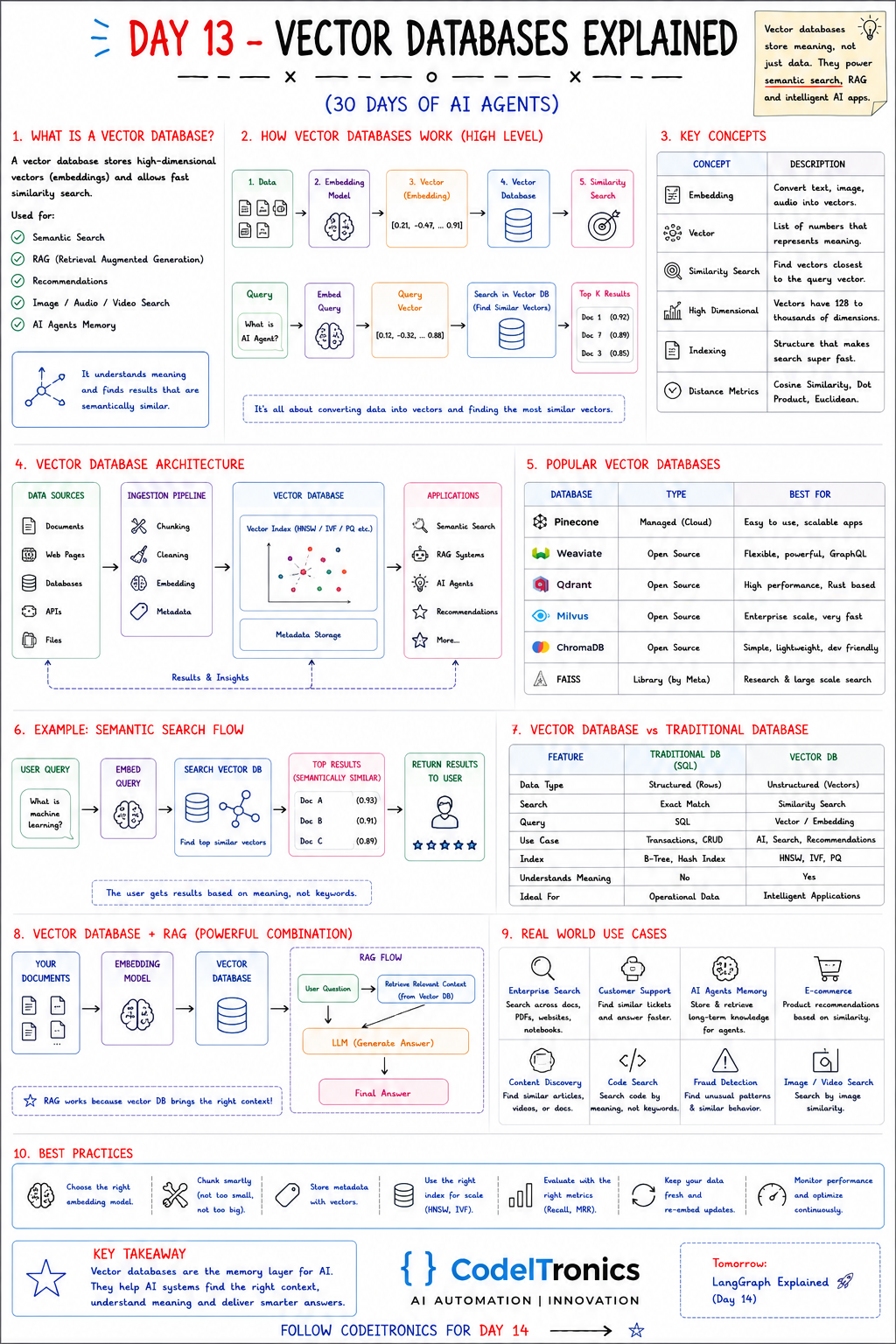
Save this sheet. The rest of this note walks through it section by section.
What a Vector Database Is
A vector database stores high-dimensional vectors (embeddings) and finds the ones closest to a query vector quickly. The sheet lists the main uses: semantic search, RAG, recommendations, image/audio/video search, and AI agent memory.
The one-line version: a vector database stores meaning, not just data. "How do I reset my password?" and "I'm locked out of my account" share almost no words, but their embeddings land close together, so a vector search connects them.
How It Works
There are two paths, and the sheet shows both.
Indexing path: data → embedding model → vector like [0.21, -0.47, ..., 0.91] → stored in the vector database.
Query path: "What is an AI agent?" → the same embedding model → query vector → nearest-neighbor search → top-K results with similarity scores (for example 0.92, 0.89, 0.85).
The rule people break most often: the query and the documents must be embedded with the same model. Vectors from different models live in different spaces, and comparing them gives meaningless scores.
Key Concepts in Plain Terms
| Concept | What it means | Why you care |
|---|---|---|
| Embedding | Converting text, images, or audio into a vector | Model choice sets your quality ceiling |
| Vector | A list of numbers representing meaning | Its size affects storage and speed |
| Similarity search | Finding vectors closest to the query | The core operation |
| High dimensional | Typically from about a hundred to a few thousand dimensions | Exact search gets slow at scale |
| Indexing | Data structures that make search fast | Trades a little recall for big speed gains |
| Distance metrics | Cosine similarity, dot product, Euclidean | Use the one your embedding model was trained for |
Most production vector search is approximate nearest neighbor (ANN). Indexes like HNSW (a navigable graph), IVF (clustering into buckets), and PQ (compressing vectors) return almost the true top-K, much faster than comparing against every vector. You tune them for the recall-versus-latency trade-off.
The Architecture From Source to App
Data sources        Ingestion pipeline       Vector database        Applications
documents  ─┐       chunking                 vector index           semantic search
web pages   │  -->  cleaning           -->   (HNSW / IVF / PQ) -->  RAG systems
databases   │       embedding                metadata storage       AI agents
APIs, files─┘       metadata                                        recommendations
The ingestion pipeline is where quality is won or lost. Chunk too big and every result is diluted. Chunk too small and you lose the surrounding context. Skip metadata (source, date, tenant, access level) and you can't filter later. That makes it impossible to say "only search this customer's documents," which is a security problem, not just a relevance one.
A tiny end-to-end example with Chroma, which embeds documents with its default model unless you configure one:
import chromadb

client = chromadb.Client()
docs = client.create_collection("handbook")

docs.add(
    ids=["refund-1", "sso-1"],
    documents=["Refunds are issued within 5 business days.",
               "Use SSO from the login page to access your account."],
    metadatas=[{"team": "billing"}, {"team": "it"}],
)

hits = docs.query(query_texts=["I can't log in"], n_results=1, where={"team": "it"})
print(hits["documents"])
Choosing a Vector Database
| Database | Type | Good fit |
|---|---|---|
| Pinecone | Managed cloud | Teams that want no infrastructure to run |
| Weaviate | Open source | Flexible schemas, hybrid search, GraphQL API |
| Qdrant | Open source (Rust) | High performance and rich payload filtering |
| Milvus | Open source | Very large, distributed deployments |
| ChromaDB | Open source | Prototypes and lightweight apps |
| FAISS | Library (Meta) | In-process search, research, custom systems |
One option the sheet leaves out but we reach for often: pgvector in PostgreSQL. If your app already runs on Postgres and you're in the millions-of-vectors range rather than billions, keeping vectors next to your relational data means one backup, one permission model, and joins for free:
SELECT id, title FROM chunks
WHERE tenant_id = $1
ORDER BY embedding <=> $2   -- cosine distance
LIMIT 5;
Vector DB vs Traditional DB
| Traditional DB (SQL) | Vector DB | |
|---|---|---|
| Data | Structured rows | Unstructured content as vectors |
| Search | Exact match | Similarity |
| Query | SQL | Vector/embedding query |
| Index | B-tree, hash | HNSW, IVF, PQ |
| Understands meaning | No | Yes, approximately |
| Ideal for | Operational data | Search, recommendations, AI apps |
They complement each other. Keyword search still wins on exact identifiers like order numbers, error codes, and SKUs, which is why hybrid search (keyword plus vector, then merge) is often the best default.
Vector DBs and RAG
The sheet's RAG flow: your documents → embedding model → vector database; the user's question retrieves relevant context → the LLM generates an answer. RAG works because the vector database brings the right context. Our Customer Support AI Triage build at CodeITronics used vector embeddings over past tickets and docs to ground replies, and auto-resolved 40% of tickets with instant responses. The retrieval layer is what made that safe enough to ship.
Best Practices
- Choose the embedding model on purpose. Test a few on your own queries rather than trusting a generic leaderboard.
- Chunk smartly. Split on document structure (headings, sections) before falling back to fixed sizes.
- Store metadata with every vector. Source, timestamp, tenant, and permissions.
- Pick the right index. HNSW is a strong default. Use IVF or PQ variants when memory is the constraint.
- Evaluate retrieval. Measure Recall@K and MRR on a set of real questions with known answers.
- Re-embed on updates. Changing the embedding model means re-indexing everything.
- Monitor continuously. Watch latency, empty-result rates, and score distributions.
Key Takeaways
- Vector databases find content by meaning using embeddings and nearest-neighbor search.
- Embed queries and documents with the same model, and store metadata for filtering.
- ANN indexes like HNSW trade a little recall for a lot of speed.
- pgvector is often enough. Reach for a dedicated vector DB when scale or features demand it.
- Measure retrieval quality directly. Don't judge it only by final answers.
FAQs
Do I need a dedicated vector database?
Often not at the start. pgvector or an in-process library covers many apps. Move when scale, latency, or filtering needs outgrow it.
What chunk size should I use?
There's no universal number. Start with a few hundred tokens, split on structure, add some overlap, then tune using retrieval metrics on real questions.
Cosine similarity or dot product?
Use what your embedding model recommends. For normalized vectors they rank results identically.
Up Next
Day 14 is LangGraph, which brings explicit structure to agent workflows: shared state, nodes, conditional edges, and loops you can actually reason about. If you're planning a search or RAG system on top of your own data, reach out.
Letters to the editor
No letters yet. Questions and counterpoints are welcome.