Yesterday was AutoGen, where agents coordinate by talking to each other in code. Today we switch to visual automation: n8n + AI Agents. n8n runs the workflow (triggers, integrations, retries, actions), and an AI Agent node does the reasoning in the middle. For a lot of business automation, that split is the most practical way to get an agent into production.
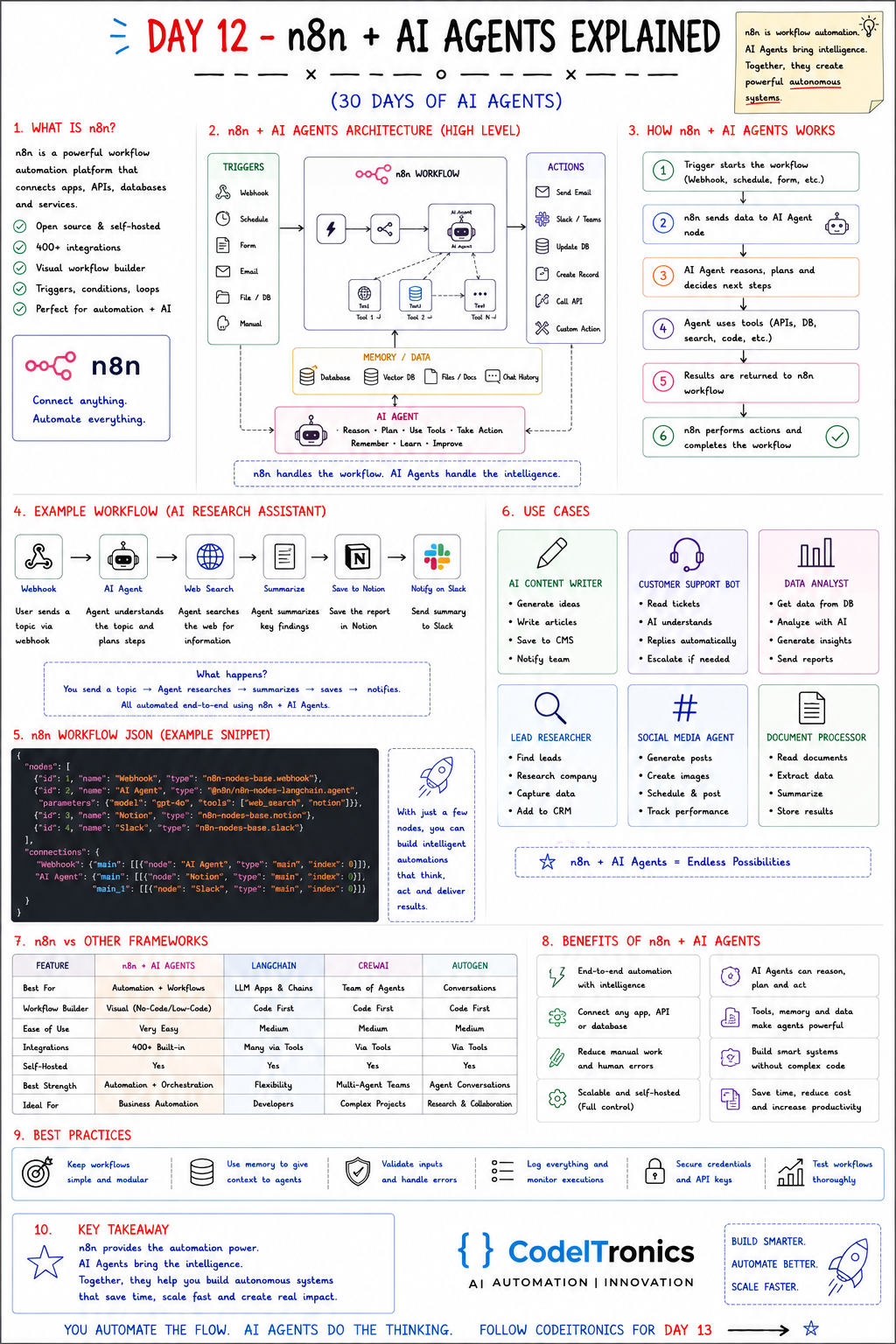
Save this sheet. The rest of this note walks through it section by section.
What n8n Is
n8n is a workflow automation platform that connects apps, APIs, databases, and services. What makes it useful for agent work:
- Self-hostable, source-available. You can run it on your own infrastructure, which matters when the data can't leave your network. (Its license is "fair-code" rather than a classic open-source license. Read it if you plan to resell n8n itself.)
- A large integration library. 400+ built-in integrations, plus a generic HTTP node for everything else.
- A visual builder. Each step is a node you can inspect, with the input and output data of the last run.
- Real control flow. Triggers, conditions, loops, error branches, and sub-workflows.
The sheet's summary line is the right mental model: n8n handles the workflow, AI agents handle the intelligence.
The Architecture
The sheet groups an n8n agent system into four zones:
TRIGGERS            n8n WORKFLOW                    ACTIONS
webhook   ─┐                                     ┌─ send email
schedule   ├──> [prep] -> [AI Agent node] -> ... ├─ Slack / Teams
form       │                 │  tools            ├─ update DB
email      │                 │  (sub-nodes)      ├─ create record
file / DB  │                 v                   ├─ call API
manual    ─┘          MEMORY / DATA              └─ custom action
                 DB, vector DB, files, chat history
Inside n8n, the AI Agent node is wired to sub-nodes: a chat model, an optional memory, and the tools the agent may call. A tool can be another n8n node (an HTTP request, a database query, a Notion lookup) or a whole sub-workflow. That last option is the useful one. You can expose a carefully built, tested workflow to the agent as a single tool. The agent decides when to call it, and n8n decides exactly what it does.
How a Run Works Step by Step
- A trigger starts the workflow (webhook, schedule, form, incoming email).
- n8n prepares the data and passes it to the AI Agent node.
- The agent reasons about the input and plans the next steps.
- The agent calls tools as needed (APIs, database, search, code).
- Results return to the n8n workflow.
- n8n performs the deterministic actions and completes the run.
Steps 1, 2, 5, and 6 are plain automation. They're predictable, logged, and retryable. Only steps 3 and 4 are probabilistic. Keeping the LLM in a small, well-defined box is why this pattern holds up in production.
Example Workflow An AI Research Assistant
The sheet's example runs end to end:
Webhook (topic in) → AI Agent (understands the topic, plans) → Web Search tool → Summarize → Save to Notion → Notify on Slack.
How we'd harden it:
- Validate the webhook payload before the agent sees it. Reject empty or oversized topics.
- Ask the agent for structured output (a title, bullet findings, a source URL list) using an output parser, so the Notion node gets fields rather than a blob of prose.
- Put Notion and Slack after the agent as ordinary nodes, not as agent tools. The agent doesn't need to decide whether to save. Saving always happens.
- Add an error branch that posts to Slack when the agent run fails, so failures are never silent.
That last structural choice is the general rule: give the agent tools for things that need judgment, and use ordinary nodes for things that always happen.
Use Cases That Fit Well
The sheet lists six, and they all follow the trigger → think → act shape:
| Use case | Trigger | Agent's job | Deterministic actions |
|---|---|---|---|
| AI content writer | Schedule or form | Ideate and draft | Save to CMS, notify team |
| Support bot | New ticket | Understand, draft reply | Reply or escalate |
| Data analyst | Schedule | Query and interpret | Send report |
| Lead researcher | New lead | Research the company | Add to CRM |
| Social media agent | Schedule | Generate posts | Schedule and track |
| Document processor | File upload | Extract and summarize | Store results |
We have built several of these at CodeITronics. Our AI Content Automation System, built on n8n, LLMs, APIs, and Google Drive, reduced manual effort by 80%. The Internal Ops Automation we built for a founder pulled Notion, email, and task flows into one operational layer with n8n at the center. In both cases the reliability came from the boring parts: validation, retries, and clear handoffs between nodes.
n8n vs Code-First Frameworks
| n8n + AI Agents | LangChain | CrewAI | AutoGen | |
|---|---|---|---|---|
| Best for | Automation and workflows | LLM apps and chains | Agent teams | Agent conversations |
| Builder | Visual, low-code | Code | Code | Code |
| Integrations | 400+ built in | Many, via packages | Via tools | Via tools |
| Self-hosted | Yes | Your app | Your app | Your app |
| Ideal for | Business automation | Developers | Complex multi-agent projects | Research and collaboration |
These aren't really competitors. A common pattern is n8n as the outer workflow, calling a code-first agent service over HTTP for the parts that need custom logic.
Best Practices From Real Builds
- Keep workflows simple and modular. Split big flows into sub-workflows with clear inputs and outputs.
- Use memory deliberately. Chat memory scoped by session key, and a vector store for knowledge. Don't use one for the other.
- Validate inputs and handle errors. Use IF nodes before the agent and error workflows after it.
- Log everything. n8n keeps execution data, so set retention to match your debugging and privacy needs.
- Secure credentials. Use n8n's credential store, never keys pasted into node parameters.
- Test with real data. Pin sample data on the trigger and replay it while you iterate on prompts.
Key Takeaways
- n8n owns triggers, integrations, and actions. The AI Agent node owns reasoning and tool choice.
- Keep the probabilistic part small: deterministic nodes before and after the agent.
- Give agents tools for decisions, and use plain nodes for steps that always run.
- Visual and code-first tools combine well. n8n can call a custom agent service over HTTP.
FAQs
Is n8n free to use?
You can self-host the community edition. There are also paid cloud and enterprise plans. Check the current license terms if you plan to embed or resell it.
Can the n8n AI Agent node use models other than OpenAI?
Yes. The model is a separate sub-node, and several providers are supported, including self-hosted models through compatible endpoints.
When should I move from n8n to code?
Move when the agent logic itself (state, branching, custom evaluation) becomes the product. Keep n8n for the integration layer around it.
Up Next
Day 13 covers Vector Databases, the layer that lets agents search by meaning instead of keywords. We'll walk through embeddings, similarity search, indexes like HNSW, and how to choose between the popular options. If you'd like an n8n + AI workflow built for your team, talk to us.
Letters to the editor
No letters yet. Questions and counterpoints are welcome.