Yesterday we covered LangChain, the general-purpose orchestration layer. Today we look at CrewAI, a framework built specifically for teams of agents. On Day 4 we argued that more agents only help when roles are clear and handoffs are designed. CrewAI is essentially that idea turned into an API: agents with roles, tasks with owners, and a process that runs them.
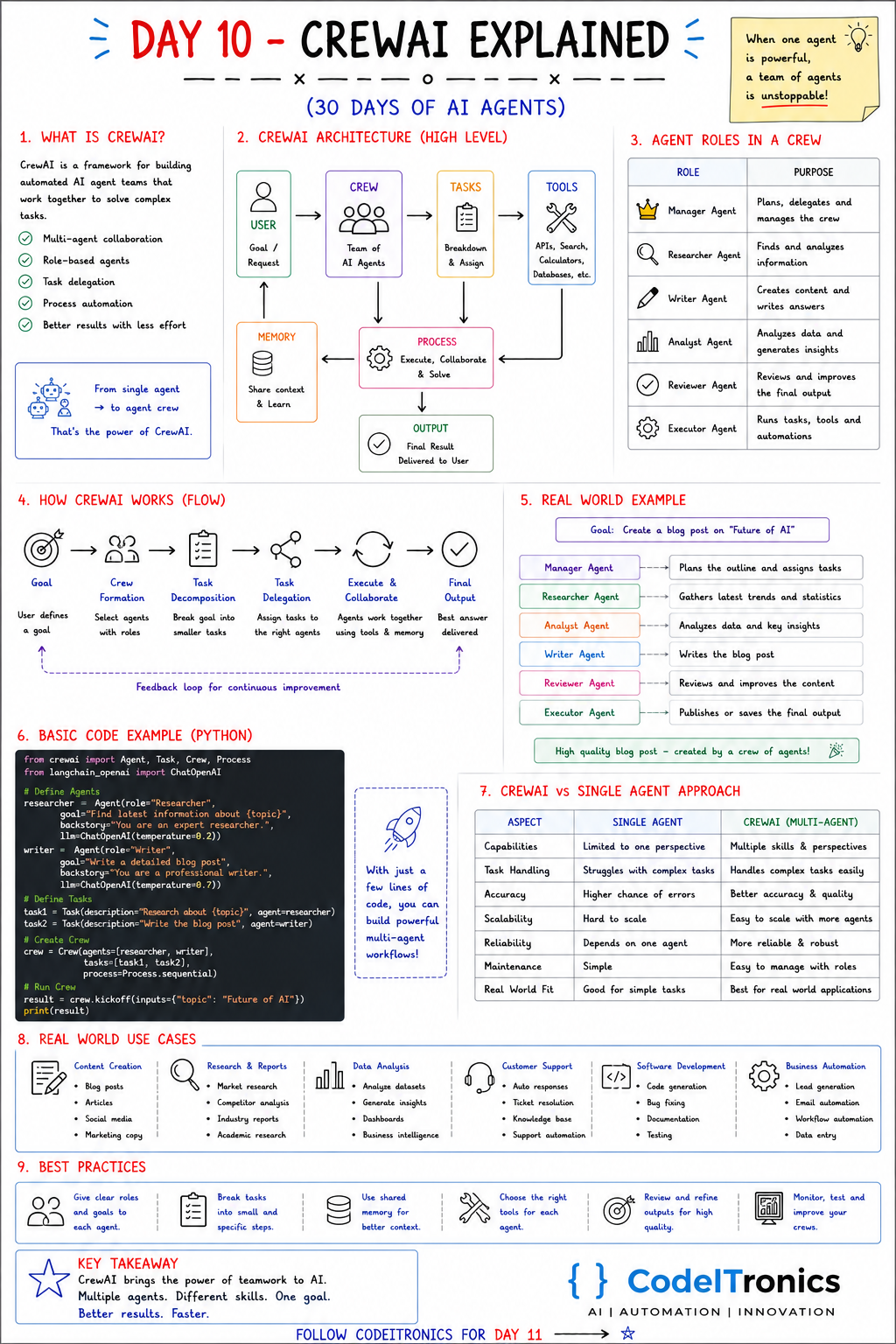
Save this sheet. The rest of this note walks through it section by section.
What CrewAI Is
CrewAI is a Python framework for building teams of AI agents that work together on complex tasks. Its main ideas:
- multi-agent collaboration,
- role-based agents,
- task delegation,
- process automation.
The pitch is to go from a single agent to an agent crew. The sticky note on the sheet says a team of agents is unstoppable. Our version is a little more measured: a well-designed team of agents can handle work that one overloaded agent handles badly.
The Architecture
User (goal / request)
   -> Crew (team of AI agents)
   -> Tasks (breakdown and assignment)
   -> Tools (APIs, search, calculators, databases)
   -> Process (execute, collaborate, solve)  <->  Memory (shared context)
   -> Output (final result to the user)
The core objects map directly to that diagram:
| Object | What it is |
|---|---|
| Agent | A role with a goal, a backstory, an LLM, and optional tools |
| Task | A unit of work with a description, an expected output, and an assigned agent |
| Crew | The team: a set of agents and tasks plus a process |
| Process | How tasks run: sequential, or hierarchical with a manager |
| Memory | Optional shared context across agents and runs |
Agent Roles in a Crew
| Role | Purpose |
|---|---|
| Manager | Plans, delegates, and manages the crew |
| Researcher | Finds and analyzes information |
| Writer | Creates content and writes answers |
| Analyst | Analyzes data and generates insights |
| Reviewer | Reviews and improves the final output |
| Executor | Runs tasks, tools, and automations |
You will rarely need all six. Most useful crews have two to four roles. The reviewer is the one we would keep in almost every crew, for the reason from Day 4: a second agent checking against explicit criteria is the cheapest real accuracy gain.
How a Crew Runs
- Goal. The user defines what they want.
- Crew formation. Agents with the right roles are selected.
- Task decomposition. The goal is broken into smaller tasks.
- Task delegation. Each task is assigned to the right agent.
- Execute and collaborate. Agents work through tasks using tools and shared memory, passing outputs along.
- Final output. The best answer is delivered, with a feedback loop for improvement.
In a sequential process, tasks run in order and each task's output becomes context for the next. In a hierarchical process, a manager agent (backed by an LLM you configure) decides which agent handles what and reviews results. Start sequential. It is cheaper, more predictable, and easier to debug.
A Worked Example
Goal: create a blog post on "The Future of AI".
| Agent | Responsibility |
|---|---|
| Manager | Plans the outline and assigns tasks |
| Researcher | Gathers the latest trends and sources |
| Analyst | Pulls out key data points and insights |
| Writer | Writes the post |
| Reviewer | Reviews and improves the content |
| Executor | Publishes or saves the final output |
This is close to how we think about content pipelines in client work, with one difference: for anything that publishes publicly, the executor's "publish" step goes to a human approval queue first.
The Code
A minimal two-agent crew:
from crewai import Agent, Task, Crew, Process

researcher = Agent(
    role="Researcher",
    goal="Find current, well-sourced information about {topic}",
    backstory="A careful analyst who cites sources and flags uncertainty.",
)
writer = Agent(
    role="Writer",
    goal="Write a clear, accurate blog post about {topic}",
    backstory="A technical writer who explains without hype.",
)

research = Task(
    description="Research {topic}. List 5 key developments with a source URL for each.",
    expected_output="A bulleted list of 5 developments, each with a source URL.",
    agent=researcher,
)
write = Task(
    description="Using the research, write a 600-word blog post about {topic}.",
    expected_output="A 600-word post in Markdown with a title and sections.",
    agent=writer,
)

crew = Crew(agents=[researcher, writer], tasks=[research, write],
            process=Process.sequential)
result = crew.kickoff(inputs={"topic": "the future of AI"})
print(result)
A few notes. The {topic} placeholders are filled from kickoff inputs. expected_output is where you get most of your quality control, so make it specific and checkable. Each agent uses your configured default LLM unless you pass one with the llm argument, which lets you give cheaper models to simpler roles. Tools are attached per agent, and the researcher is the only one here that would need web search.
CrewAI vs a Single Agent
| Aspect | Single agent | CrewAI crew |
|---|---|---|
| Capabilities | One perspective | Multiple skills and perspectives |
| Task handling | Struggles with long, complex tasks | Splits complex tasks across roles |
| Accuracy | Errors go unchecked | A reviewer role can catch errors |
| Scalability | Hard to extend without bloating the prompt | Add a role instead |
| Cost and latency | Lower | Higher; every agent adds model calls |
| Best fit | Simple tasks | Multi-step work with distinct roles |
The single-agent column is not the losing side. For simple tasks it is the right answer, and the crew is overhead.
Use Cases and Best Practices
Common use cases: content creation, research and reports, data analysis, customer support, software development, and business automation such as lead research and enrichment.
Best practices that hold up:
- Give each agent a clear role and goal. Overlapping roles produce duplicated or conflicting work.
- Break tasks into small, specific steps with concrete expected outputs.
- Use shared memory deliberately, for context that genuinely needs to cross agents.
- Choose the right tools for each agent, and only those.
- Review outputs before anything leaves the system.
- Monitor, test, and improve your crews with saved example inputs and expected results.
Key Takeaways
- CrewAI models a team: agents with roles, tasks with expected outputs, and a process.
- Start with a sequential process and two to four roles.
expected_outputis your main quality lever; make it specific.- Keep a reviewer role in almost every crew.
- A crew costs more than a single agent; use it when roles are genuinely distinct.
FAQs
Does CrewAI require LangChain?
No. CrewAI is its own framework. You can use LangChain tools with it, but it is not a dependency you need to learn first.
Sequential or hierarchical process?
Sequential for most crews. Use hierarchical when the order of work genuinely depends on intermediate results and you are willing to pay for a manager LLM.
How do I stop a crew from producing confident but wrong output?
Require sources in the research task, give the reviewer explicit criteria, and validate the final output in code before using it.
Up Next
Day 11 is AutoGen, Microsoft's framework for agents that collaborate through conversation, with built-in human-in-the-loop and code execution. We will compare it directly with LangChain and CrewAI. If you want a crew of agents designed around a real business process, let's talk.
Letters to the editor
No letters yet. Questions and counterpoints are welcome.