Yesterday we looked at MCP, the standard for connecting agents to tools and data. Today we move to the orchestration layer with LangChain, the most widely used framework for building LLM applications. As the sheet puts it, LangChain is not just a library, it is an ecosystem. This note covers what is in it, how the pieces fit, and when it is worth the abstraction.
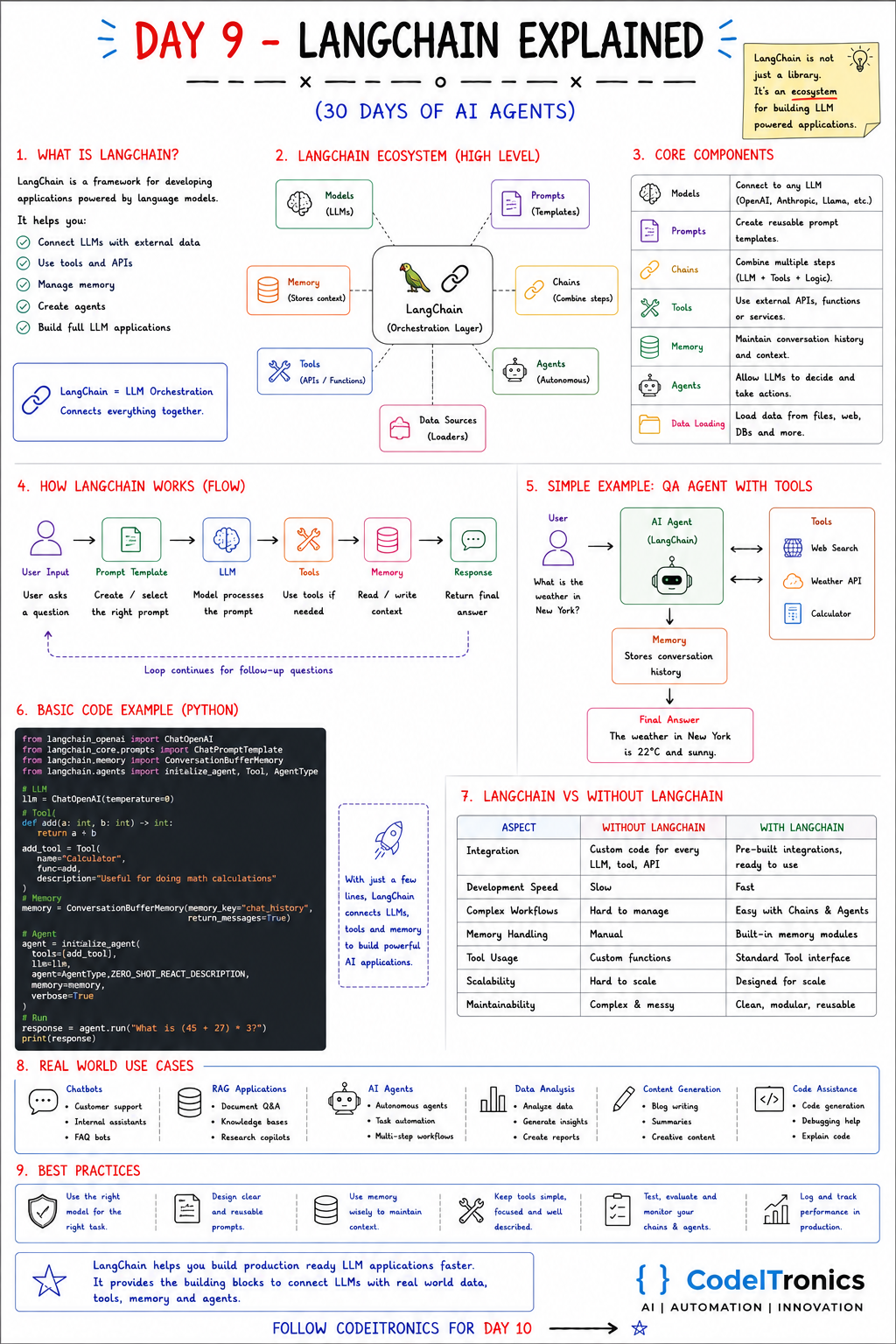
Save this sheet. The rest of this note walks through it section by section.
What LangChain Is
LangChain is a framework for developing applications powered by language models. It helps you:
- connect LLMs to external data,
- use tools and APIs,
- manage memory,
- create agents,
- and build complete LLM applications.
The one-line summary: LangChain is LLM orchestration. It connects everything together.
The Ecosystem
On the sheet, LangChain sits in the middle as the orchestration layer, surrounded by models, prompts, chains, memory, tools, agents, and data sources. In package terms, the ecosystem today looks roughly like this:
| Piece | What it gives you |
|---|---|
langchain-core | The base abstractions: messages, prompts, runnables, tools |
| Integration packages | Providers and stores, e.g. langchain-openai, langchain-anthropic, vector store packages |
langchain | Higher-level chains, agents, and helpers |
| LangGraph | Stateful, graph-based agent workflows (Day 14) |
| LangSmith | Tracing, evaluation, and monitoring (a separate hosted product) |
Knowing this split saves confusion. Many "LangChain is too complex" complaints come from importing everything when you only needed langchain-core and one provider package.
Core Components
| Component | What it does |
|---|---|
| Models | A common interface to any LLM: OpenAI, Anthropic, Llama, and others |
| Prompts | Reusable prompt templates with variables |
| Chains | Combine steps: prompt, model, tools, parsing, logic |
| Tools | Wrap external APIs and functions so models can call them |
| Memory | Keep conversation history and context |
| Agents | Let the LLM decide which actions to take |
| Data loading | Load content from files, the web, databases, and more |
How a LangChain App Flows
User input -> Prompt template -> LLM -> Tools (if needed)
           -> Memory (read / write) -> Response
           -> loop continues for follow-up questions
It is the same loop you built by hand on Day 7. LangChain gives each box a standard interface, so you can swap a model, a prompt, or a tool without rewriting the rest.
A Small Example
The sheet's example is a QA agent with web search, a weather API, and a calculator, plus memory, answering "What is the weather in New York?". Here are the two building blocks it rests on, written with the composable runnable style (often called LCEL) that current LangChain code uses:
from langchain_openai import ChatOpenAI
from langchain_core.prompts import ChatPromptTemplate
from langchain_core.output_parsers import StrOutputParser
from langchain_core.tools import tool

llm = ChatOpenAI(model="gpt-4o-mini", temperature=0)

# 1. A chain: prompt -> model -> parser
prompt = ChatPromptTemplate.from_messages([
    ("system", "You explain {domain} concepts in two sentences."),
    ("human", "{question}"),
])
chain = prompt | llm | StrOutputParser()
print(chain.invoke({"domain": "weather", "question": "What does dew point tell me?"}))

# 2. A tool the model can choose to call
@tool
def add(a: int, b: int) -> int:
    """Add two integers."""
    return a + b

llm_with_tools = llm.bind_tools([add])
msg = llm_with_tools.invoke("What is 45 + 27?")
print(msg.tool_calls)   # e.g. [{'name': 'add', 'args': {'a': 45, 'b': 27}, ...}]
The | operator composes steps into a runnable that supports invoke, batch, and stream with no extra code. bind_tools turns your function and docstring into a schema the model sees, the same thing we did by hand with JSON on Day 7.
To turn this into a full agent loop with memory, current LangChain points you to agent helpers built on LangGraph rather than the older initialize_agent and ConversationBufferMemory pattern you will still see in many tutorials. The ideas are identical; the newer APIs give you explicit state and better control over the loop. We cover that on Day 14.
LangChain vs Building Without It
| Aspect | Without LangChain | With LangChain |
|---|---|---|
| Integration | Custom code for every LLM, tool, and API | Pre-built integrations, ready to use |
| Development speed | Slower to start | Fast to prototype |
| Complex workflows | Hard to manage | Composable chains and agents |
| Memory handling | Manual | Built-in patterns |
| Tool usage | Custom functions and schemas | A standard tool interface |
| Maintainability | Can get messy | Modular and reusable, if kept disciplined |
The honest counterweight: abstractions have a cost. When something goes wrong deep inside a chain, you debug the framework as well as your code, and the APIs have changed substantially over time. Our rule of thumb: use LangChain when you benefit from its integrations (many models, vector stores, loaders) or its tracing. For a single model and three tools, plain code is often clearer.
Use Cases
- Chatbots: customer support, internal assistants, FAQ bots.
- RAG applications: document Q&A, knowledge bases, research copilots (Day 15).
- AI agents: autonomous task handling and multi-step workflows.
- Data analysis: analyze data, generate insights, create reports.
- Content generation: drafts, summaries, structured content.
- Code assistance: generation, debugging help, explanations.
Best Practices
- Use the right model for each step. A small model for routing or extraction, a stronger one for reasoning.
- Design clear, reusable prompts and keep them in version control.
- Use memory wisely. Pass only what each step needs.
- Keep tools simple, focused, and well described.
- Test, evaluate, and monitor chains and agents with real examples, not just happy paths.
- Log and track performance in production: latency, cost, and failure rate per step.
Key Takeaways
- LangChain is an orchestration layer: models, prompts, chains, tools, memory, agents, loaders.
langchain-coreplus one provider package is often all you need.- Compose steps with runnables; bind tools to models with a standard interface.
- For stateful agent loops, look at LangGraph.
- Use it where its integrations and tooling save you work; plain code is fine elsewhere.
FAQs
Is LangChain required to build agents?
No. Day 7's agent used no framework. LangChain speeds things up when you need many integrations, consistent interfaces, or tracing.
What is the difference between LangChain and LangGraph?
LangChain provides the building blocks. LangGraph models an agent as a graph of steps with explicit, persistent state, which suits loops, branching, and human approval.
Is LangChain production ready?
Many teams run it in production. Pin versions, keep your chains small, and add tracing so you can see what each step did.
Up Next
Day 10 is CrewAI: a framework for teams of role-based agents, with a manager, researcher, writer, reviewer, and more working through delegated tasks toward one goal. It is our first hands-on look at the multi-agent ideas from Day 4. If you are deciding whether LangChain fits your stack, we are happy to talk it through.
Letters to the editor
No letters yet. Questions and counterpoints are welcome.