Yesterday we walked through the agent lifecycle, from perceive to evaluate and learn. Today we close out the foundations week by building one. The sheet's motto is the right one: simple agent, real concepts, production mindset. The best way to understand AI agents is to build one.
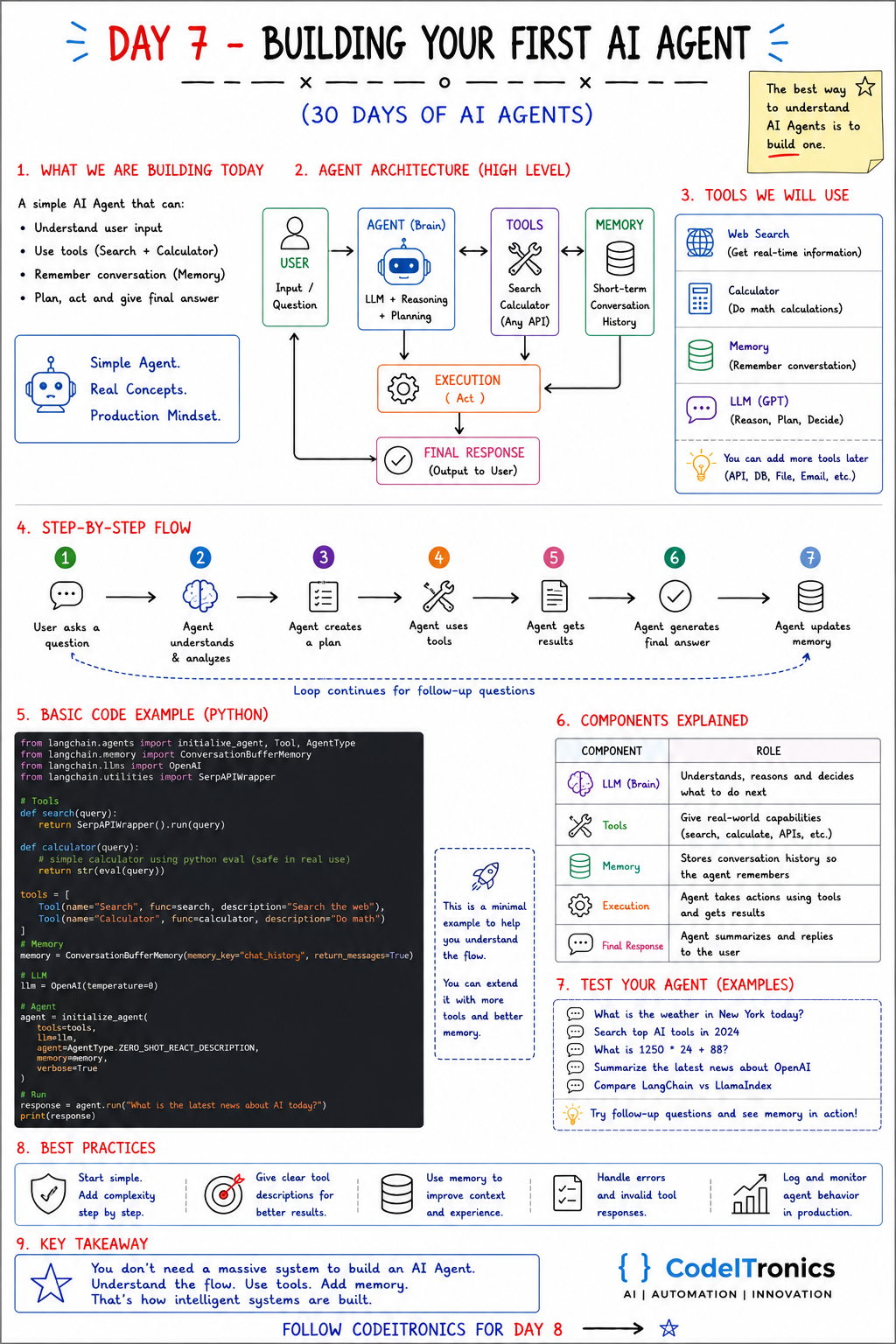
Save this sheet. The rest of this note walks through it section by section.
What We Are Building
A small agent that can:
- understand user input,
- use tools (web search and a calculator),
- remember the conversation,
- plan, act, and give a final answer.
That is enough to exercise every concept from this week: the loop, tools, memory, a stopping rule, and error handling.
The Architecture
User (question)
   -> Agent brain (LLM: reasoning + planning)
        <-> Tools (search, calculator, any API)
        <-> Memory (short-term conversation history)
   -> Execution (act)
   -> Final response -> back to the user, loop for follow-ups
The brain decides; the tools do; memory remembers. Execution is the plain code that runs whatever the brain chose and feeds the result back.
The Tools
| Tool | Purpose |
|---|---|
| Web search | Real-time information the model does not have |
| Calculator | Exact math, which models are unreliable at |
| Memory | Remembers the conversation for follow-ups |
| LLM | Reasons, plans, and decides which tool to use |
You can add more later: database queries, file access, email, internal APIs. The pattern does not change.
The Step-by-Step Flow
- The user asks a question.
- The agent understands and analyzes it.
- The agent creates a plan (often implicitly: "I need to search, then calculate").
- The agent uses tools.
- The agent gets results.
- The agent generates a final answer.
- The agent updates memory, and the loop continues for follow-up questions.
The Code
Frameworks like LangChain wrap this loop for you, and we will look at them from Day 9. Writing it once without a framework is the fastest way to understand what they do. This version uses the OpenAI Python SDK's tool calling. Any provider with tool calling works the same way.
import ast, json, operator
from openai import OpenAI

client = OpenAI()  # reads OPENAI_API_KEY

# Safe calculator: parses arithmetic only. Never eval() model output.
OPS = {ast.Add: operator.add, ast.Sub: operator.sub, ast.Mult: operator.mul,
       ast.Div: operator.truediv, ast.Pow: operator.pow, ast.USub: operator.neg}

def calculator(expression: str) -> str:
    def ev(node):
        if isinstance(node, ast.Constant) and isinstance(node.value, (int, float)):
            return node.value
        if isinstance(node, ast.BinOp) and type(node.op) in OPS:
            return OPS[type(node.op)](ev(node.left), ev(node.right))
        if isinstance(node, ast.UnaryOp) and type(node.op) in OPS:
            return OPS[type(node.op)](ev(node.operand))
        raise ValueError("unsupported expression")
    return str(ev(ast.parse(expression, mode="eval").body))

def web_search(query: str) -> str:
    raise NotImplementedError("call your search API here (SerpAPI, Tavily, Brave, ...)")

TOOLS = {"calculator": calculator, "web_search": web_search}
SCHEMAS = [
    {"type": "function", "function": {
        "name": "calculator",
        "description": "Evaluate an arithmetic expression such as '1250 * 24 + 88'.",
        "parameters": {"type": "object",
                       "properties": {"expression": {"type": "string"}},
                       "required": ["expression"]}}},
    {"type": "function", "function": {
        "name": "web_search",
        "description": "Search the web for current events or facts after your training data.",
        "parameters": {"type": "object",
                       "properties": {"query": {"type": "string"}},
                       "required": ["query"]}}},
]

# Short-term memory: the running message list
messages = [{"role": "system",
             "content": "You are a helpful assistant. Use tools when you need facts or math."}]

def ask(question: str, max_steps: int = 6) -> str:
    messages.append({"role": "user", "content": question})
    for _ in range(max_steps):
        resp = client.chat.completions.create(
            model="gpt-4o-mini", messages=messages, tools=SCHEMAS)
        msg = resp.choices[0].message
        messages.append(msg)
        if not msg.tool_calls:                       # no tool needed: final answer
            return msg.content
        for call in msg.tool_calls:                  # act, then observe
            try:
                args = json.loads(call.function.arguments)
                result = TOOLS[call.function.name](**args)
            except Exception as e:                   # errors go back to the model
                result = f"Tool error: {e}"
            messages.append({"role": "tool", "tool_call_id": call.id, "content": result})
    return "Stopped: step limit reached without a final answer."

print(ask("What is 1250 * 24 + 88?"))
Three details carry most of the weight:
- The calculator never calls
eval. Model output is untrusted input. Running it withevalis a remote code execution bug waiting to happen. - Tool errors go back to the model as observations, so it can retry or change approach instead of crashing.
max_stepsbounds the loop, so a confused agent stops instead of spending money forever.
Test Your Agent
Try the prompts from the sheet:
- What is the weather in New York today?
- Search for the top AI tools this year.
- What is 1250 * 24 + 88?
- Summarize the latest news about OpenAI.
- Compare LangChain and LlamaIndex.
Then ask follow-ups like "and what about Boston?" or "divide that by 4" to see memory in action. Also try a question that needs no tools at all. A well-described toolset means the agent answers directly instead of searching for everything.
Best Practices
- Start simple. Two tools and a loop. Add complexity step by step.
- Write clear tool descriptions. The model picks tools from their names and descriptions. Vague descriptions cause wrong picks.
- Use memory to improve context, and trim it before it grows past what the step needs.
- Handle errors and invalid tool responses. Validate arguments, catch exceptions, return readable errors.
- Log and monitor in production. Log every tool call with its arguments, result, and latency.
Key Takeaways
- An agent is a loop: model decides, code executes, results feed back.
- Tools need precise descriptions and strict validation.
- Never execute model output directly; parse it safely.
- Memory can start as a message list; graduate to real stores when you need persistence.
- You do not need a massive system. Understand the flow, use tools, add memory.
FAQs
Why not just use LangChain from the start?
You can, and we cover it on Day 9. Building the loop once by hand makes framework behavior much easier to understand and debug later.
Which model should I use for my first agent?
Any current model with reliable tool calling. A smaller, cheaper model is fine for learning. Upgrade when you see it choosing tools poorly.
How do I stop the agent from searching for everything?
Tighten the tool description ("only for events after your training data"), add a system instruction to answer directly when possible, and review logs for unnecessary calls.
Up Next
Day 8 opens the tools and ecosystem week with MCP, the Model Context Protocol: an open standard for connecting agents to tools and data, so you write an integration once and every compatible client can use it. If you want a first agent built around a real workflow in your business, we can help.
Letters to the editor
No letters yet. Questions and counterpoints are welcome.