Yesterday we built a first agent by hand, wiring two tools straight into the loop. That works for two tools. It gets painful at twenty, especially when every app you use needs its own copy of every integration. Today we start the tools and ecosystem week with MCP, the Model Context Protocol, which exists to solve exactly that problem.
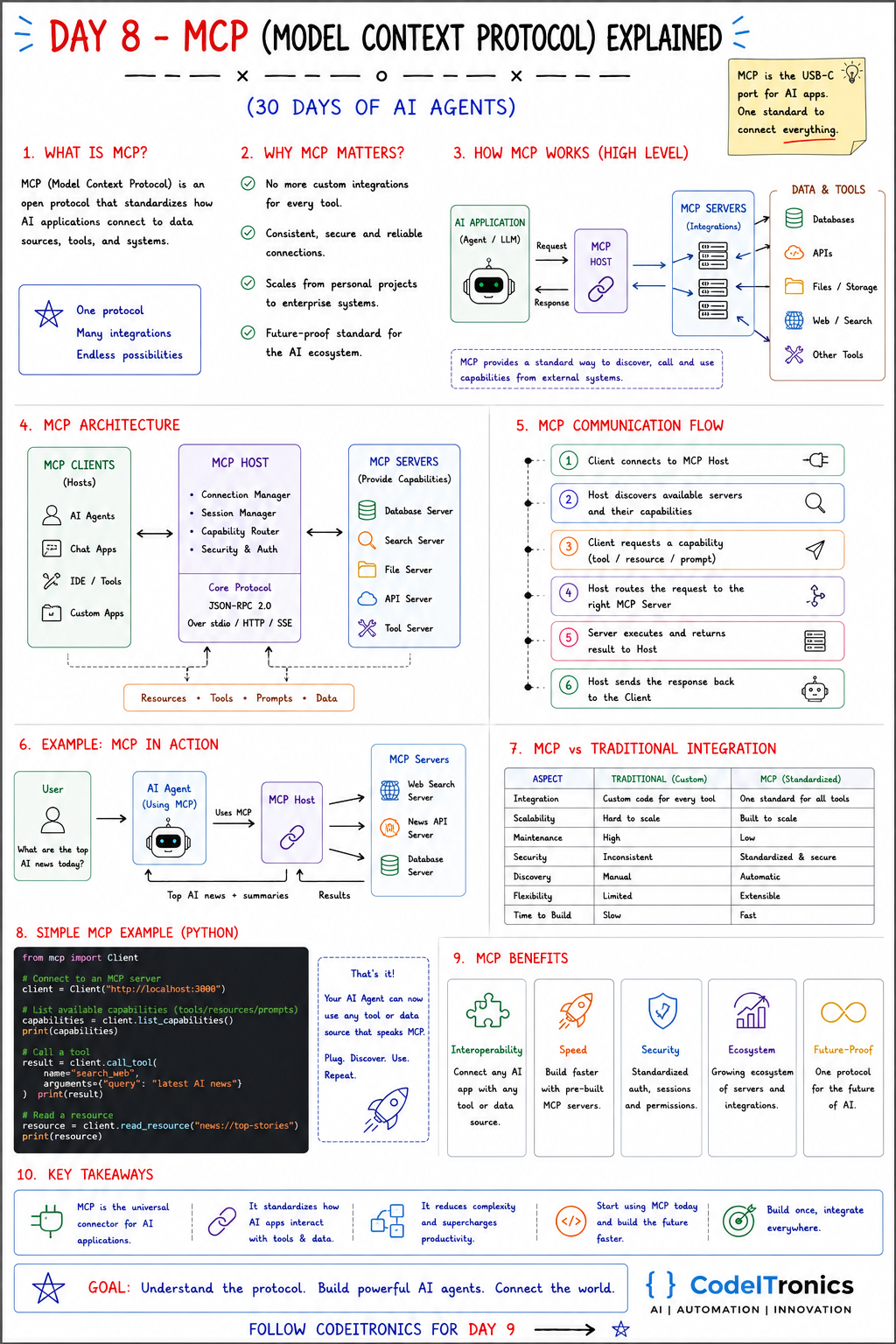
Save this sheet. The rest of this note walks through it section by section.
What MCP Is
MCP is an open protocol, introduced by Anthropic in late 2024, that standardizes how AI applications connect to data sources, tools, and systems. The common analogy is the one on the sheet: MCP is the USB-C port for AI apps. One standard plug, many devices.
Before MCP, connecting an assistant to GitHub, a database, and your file system meant writing three custom integrations for that assistant, and three more for the next one. With MCP, each system gets one MCP server, and any MCP-compatible application can use it.
Why It Matters
- No more custom integration per tool per app. Build the server once.
- Consistent connections. Every server describes its capabilities the same way, so clients can discover them automatically.
- Scales from personal projects to enterprise. The same protocol runs a local file server on your laptop and a remote service behind authentication.
- A shared ecosystem. Many tools already ship MCP servers, so you often install instead of build.
How MCP Works
At a high level: an AI application wants to use something outside the model. It sends a request over MCP to a server that wraps that system (a database, an API, files, web search), the server does the work, and the result comes back in a standard format. MCP gives the application a standard way to discover, call, and use capabilities from external systems.
The Architecture
MCP has three roles. The names are easy to mix up, so precisely:
| Role | What it is | Examples |
|---|---|---|
| Host | The AI application the user interacts with | Claude Desktop, an IDE, your own agent app |
| Client | A connector inside the host; each client holds one connection to one server | Created by the host per server |
| Server | A program that exposes capabilities over MCP | Database, search, file, API, or custom tool servers |
Servers expose three main kinds of capability:
- Tools: functions the model can call, such as
search_issuesorrun_query. - Resources: data the application can read, addressed by URI, such as a file or a record.
- Prompts: reusable prompt templates the server offers.
Under the hood, messages are JSON-RPC 2.0. Local servers usually run as a subprocess and talk over stdio. Remote servers talk over HTTP (the current spec uses a streamable HTTP transport; older servers used HTTP with server-sent events). The host is also where security decisions live: which servers are connected, what the user has approved, and what credentials each server gets.
The Communication Flow
- The host starts a client and connects it to a server; they exchange an initialize handshake and agree on capabilities.
- The client discovers what the server offers, for example by listing its tools.
- The model decides it needs a capability (a tool, resource, or prompt).
- The host routes the request through the right client to the right server.
- The server executes and returns a result.
- The host passes the result back to the model, which continues its loop.
A tool call on the wire looks like this:
{"jsonrpc": "2.0", "id": 7, "method": "tools/call",
 "params": {"name": "search_news", "arguments": {"query": "AI agents", "limit": 5}}}
The sheet's example, "What are the top AI news today?", works this way: the agent's host is connected to a web search server, a news API server, and a database server. The model calls tools across them and the host returns summaries to the user.
A Small MCP Server in Python
The official Python SDK makes a server short. This one exposes a tool and a resource:
from mcp.server.fastmcp import FastMCP

mcp = FastMCP("news")

@mcp.tool()
def search_news(query: str, limit: int = 5) -> list[dict]:
    """Search recent news articles. Returns title, url and published date."""
    return news_api.search(query, limit=limit)   # your API client here

@mcp.resource("news://top-stories")
def top_stories() -> str:
    """Today's top stories as plain text."""
    return news_api.top_stories_text()

if __name__ == "__main__":
    mcp.run()   # stdio transport by default
The type hints and docstrings become the tool's schema and description, which is what the model reads when deciding whether to call it. Write them as carefully as you would write the tool descriptions on Day 7. Register the server in your host's configuration and the tools appear, with no host-specific code.
MCP vs Traditional Integration
| Aspect | Traditional, custom | MCP, standardized |
|---|---|---|
| Integration | Custom code for every tool and app | One standard for all |
| Scalability | Hard to scale | Built to scale |
| Maintenance | High | Low |
| Security | Inconsistent | Standard patterns for auth and consent |
| Discovery | Manual | Automatic |
| Flexibility | Limited | Extensible |
| Time to build | Slow | Fast, often install instead of build |
Benefits and the Caveats
The benefits on the sheet are real: interoperability, speed through pre-built servers, standardized security patterns, a growing ecosystem, and a future-proof foundation.
The caveats are just as real, and most tutorials skip them:
- A server runs with whatever access you give it. Scope credentials tightly; a read-only database user for a read-only server.
- Tool output is untrusted. A web page or document returned by a server can contain instructions aimed at the model (prompt injection). Do not let tool results authorize sensitive actions on their own.
- Vet third-party servers like any dependency. Read what tools they expose before connecting them.
- More tools is not always better. Dozens of connected tools crowd the context and make tool selection worse.
Key Takeaways
- MCP is a universal connector between AI applications and tools or data.
- Host is the app, clients are its connectors, servers expose tools, resources, and prompts.
- It runs on JSON-RPC 2.0 over stdio locally or HTTP remotely.
- Build a server once and every MCP-compatible host can use it.
- Least privilege and treating tool output as untrusted are not optional.
FAQs
Is MCP only for Claude?
No. It is an open protocol, and many other assistants, IDEs, and agent frameworks support it as hosts or clients.
Does MCP replace function calling?
No. Function calling is how a model asks for a tool. MCP is how the application finds and talks to the tool. They work together.
Should I write my own MCP server or use an existing one?
Use an existing server for common systems if it is maintained and you have reviewed it. Write your own for internal APIs, or when you need tighter control over what is exposed.
Up Next
Day 9 covers LangChain: what the ecosystem actually includes, its core building blocks (models, prompts, chains, tools, memory, agents), and when the abstraction helps versus when plain code is clearer. If you want MCP servers built around your internal systems, reach out.
Letters to the editor
No letters yet. Questions and counterpoints are welcome.