Yesterday we built a role-based agent team with CrewAI. Today is the other big name in multi-agent frameworks, Microsoft's AutoGen, which treats a team of agents as a conversation instead of a task list. Once you see how the two differ, picking between them gets easy.
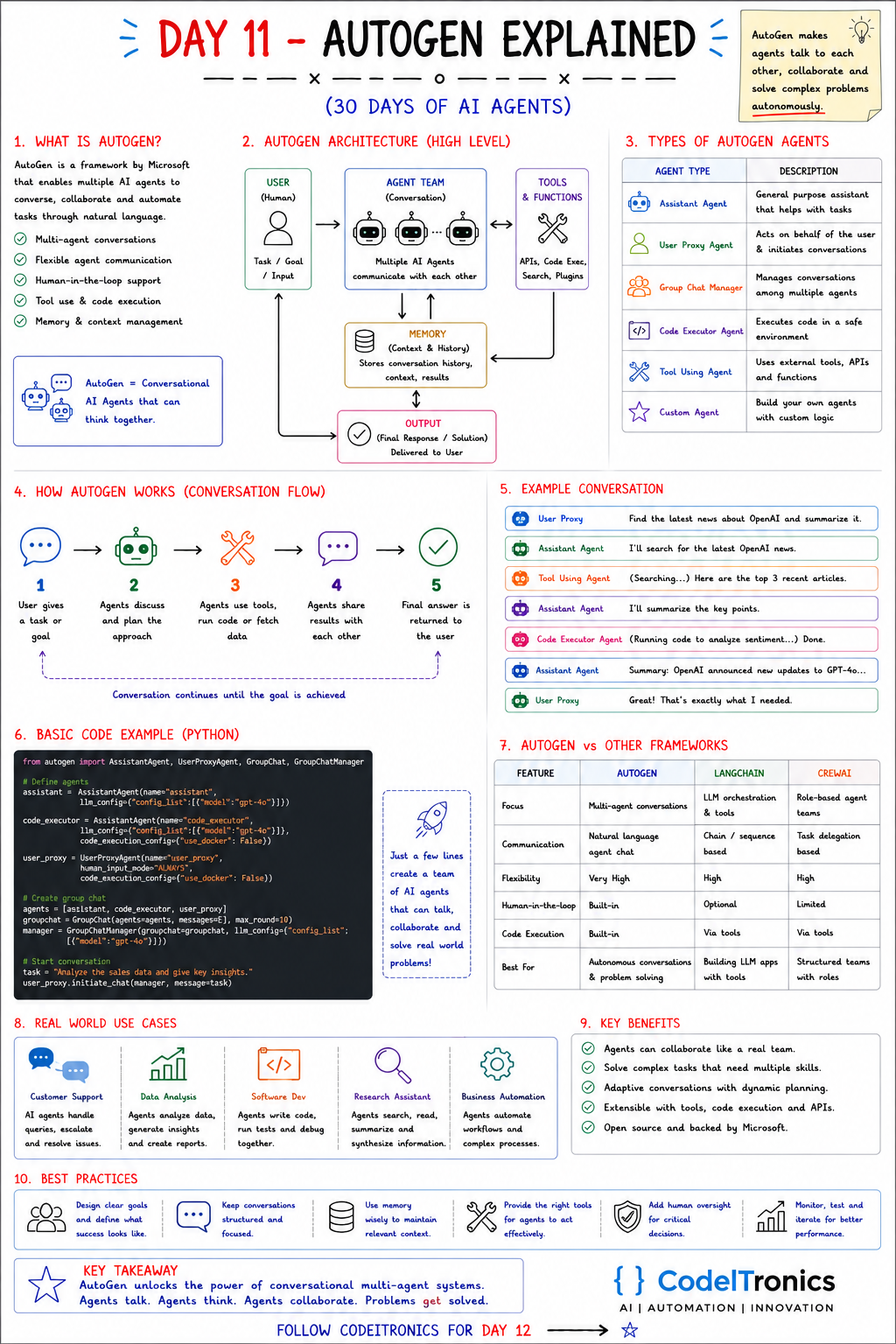
Save this sheet. The rest of this note walks through it section by section.
What AutoGen Is
AutoGen is an open-source framework from Microsoft for building applications where several LLM-backed agents talk to each other, and to a human, until a task is done. The core idea fits on a sticky note: agents send each other messages, and the conversation itself is the control flow.
The sheet lists five capabilities, and they are the right ones to care about:
- Multi-agent conversations. Two agents chatting, or a group chat with a manager picking who speaks next.
- Flexible communication. Agents exchange natural-language messages, so you can add a new agent without designing a new protocol.
- Human-in-the-loop. A human can sit in the conversation as a participant, approving or redirecting at each turn.
- Tool use and code execution. Agents can call functions, and a dedicated executor can run the code another agent writes.
- Memory and context. The shared message history is the working memory every agent reads from.
AutoGen has gone through a significant redesign, and Microsoft has since folded these ideas into its newer Agent Framework, so check which API generation you're on before copying examples. The snippet below uses the classic AssistantAgent / UserProxyAgent style shown on the sheet because it's the clearest way to see the concepts. The concepts carry across versions.
The Architecture in One Picture
The high-level flow on the sheet is:
User (task) --> Agent team (conversation) <--> Tools & functions
                       |                         (APIs, code exec, search)
                       v
                Memory (history, context, results)
                       |
                       v
                Output (final answer delivered to user)
Notice what is missing: there is no explicit graph or task list. The order of work emerges from who speaks when. That's AutoGen's biggest strength, because it handles open-ended problems where you can't predict the steps. It's also its biggest risk, because you can't always predict the steps.
The Agent Types You Actually Use
The sheet lists six agent types. In practice they are roles you configure, not six unrelated classes:
| Role | What it does | Practical note |
|---|---|---|
| Assistant agent | General LLM worker that plans, writes, and answers | Usually where your system prompt lives |
| User proxy agent | Stands in for the human and can relay input or run code | Controls how much a human is asked |
| Group chat manager | Picks the next speaker in a multi-agent chat | Speaker selection is where most bugs hide |
| Code executor | Runs generated code in a controlled environment | Use a container, never the host machine |
| Tool-using agent | Calls registered functions and APIs | Tools need tight schemas, same as any agent |
| Custom agent | Your own reply logic, which can be rule-based | Good for deterministic checks inside a chat |
The custom agent gets less attention than it deserves. Putting a plain-Python "validator" agent in a group chat lets you add a hard rule ("the SQL must be read-only") without hoping the LLM remembers it.
How a Conversation Runs
The five-step flow on the sheet:
- The user gives a task or goal.
- Agents discuss it and plan an approach.
- Agents use tools, run code, or fetch data.
- Agents share results with each other.
- The final answer goes back to the user.
The loop repeats until the goal is reached, or until something stops it. That second condition is the one you have to design. In the sheet's example conversation, the user proxy asks for a summary of recent OpenAI news. The assistant says it will search, a tool-using agent returns articles, a code executor runs a quick sentiment pass, and the assistant summarizes. Clean on paper. In production you also need a termination message, a round limit, and a reason for each agent to stop talking.
A Minimal Group Chat in Python
This mirrors the sheet's example in the classic API, with two production changes: code runs in Docker, and the human is only asked at the end.
from autogen import AssistantAgent, UserProxyAgent, GroupChat, GroupChatManager

llm_config = {"config_list": [{"model": "gpt-4o"}]}  # key read from OPENAI_API_KEY

analyst = AssistantAgent(name="analyst", llm_config=llm_config)

executor = UserProxyAgent(
    name="executor",
    human_input_mode="NEVER",
    code_execution_config={"work_dir": "work", "use_docker": True},
)

user_proxy = UserProxyAgent(
    name="user_proxy",
    human_input_mode="TERMINATE",   # ask the human only when the chat wants to stop
    code_execution_config=False,
)

chat = GroupChat(agents=[user_proxy, analyst, executor], messages=[], max_round=10)
manager = GroupChatManager(groupchat=chat, llm_config=llm_config)

user_proxy.initiate_chat(manager, message="Analyze sales.csv and give three key insights.")
Three settings matter more than the rest. max_round is your budget ceiling. human_input_mode decides how much autonomy you're granting. use_docker decides whether generated code can touch your machine. The sheet's version sets the human mode to always ask and turns Docker off. That's fine for a notebook demo and wrong for anything else.
AutoGen vs LangChain vs CrewAI
| AutoGen | LangChain | CrewAI | |
|---|---|---|---|
| Focus | Multi-agent conversations | LLM orchestration and tools | Role-based agent teams |
| Control flow | Natural-language chat | Chains and sequences | Task delegation |
| Flexibility | Very high | High | High |
| Human-in-the-loop | Built into the conversation model | Possible, you wire it | Possible, more limited |
| Code execution | Built in | Via tools | Via tools |
| Best for | Exploratory, open-ended problem solving | Building LLM apps with tools | Structured teams with clear roles |
Our rule of thumb: if you can write the steps down in advance, use something with explicit structure (CrewAI tasks, or the LangGraph graphs coming on Day 14). If you can't, and the agents need to argue their way to an answer, a conversational framework like AutoGen earns its keep.
Where It Fits and How to Keep It Under Control
The sheet's use cases are customer support, data analysis, software development, research assistants, and business automation. AutoGen is strongest in the middle three, where the work is exploratory and code execution helps. For support and business automation, where every step needs to be predictable and auditable, a free-form conversation is usually more freedom than you want.
The best practices on the sheet, with the engineering behind each:
- Clear goals. Spell out what "done" means, and give the agents a termination phrase.
- Structured conversations. Limit who can talk to whom. Fewer participants means fewer wasted turns.
- Use memory wisely. Long chats get expensive. Summarize, or pass only the results that matter.
- The right tools. Give each agent only the functions its role needs.
- Human oversight for critical decisions. Anything that sends, deletes, or spends money waits for approval.
- Monitor and iterate. Log every message. A multi-agent chat you can't replay is one you can't debug.
Key Takeaways
- AutoGen models a team of agents as a conversation, and the message history is the control flow.
- Agent "types" are roles: assistant, user proxy, group chat manager, code executor, tool user, custom.
- Turn limits, termination conditions, and sandboxed code execution are not optional in production.
- Pick AutoGen for exploratory, open-ended work. Pick structured frameworks when you can write the steps down.
FAQs
Is AutoGen still maintained?
Yes, but it has gone through major API changes, and Microsoft is moving its agent work into a unified Agent Framework. Pin your version and read the docs for that version.
Do I need Docker to use AutoGen?
Not to run conversations. You should use it, or another sandbox, as soon as agents execute generated code.
Can AutoGen agents use models other than OpenAI?
Yes. Model settings are configuration, and any provider with a supported client or an OpenAI-compatible endpoint can be plugged in.
Up Next
Day 12 moves from code-first frameworks to visual automation with n8n + AI Agents. We'll look at how n8n handles triggers, integrations, and actions while an AI Agent node does the reasoning in the middle. If you want a multi-agent workflow like this built for your team, get in touch.
Letters to the editor
No letters yet. Questions and counterpoints are welcome.