Yesterday we covered vector databases, the memory layer behind search and RAG. Today is LangGraph, a library that gives agent workflows explicit structure: shared state, nodes, and edges, including the conditional ones. If AutoGen (Day 11) is agents improvising a conversation, LangGraph is agents following a map you drew, with room to loop and branch.
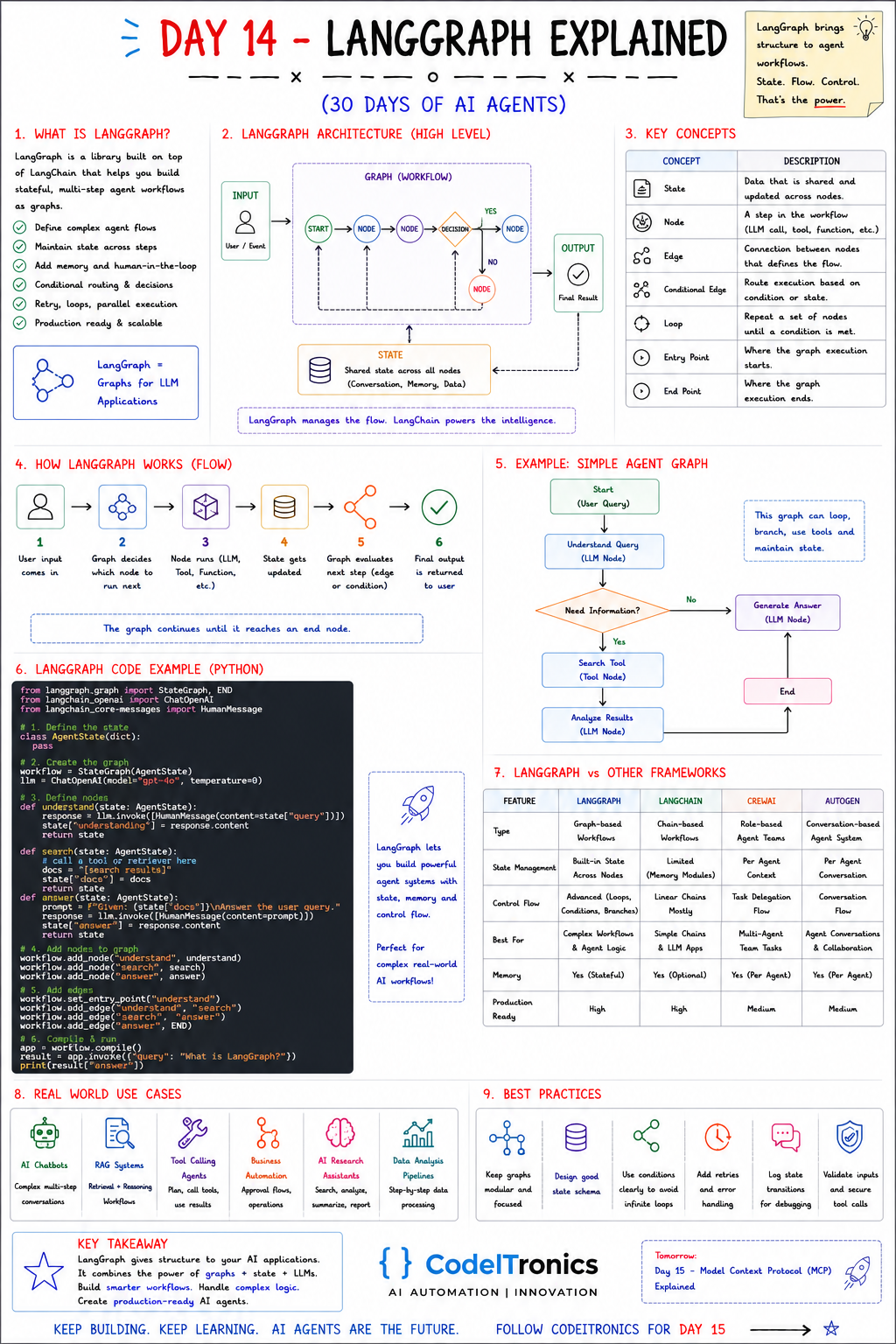
Save this sheet. The rest of this note walks through it section by section.
What LangGraph Is
LangGraph is a library from the LangChain team for building stateful, multi-step agent workflows as graphs. It works with LangChain components but doesn't require them. A node can be any Python function. The sheet lists what it's for:
- Defining complex flows rather than single prompts
- Keeping state across steps
- Adding memory and human-in-the-loop checkpoints
- Conditional routing and decisions
- Retries, loops, and parallel branches
- Running in production, where you need to inspect and resume runs
The sheet's tagline sums up the division of labor: LangGraph manages the flow. The model (often via LangChain) powers the intelligence.
The Architecture
Input (user / event)
      |
      v
  START -> [node] -> [node] -> <decision> --yes--> [node] -> END
                                   |no
                                   v
                                [node] --(loop back)--^
      ^                                         |
      +------------- shared STATE --------------+
               (conversation, memory, data)
Every node reads the shared state and returns updates to it. Edges decide what runs next. That's the whole model, and it's why LangGraph is easy to debug: at any point you can ask "what was the state, and which edge did we take?"
Seven Concepts to Know
| Concept | What it is |
|---|---|
| State | A typed object shared and updated across nodes |
| Node | One step: an LLM call, a tool call, or any function |
| Edge | A fixed connection from one node to the next |
| Conditional edge | A routing function that picks the next node from the state |
| Loop | Edges that point back to an earlier node until a condition is met |
| Entry point | Where execution starts (the START node) |
| End point | Where execution finishes (the END node) |
Two production features build on these. Checkpointers save the state after each step, so a run can be resumed, replayed, or inspected later. Interrupts pause the graph to wait for a human, for example before a node that sends an email, and resume once someone approves.
How a Graph Runs
- User input arrives and becomes the initial state.
- The graph decides which node runs next.
- The node runs (an LLM call, a tool, a function).
- The state is updated with the node's output.
- The graph evaluates the next edge or condition.
- When it reaches
END, the final state is returned.
The loop between steps 2 and 5 continues until an end node is reached. That's also why you need an explicit exit condition on every cycle.
A Working Example in Python
The sheet's example graph: understand the query, decide whether more information is needed, search if so, then generate an answer. Here it is with a typed state and a real conditional edge:
from typing import TypedDict
from langgraph.graph import StateGraph, START, END
from langchain_openai import ChatOpenAI

llm = ChatOpenAI(model="gpt-4o", temperature=0)

class AgentState(TypedDict, total=False):
    query: str
    needs_search: bool
    docs: list[str]
    answer: str

def understand(state: AgentState) -> dict:
    verdict = llm.invoke(f"Does answering this need external lookup? Reply YES or NO.\n{state['query']}")
    return {"needs_search": "YES" in verdict.content.upper()}

def search(state: AgentState) -> dict:
    return {"docs": my_retriever(state["query"])}  # your vector search from Day 13

def answer(state: AgentState) -> dict:
    context = "\n".join(state.get("docs", []))
    reply = llm.invoke(f"Context:\n{context}\n\nAnswer: {state['query']}")
    return {"answer": reply.content}

g = StateGraph(AgentState)
g.add_node("understand", understand)
g.add_node("search", search)
g.add_node("answer", answer)
g.add_edge(START, "understand")
g.add_conditional_edges("understand", lambda s: "search" if s["needs_search"] else "answer")
g.add_edge("search", "answer")
g.add_edge("answer", END)

app = g.compile()
print(app.invoke({"query": "What is LangGraph?"})["answer"])
Notice that nodes return only the keys they change. LangGraph merges those updates into the state. In production you'd make understand return structured output instead of parsing YES/NO, and you'd pass a checkpointer to compile() so runs can be resumed.
LangGraph vs Other Frameworks
| LangGraph | LangChain | CrewAI | AutoGen | |
|---|---|---|---|---|
| Model | Graph workflows | Chains and components | Role-based teams | Conversations |
| State | Built in, shared across nodes | Limited, via memory modules | Per-agent context | Per conversation |
| Control flow | Loops, conditions, branches | Mostly linear | Task delegation | Conversation flow |
| Best for | Complex workflows and agent logic | Simple chains and LLM apps | Multi-agent team tasks | Agent conversations |
| Production readiness | High | High | Medium | Medium |
Our take: LangGraph is the right default when the workflow is the product, meaning you need to explain to someone exactly why the agent did what it did.
Use Cases and Best Practices
The sheet's use cases: chatbots with multi-step conversations, RAG systems that retrieve then reason, tool-calling agents, business automation with approval flows, research assistants, and step-by-step data pipelines.
Best practices, with the reasoning:
- Keep graphs modular and focused. Use subgraphs for reusable pieces like "retrieve and rerank."
- Design the state schema first. Most LangGraph bugs are state bugs: a key that's missing, overwritten, or growing without bound.
- Make exit conditions explicit. Every loop needs a counter or a clear stop condition, plus a recursion limit as a backstop.
- Add retries and error handling. Wrap flaky tool calls, and route failures to a fallback node rather than crashing.
- Log state transitions. The node, its input state, and its output are your debugging trail.
- Validate inputs and secure tool calls. Never let raw model output become a SQL query or shell command unchecked.
Key Takeaways
- LangGraph models agents as graphs: nodes do the work, edges choose the path, and state carries the context.
- Conditional edges and loops give you agent behavior without giving up control.
- Checkpointers and interrupts make runs resumable and add human approval where it matters.
- Design the state schema and exit conditions before writing prompts.
FAQs
Do I need LangChain to use LangGraph?
No. Nodes are plain functions. LangChain model wrappers are convenient but optional.
How is LangGraph different from a normal workflow engine?
It's built for LLM-driven routing. Edges can depend on model output, and state is designed around messages and agent context.
Can LangGraph run multiple agents?
Yes. Each agent can be a node or a subgraph, with a supervisor node routing between them. We'll come back to this on Days 17 and 20.
Up Next
Day 15 is RAG (Retrieval-Augmented Generation): how to ground an LLM in your own documents, from ingestion and chunking to retrieval, prompt augmentation, and cited answers. If you need a stateful agent workflow like this built and hardened, contact us.
Letters to the editor
No letters yet. Questions and counterpoints are welcome.