Yesterday we engineered agent memory. Today we scale out to Multi-Agent Systems. Day 4 compared one agent with many and argued for starting simple. This post assumes you've decided you need several agents, and covers how to structure them so they cooperate instead of tripping over each other.
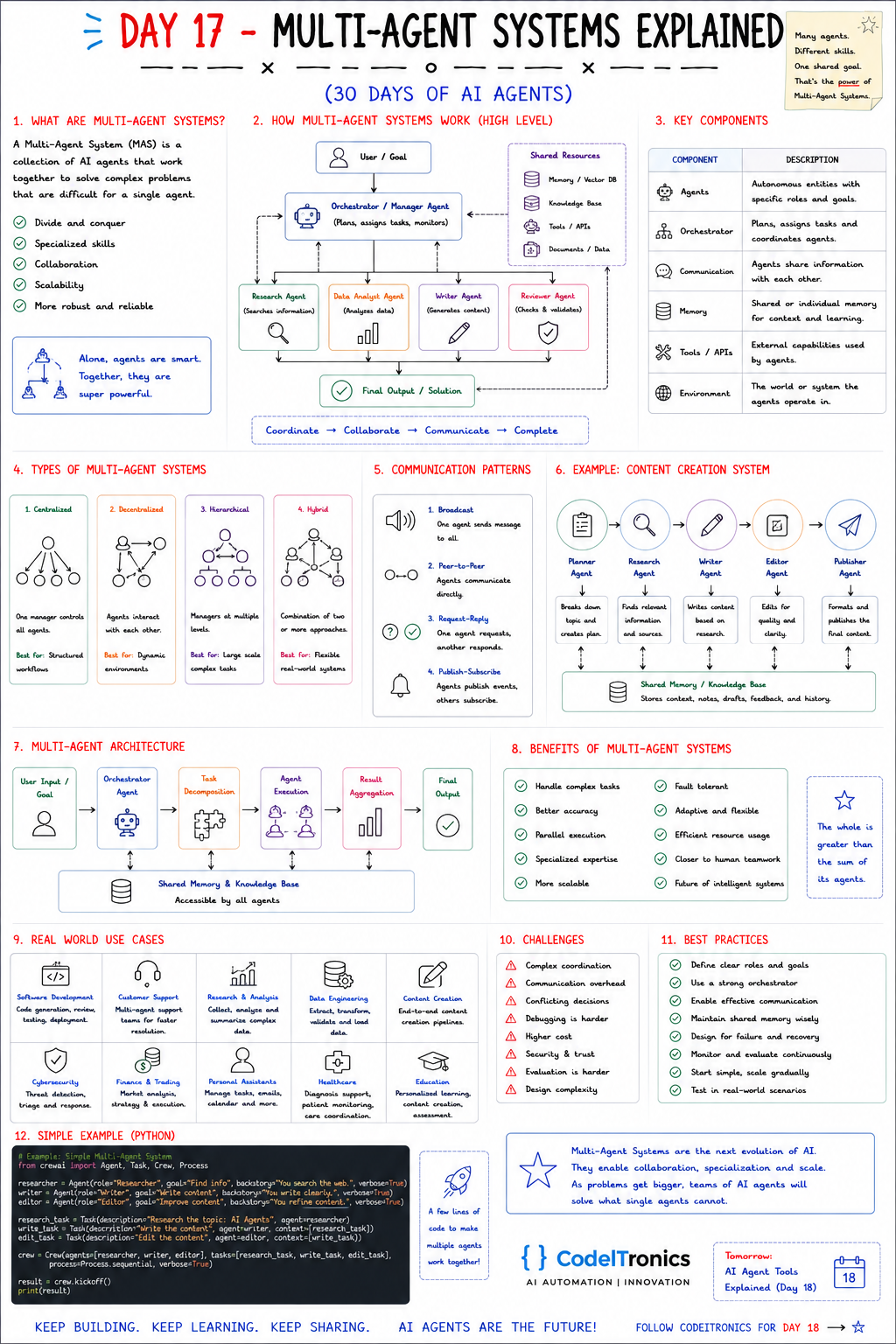
Save this sheet. The rest of this note walks through it section by section.
What a Multi-Agent System Is
A Multi-Agent System (MAS) is a set of AI agents that work together on problems too hard or too broad for a single agent. The sheet lists the reasons to use one: divide and conquer, specialized skills, collaboration, scalability, and robustness.
Specialization is the reason that holds up best in practice. A single agent with 30 tools and a 3,000-word system prompt gets worse at choosing among them. Four agents with 6 tools each and focused instructions are each easier to prompt, test, and improve. You're trading a single, harder decision problem for several easier ones, plus a coordination problem.
How the Pieces Fit
                  User / Goal
                       |
          Orchestrator / Manager agent  <----  Shared resources
          (plans, assigns, monitors)            memory / vector DB
         /        |          |        \         knowledge base
   Research   Data analyst  Writer   Reviewer   tools / APIs
     agent       agent      agent     agent     documents / data
         \        |          |        /
              Final output / solution
The sheet summarizes the cycle as Coordinate → Collaborate → Communicate → Complete. The key components:
| Component | Role |
|---|---|
| Agents | Autonomous workers with specific roles and goals |
| Orchestrator | Plans, assigns tasks, coordinates, and monitors |
| Communication | How agents exchange information |
| Memory | Shared or per-agent context, plus learning |
| Tools / APIs | External capabilities each agent can use |
| Environment | The systems and data the agents act on |
Inside the orchestrator, the sheet's architecture is a pipeline: task decomposition → agent execution → result aggregation → final output, with shared memory every agent can reach. Aggregation is the step teams underestimate. Merging four agents' outputs into one coherent answer is a task of its own, and it often deserves its own agent or a deterministic merge step.
Four System Types
| Type | Structure | Best for | Watch out for |
|---|---|---|---|
| Centralized | One manager controls all agents | Structured workflows | The manager becomes a bottleneck |
| Decentralized | Agents interact directly | Dynamic environments | Hard to predict and to stop |
| Hierarchical | Managers at multiple levels | Large, complex tasks | Latency and cost multiply by level |
| Hybrid | A mix of the above | Flexible real-world systems | Design complexity |
Our default is centralized until there's a concrete reason to change. It gives you one place to enforce budgets, log decisions, and stop a run. Hierarchical makes sense when sub-teams are genuinely independent, like a research team and a QA team each with their own lead. Fully decentralized designs are rarely the right choice for business processes, where someone has to answer "why did this happen?"
Communication Patterns
The sheet lists four:
- Broadcast. One agent sends a message to all. Good for shared announcements like "plan updated."
- Peer-to-peer. Agents talk directly. Flexible, but the number of possible conversations grows quickly.
- Request-reply. One agent asks and another answers. It's the easiest to trace and test.
- Publish-subscribe. Agents publish events, and the agents that care subscribe. It decouples agents well.
Whatever the pattern, make messages structured. Free-text handoffs between LLMs drift. A small contract fixes most of it:
{
  "task_id": "rpt-42-research",
  "from": "researcher",
  "to": "writer",
  "status": "done",
  "summary": "Five sources on agent memory, two with benchmarks",
  "artifacts": ["memory://rpt-42/sources"],
  "open_questions": ["Need a 2025 source on episodic memory"]
}
A status field lets the orchestrator branch. Artifact references keep large payloads out of the messages. Open questions make gaps visible instead of quietly papered over.
Designing the Shared Memory
The sheet's content system shows planner, research, writer, editor, and publisher agents all reading and writing a shared knowledge base of context, notes, drafts, feedback, and history. That works when you set three rules:
- Namespaces per task. Agents read and write under the run's ID, so parallel runs don't contaminate each other.
- Ownership. Each artifact has one writer. Others read it or comment on it. This prevents two agents silently overwriting the same draft.
- Private scratchpads. Each agent's internal reasoning stays in its own memory. Only results go to shared memory.
Use shared memory for results and individual memory for working state. That's the balance Day 16's memory policies apply to a team.
A Content Pipeline in CrewAI
The sheet's example uses CrewAI (Day 10) with three agents chained through task context:
from crewai import Agent, Task, Crew, Process

researcher = Agent(role="Researcher", goal="Find accurate, current information",
                   backstory="You verify claims and keep source links.")
writer = Agent(role="Writer", goal="Write clear content",
               backstory="You write for busy technical readers.")
editor = Agent(role="Editor", goal="Improve accuracy and clarity",
               backstory="You cut fluff and flag unsupported claims.")

research = Task(description="Research the topic: {topic}", agent=researcher,
                expected_output="Bullet findings with source URLs")
write = Task(description="Write an article from the research", agent=writer,
             expected_output="An 800-word draft", context=[research])
edit = Task(description="Edit the draft", agent=editor,
            expected_output="Final article plus a list of changes", context=[write])

crew = Crew(agents=[researcher, writer, editor], tasks=[research, write, edit],
            process=Process.sequential)
result = crew.kickoff(inputs={"topic": "AI agent memory"})
context=[...] is the communication channel here. Each task gets the previous task's output. expected_output is your contract, and the more specific it is, the less each handoff drifts.
Benefits Challenges and How to Stay Sane
The benefits on the sheet are real: complex tasks, better accuracy through review, parallel execution, specialized expertise, scalability, and fault tolerance. So are the challenges: complex coordination, communication overhead, conflicting decisions, harder debugging, higher cost, security and trust, evaluation, and design complexity.
What keeps a MAS manageable:
- Define clear roles and goals. If two agents' descriptions overlap, merge them.
- Use a strong orchestrator. It owns the plan, the budget, and the stop condition.
- Share memory deliberately. Shared results, private working state.
- Design for failure. Each agent call gets a timeout, a retry limit, and a fallback (skip, ask a human, or fail the run clearly).
- Least privilege. The writer doesn't need the publish API. Only the publisher does.
- Trace everything. Record one trace per run with every agent step nested inside it.
- Start simple and scale gradually. Add an agent only when you can name the failure it fixes.
Key Takeaways
- Multi-agent systems trade one hard decision problem for several easy ones, plus coordination.
- Centralized orchestration is the safest default. Move to hierarchical or decentralized only for a concrete reason.
- Structured message contracts and expected outputs stop handoffs from drifting.
- Shared memory needs namespaces, ownership, and private scratchpads.
- Budgets, timeouts, and least-privilege tools belong in the orchestrator from day one.
FAQs
How many agents is too many?
When you can't explain what each one adds. Most business workflows land between two and five.
Should every agent use the same model?
No. Routing and formatting agents can often use smaller, cheaper models. Save the strongest model for planning and review.
How do agents resolve disagreements?
Give one role authority, usually a reviewer or the orchestrator. Or escalate to a human when confidence is low. Don't let agents debate without a limit.
Up Next
Day 18 is AI Agent Tools: how agents call functions and APIs, how tool schemas work, and how to keep tool use safe and reliable. If you're designing a multi-agent system and want a second opinion on the architecture, reach out.
Letters to the editor
No letters yet. Questions and counterpoints are welcome.