Yesterday's copilot helped support agents answer tickets. Today we build the AI meeting notes system: a post-meeting pipeline that takes a recording, transcribes it, and produces structured notes with a summary, decisions, and action items that have owners and due dates.
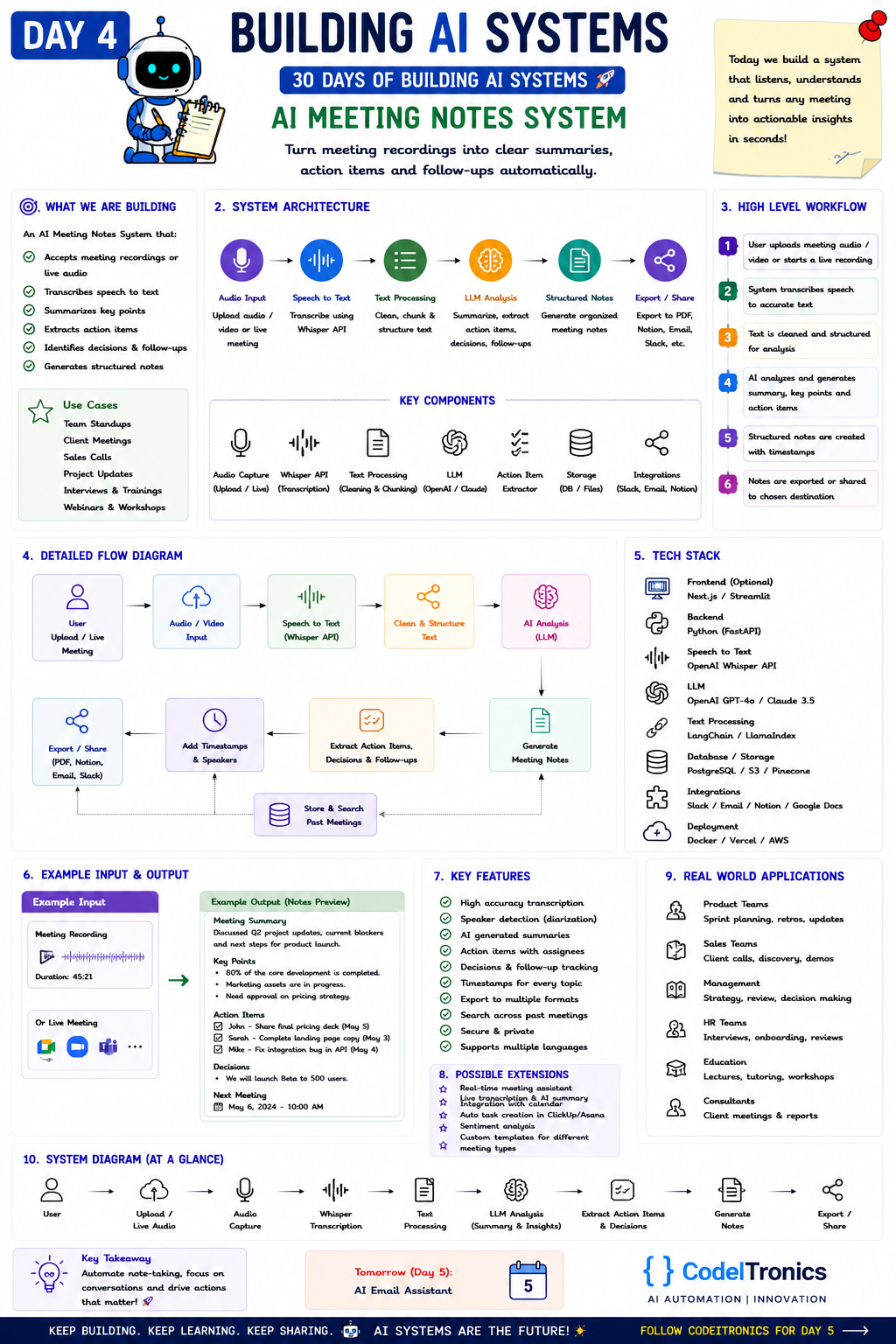
Save this sheet. The rest of this note walks through it section by section.
What We Are Building
The system accepts a recording or an upload after the call ends, transcribes it, and turns it into notes people actually read: key points, decisions, action items with assignees, follow-ups, and timestamps that link back to the moment something was said. Past meetings are stored and searchable.
The scope is after the meeting. On Day 11 we build a live meeting assistant that joins calls as a bot. Starting with the batch version is the right order: no real-time constraints, no meeting platform SDKs, and the same extraction logic you'll reuse later.
Use cases: standups, client meetings, sales calls, project updates, interviews, trainings, and webinars.
System Architecture
audio / video file
  -> speech to text (Whisper API) with timestamps
  -> speaker attribution (diarization)
  -> text processing: clean, chunk by time, structure
  -> LLM analysis: summary, decisions, action items, follow-ups
  -> structured notes (JSON + rendered Markdown)
  -> export / share: PDF, Notion, email, Slack
  -> store transcript + notes for search
This is a batch job from end to end. Put it on a queue: upload triggers a job, the job writes results to the database, and the UI polls or gets a webhook when it's done.
Key Components
| Component | Job |
|---|---|
| Audio capture | Accept uploads, or pull recordings from meeting platforms |
| Transcription | Whisper API or similar, returning segments with timestamps |
| Diarization | Label who spoke when, so action items get the right owner |
| Text processing | Remove filler, merge segments, chunk long meetings |
| LLM | Summarize and extract structured items |
| Action item extractor | A strict schema for tasks, owners, and dates |
| Storage | PostgreSQL for notes, object storage for audio, a vector index for search |
| Integrations | Slack, email, Notion, Google Docs |
One point people miss: the Whisper model transcribes speech but doesn't label speakers. Diarization is usually a separate step, from a library like pyannote or from a transcription provider that includes it. Without it, "I'll handle that" has no owner.
Data Flow Step by Step
- The user uploads meeting audio or video, or a recording arrives from a connected platform.
- The audio is normalized, split into segments under the API's file-size limit, and transcribed with timestamps.
- Diarization assigns speaker labels, which the user can map to names once and reuse.
- The transcript is cleaned and chunked by time window.
- The LLM produces a summary, key points, decisions, and action items for each chunk, and a final pass merges them.
- Notes are stored with timestamps and exported or shared to the chosen destination.
The extraction step is where you earn trust. Require evidence for every action item, then check that the evidence exists:
from pydantic import BaseModel
from datetime import date

class ActionItem(BaseModel):
    task: str
    owner: str | None          # None if nobody clearly took it
    due: date | None
    quote: str                 # exact words from the transcript
    timestamp: str             # "00:31:12"

class MeetingNotes(BaseModel):
    summary: str
    decisions: list[str]
    action_items: list[ActionItem]

def grounded(notes: MeetingNotes, transcript: str) -> MeetingNotes:
    notes.action_items = [a for a in notes.action_items if a.quote in transcript]
    return notes
The exact-match check is crude, and you'll want a fuzzy match in practice, since transcripts get lightly cleaned. But the principle holds: an action item without a quote is a guess.
A Minimal Tech Stack
| Layer | Choice |
|---|---|
| Frontend | Next.js or Streamlit |
| Backend | Python with FastAPI, plus a worker queue |
| Speech to text | OpenAI Whisper API |
| LLM | A current OpenAI GPT or Anthropic Claude model |
| Text processing | LangChain or LlamaIndex, or plain code |
| Storage | PostgreSQL, S3, and Pinecone for meeting search |
| Integrations | Slack, email, Notion, Google Docs |
| Deployment | Docker on AWS, frontend on Vercel |
Example Input and Output
The sheet's input is a 45-minute recording. The output:
- Summary. Discussed Q2 project updates, current blockers, and next steps for the product launch.
- Key points. Most core development is complete, marketing assets are in progress, and pricing still needs approval.
- Action items. John shares the final pricing deck, Sarah completes the landing page copy, and Mike fixes the integration bug in the API, each with a due date.
- Decisions. Launch the beta to 500 users.
- Next meeting. Date and time.
Notice that "500 users" is a number someone said, and a decision someone made. Those are exactly the details a model can garble, so link each decision to its timestamp and let readers jump to the audio.
Production Concerns
Evaluation
Take ten real meetings and have the people who attended write the action items and decisions by hand. Compare against the system's output on three things: missed items, invented items, and wrong owners. Wrong owners usually trace back to diarization, not the LLM, so evaluate speaker labels separately.
Cost
Transcription is priced per minute of audio and usually dominates. LLM cost scales with transcript length. A single pass over a long transcript is often cheaper than chunked passes plus a merge, provided the model's context window fits it. Test both on your typical meeting length.
Failure Modes
- Consent and privacy. Recording laws vary by jurisdiction, and many require every participant's consent. Make consent explicit, set retention limits, and let people delete recordings.
- Crosstalk and poor audio. Overlapping speakers degrade both transcription and diarization. Flag low-confidence segments instead of hiding them.
- Hallucinated commitments. "We should look into that" becomes a task with a due date. The evidence quote requirement and a "tentative" flag handle most of it.
- Names and jargon. Product names and acronyms get mangled. Feed a custom vocabulary or a prompt with known terms into transcription where the provider supports it.
Extensions Worth Adding
The sheet lists a real-time meeting assistant, calendar integration, automatic task creation in ClickUp or Asana, sentiment analysis, and custom templates for different meeting types. Templates come first: a sales call, a standup, and an interview need different sections. Auto-creating tasks comes after you trust owner and date extraction.
Key Takeaways
- Start with post-meeting batch processing. It's simpler, cheaper, and builds the extraction logic you'll reuse for live bots.
- Diarization is a separate step from transcription, and owner accuracy depends on it.
- Require an evidence quote and timestamp for every action item and decision.
- Treat consent and retention as product features, not legal footnotes.
FAQs
Can I skip diarization?
For a summary, yes. For action items with owners, no. Without speaker labels the model guesses who said "I'll take it."
How do I handle two-hour recordings?
Split the audio to fit the transcription API's limits, then either chunk the transcript by time with a merge pass or use a long-context model in a single pass. Keep timestamps through every step.
Should notes go straight to Slack?
Send them to the meeting owner for a quick review first. Once owners rarely edit, auto-share for routine meeting types.
Up Next
Tomorrow is Day 5, the AI Email Assistant: a system that summarizes long threads, prioritizes the inbox, and drafts replies in your own tone while you stay in control of what gets sent. If your team wants meeting notes wired into your own tools, reach out.
Letters to the editor
No letters yet. Questions and counterpoints are welcome.