Over the last 30 days we covered AI agents as concepts: loops, tools, memory, planning and multi-agent patterns. This series is the other half. For the next 30 days we build one real system per day, with its architecture, components, data flow, stack, an example run, and what breaks in production, starting today with an AI research assistant that turns a question into a sourced report.
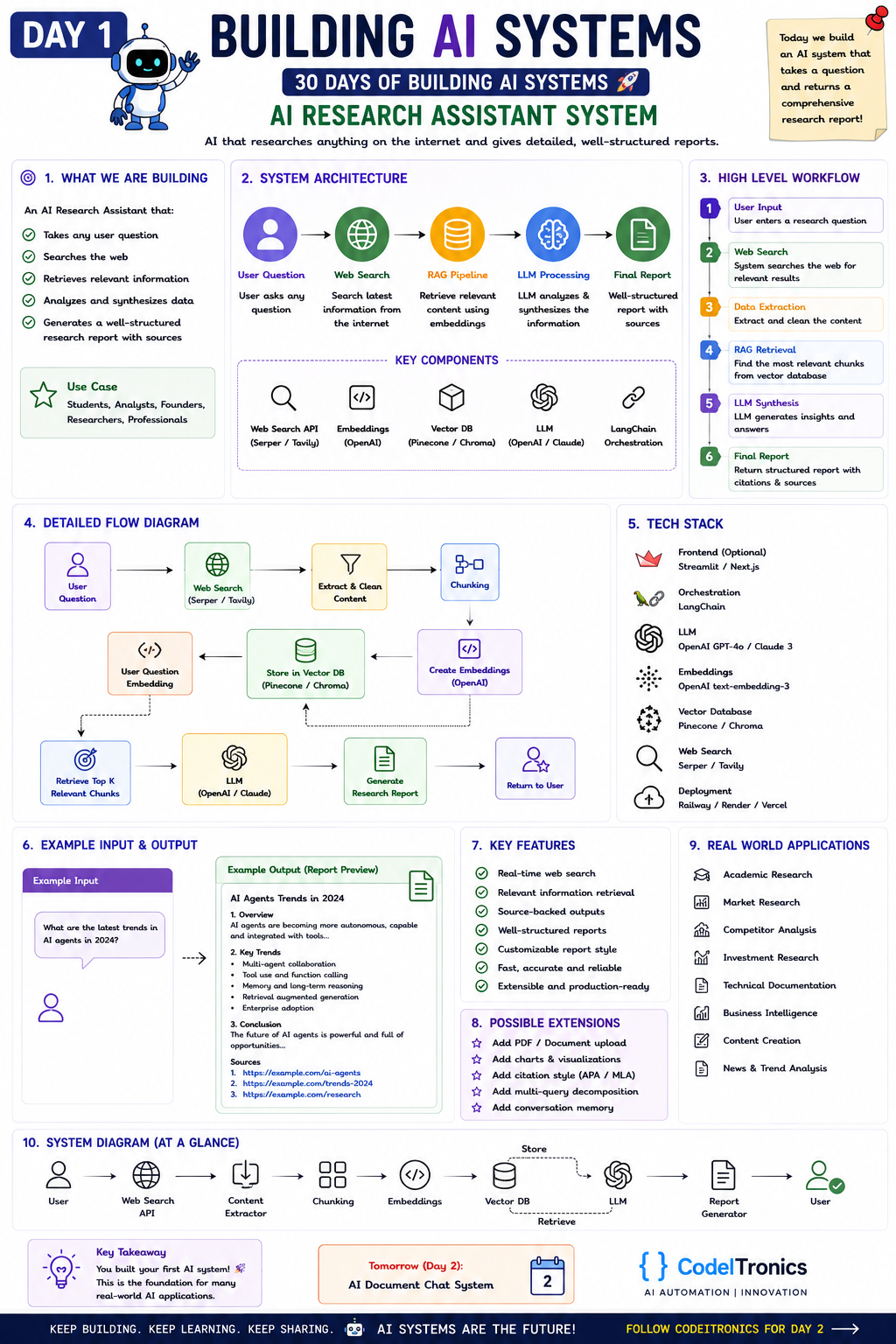
Save this sheet. The rest of this note walks through it section by section.
What We Are Building
An AI research assistant takes any question, searches the web for current information, pulls out the passages that matter, and writes a structured report with sources. The users are students, analysts, founders, and researchers.
The important word is sources. A model answering from training data alone can't tell you what happened last month, and it can't show you where a claim came from. This system fixes both by turning the model into a writer over retrieved evidence instead of an oracle.
Two design goals drive every decision below:
- Every factual claim in the report traces back to a URL.
- When the evidence is thin or contradictory, the report says so instead of smoothing it over.
System Architecture
The sheet shows five stages: User Question, Web Search, RAG Pipeline, LLM Processing, Final Report. Expanded, the pipeline looks like this:
question
  -> search API (Serper / Tavily)       top N URLs + snippets
  -> fetch, extract, clean              readable text per page
  -> chunk + embed + store              vector DB, scoped to this request
  -> embed question, retrieve top-K     most relevant passages
  -> LLM synthesis with numbered sources
  -> report: overview, findings, conclusion, sources
Why put a retrieval step on top of search? Search returns pages, and pages are long, noisy, and mostly irrelevant to the exact question. Embedding the chunks and retrieving the top passages keeps the prompt small and focused. That lowers cost and reduces the chance that the model anchors on a boilerplate paragraph or a cookie banner.
For a single question over ten pages you can rank chunks in memory and skip the vector database. Persisting chunks pays off once users ask follow-ups.
Key Components
| Component | Job | Typical choice |
|---|---|---|
| Web search API | Find candidate pages | Serper, Tavily |
| Extractor | Turn HTML into clean text | Readability-style extractors, or the search API's own content mode |
| Embeddings | Vectorize chunks and the question | OpenAI text-embedding-3 |
| Vector DB | Store and search chunks | Pinecone, Chroma |
| LLM | Analyze and synthesize | A current OpenAI GPT or Anthropic Claude model |
| Orchestration | Glue, retries, tracing | LangChain, or plain code |
The orchestration layer is the most optional part. The core loop is a few dozen lines of plain Python, which is easier to debug than a framework when a run goes sideways.
Data Flow Step by Step
- User input. Take the question. Many research questions are really three questions, so decompose them into two to four sub-queries up front. The sheet lists this as an extension; in practice it's one of the biggest quality wins.
- Web search. Pull the top results per sub-query and dedupe by URL.
- Extraction and cleaning. Strip navigation, ads, and footers. Keep the title, URL, and publish date as metadata, because "latest" questions depend on dates.
- Chunking. Split into passages of a few hundred tokens with a little overlap, and attach the source metadata to every chunk.
- Retrieval. Embed the question, retrieve the top-K chunks, and cap how many come from any single domain so one site can't dominate the report.
- Synthesis. Give the model numbered passages and require a citation on every claim.
- Report. Render the sections and a source list the reader can click.
The synthesis step is where most of the reliability lives, so here is a minimal version with a citation check:
import re
from openai import OpenAI

client = OpenAI()
MODEL = "your-model-id"

def synthesize(question, passages):
    # passages: list of dicts with url, title, text
    sources = "\n\n".join(
        f"[{i+1}] {p['title']} ({p['url']})\n{p['text']}"
        for i, p in enumerate(passages)
    )
    prompt = (
        "Answer the question as a research report using ONLY the sources below.\n"
        "Sections: Overview, Key Findings, Conclusion.\n"
        "Cite every factual claim as [n]. If sources disagree or are thin, say so.\n\n"
        f"Question: {question}\n\nSources:\n{sources}"
    )
    resp = client.chat.completions.create(
        model=MODEL, messages=[{"role": "user", "content": prompt}]
    )
    report = resp.choices[0].message.content
    cited = {int(n) for n in re.findall(r"\[(\d+)\]", report)}
    unknown = [n for n in cited if not 1 <= n <= len(passages)]
    if unknown:
        raise ValueError(f"Report cites sources that don't exist: {unknown}")
    return report, sorted(cited)
This only proves the citations point at real sources. Whether each source actually supports its claim is an evaluation problem, covered below.
A Minimal Tech Stack
| Layer | Choice | Note |
|---|---|---|
| Frontend | Streamlit to prototype, Next.js for a product | Streamlit gets you a demo in an afternoon |
| Orchestration | LangChain or plain Python | Start plain, add a framework when it saves you code |
| LLM | OpenAI GPT or Anthropic Claude | Use a strong model for synthesis, a cheap one for sub-queries |
| Embeddings | OpenAI text-embedding-3 | The small variant is usually enough here |
| Vector DB | Chroma locally, Pinecone hosted | Per-request namespaces keep runs isolated |
| Search | Serper or Tavily | Tavily can return extracted page content directly |
| Deployment | Railway, Render, Vercel | Run research jobs as background tasks, not inside short request timeouts |
Example Input and Output
The sheet's example input is "What are the latest trends in AI agents?" A good output looks like this:
- Overview. Two or three sentences on where the field is, each with a citation.
- Key trends. Multi-agent collaboration, tool and function calling, memory and long-horizon reasoning, retrieval-augmented generation, and enterprise adoption, each backed by one or more sources.
- Conclusion. What the trends add up to, plus an honest note on what the sources didn't cover.
- Sources. A numbered list of URLs with publish dates.
What separates a good report from a plausible one is checkable: every bullet has a citation, the dates are visible, and "latest" is backed by a recency filter on the search rather than by whatever ranked highest.
Production Concerns
Evaluation
Build a set of 30 to 50 questions where you know what good sources look like. Score three things: whether each cited passage actually supports its claim (citation precision), whether the report covers the obvious angles, and how recent the sources are. An LLM judge can grade claim support at scale, but have a human spot-check its verdicts every week.
Cost
Your costs come from search calls, page fetches, embedding tokens, and synthesis tokens. Sub-query decomposition multiplies the search and fetch costs, so cache fetched pages and their embeddings by URL hash. Run the cheap steps on a small model and save the expensive one for the final write-up.
Failure Modes
- Low-quality sources. SEO spam and content farms rank well. Maintain allow and deny lists, and prefer primary sources.
- Empty extractions. Paywalls and pages that render with JavaScript return nothing useful. Detect near-empty text and skip it rather than embedding junk.
- Citation drift. The model cites [3] for a claim that came from [5]. Claim-level verification catches it.
- Prompt injection. A fetched page can contain instructions aimed at your model. Treat retrieved text as data, delimit it clearly, and never give a research assistant tools with side effects.
Extensions Worth Adding
From the sheet: PDF and document upload, charts and visualizations, APA or MLA citation styles, multi-query decomposition, and conversation memory for follow-ups. The same pipeline serves academic, market, competitor, and investment research, business intelligence, content research, and news analysis. The sources and the report template change; the architecture doesn't.
Key Takeaways
- A research assistant is a retrieval system with a writer on top. The quality ceiling is set by search and extraction, not by the model.
- Require a citation on every claim, and verify that each citation points at a real source.
- Decompose broad questions into sub-queries early. It's cheap and noticeably improves coverage.
- Treat fetched web content as untrusted input, and keep side-effecting tools away from this system.
FAQs
Do I need a vector database for a research assistant?
Not for single questions over a handful of pages, where in-memory ranking is fine. Add one when you support follow-ups, reuse pages across users, or let people upload their own documents.
Which search API should I use?
Serper returns Google-style results that you fetch and parse yourself. Tavily is built for LLM use and can return cleaned page content directly. Try both on your own question set and compare source quality.
How do I stop the model from making things up?
Restrict it to the numbered sources, require citations on every claim, validate the citation numbers, and run claim-support checks during evaluation. Telling it plainly to say "the sources don't cover this" helps more than you'd expect.
Up Next
Tomorrow is Day 2, the AI Document Chat System. We take the same retrieval core and point it at your own files: upload PDFs, DOCX, and text, then chat with them and get answers that cite the exact page. If your team wants a research or retrieval system built for real, get in touch.
Letters to the editor
No letters yet. Questions and counterpoints are welcome.