Yesterday we built an email assistant that drafts but never sends. Today we build an AI resume analyzer that parses resumes, matches them against a job description, and returns a fit score with strengths, gaps, and suggestions, and we'll be careful about who that score serves and how it's computed.
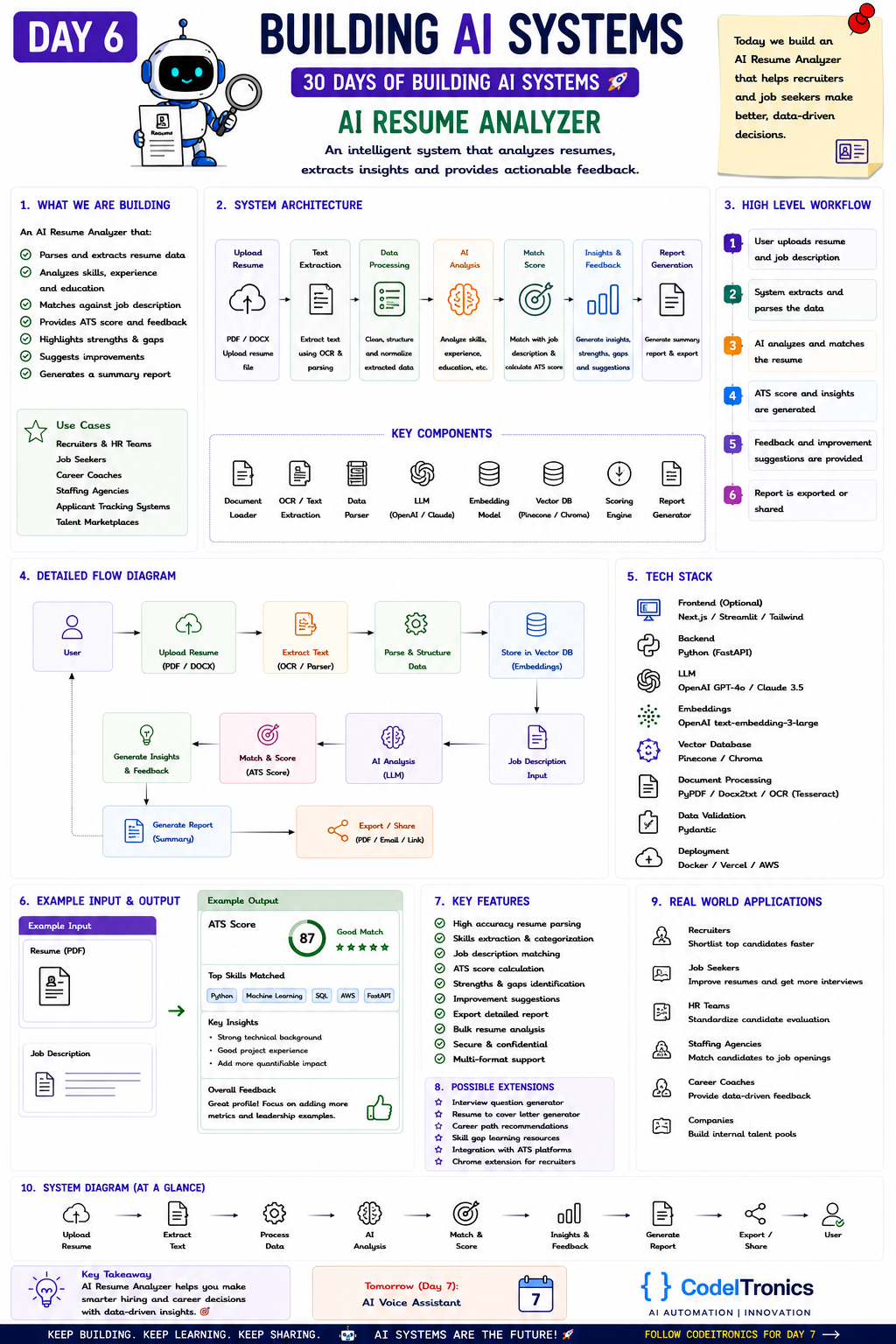
Save this sheet. The rest of this note walks through it section by section.
What We Are Building
The analyzer parses and extracts resume data, analyzes skills, experience, and education, matches the candidate against a job description, and produces a match score, strengths and gaps, improvement suggestions, and a summary report.
The sheet lists two very different audiences. Job seekers and career coaches want feedback: what to fix so the resume reads better for a given role. Recruiters, HR teams, staffing agencies, and ATS platforms want screening help. The architecture is the same for both, but the risk is not. A wrong suggestion to a job seeker costs an edit. A biased ranking of candidates can cost someone a job and expose your company to legal risk. Decide which product you're building before you write the scoring code.
One honest note on terminology: "ATS score" isn't a standard. Every applicant tracking system ranks differently, and many don't score at all. Your score is your own fit metric, so name it that way in the UI.
System Architecture
upload resume (PDF / DOCX)
  -> text extraction (parser, OCR fallback)
  -> data processing: LLM extracts into a strict schema, validated
  -> store profile + embeddings
  -> job description input -> extract requirements into the same shape
  -> AI analysis: compare profile to requirements
  -> match score (deterministic) + insights & feedback (LLM)
  -> report generation -> export / share
The key design decision is the split in the middle. The LLM reads messy documents and turns them into structured data. Plain code computes the score from that structured data. The LLM then explains the result in words. Each part does what it's good at.
Key Components
| Component | Job |
|---|---|
| Document loader | Read PDF and DOCX (PyPDF, Docx2txt) |
| OCR | Tesseract for scanned or image-based resumes |
| Data parser | LLM extraction into a Pydantic schema |
| Embedding model | Semantic skill matching ("Postgres" vs "PostgreSQL") |
| Vector DB | Store profiles for search across many candidates |
| Scoring engine | Deterministic, explainable weights |
| LLM | Insights, gap analysis, suggestions |
| Report generator | Summary report and export |
Data Flow Step by Step
- The user uploads a resume and a job description.
- The system extracts text and falls back to OCR when a PDF has no text layer.
- The LLM extracts structured fields, and Pydantic validates them.
- Requirements are extracted from the job description into must-have and nice-to-have skills, minimum years, and education.
- The scoring engine compares the two and produces a score with a breakdown.
- The LLM writes strengths, gaps, and suggestions grounded in that breakdown.
- The report is generated and exported or shared.
Here's the core of steps 3 and 5:
from pydantic import BaseModel

class Resume(BaseModel):
    skills: list[str]
    years_experience: float
    roles: list[str]
    education: list[str]
    has_quantified_impact: bool

class Requirements(BaseModel):
    must_have: list[str]
    nice_to_have: list[str]
    min_years: float

def match_score(r: Resume, req: Requirements, same_skill) -> dict:
    must = [s for s in req.must_have if any(same_skill(s, x) for x in r.skills)]
    nice = [s for s in req.nice_to_have if any(same_skill(s, x) for x in r.skills)]
    score = (
        60 * len(must) / max(len(req.must_have), 1)
        + 20 * len(nice) / max(len(req.nice_to_have), 1)
        + 20 * min(r.years_experience / max(req.min_years, 1), 1)
    )
    missing = [s for s in req.must_have if s not in must]
    return {"score": round(score), "matched": must + nice, "missing": missing}
same_skill can start as a normalized string compare plus a synonym table, then move to embedding similarity with a threshold. Either way, the same inputs always give the same score, and you can show exactly why.
A Minimal Tech Stack
| Layer | Choice |
|---|---|
| Frontend | Next.js or Streamlit with Tailwind |
| Backend | Python with FastAPI |
| LLM | A current OpenAI GPT or Anthropic Claude model |
| Embeddings | OpenAI text-embedding-3-large |
| Vector DB | Pinecone or Chroma |
| Document processing | PyPDF, Docx2txt, Tesseract OCR |
| Validation | Pydantic |
| Deployment | Docker on AWS, or Vercel for the frontend |
Example Input and Output
The sheet's example takes a resume PDF and a job description and returns a score of 87, "Good Match", with matched skills Python, machine learning, SQL, AWS, and FastAPI. The key insights are a strong technical background and good project experience, plus one suggestion: add more quantifiable impact. The overall feedback adds metrics and leadership examples.
That "add quantifiable impact" note is the most useful line in the report, and it's a good example of where the LLM earns its keep. The score says how well the resume matches. The LLM explains what to change. Keep the two clearly separated in the UI so nobody mistakes the prose for the score.
Production Concerns
Evaluation
For extraction, hand-label 50 resumes across formats (single column, two column, scanned, creative layouts) and measure field accuracy. For matching, have recruiters rank a set of candidates for a few roles and compare with the system's ordering. Look hard at disagreements, since they usually reveal a missing synonym or a requirement extracted wrong.
Cost
Extraction is one LLM call per resume and one per job description, and both can be cached. Scoring is free because it's code. The LLM feedback call is the only one that repeats for each resume and job pair, so generate it only when someone opens the report.
Failure Modes
- Bias. Names, photos, addresses, graduation years, and gaps can act as proxies for protected characteristics. Don't extract fields you don't score on, and audit outcomes across groups before using this for screening. Some jurisdictions regulate automated hiring tools directly, so check the rules where you operate.
- Layout parsing. Two-column and designed resumes scramble reading order. Test them explicitly.
- Keyword gaming. Hidden text and keyword stuffing exist. Extract from the visible layout, and weigh skills that show up in role descriptions above a bare skills list.
- LLM-generated scores. Asking the model for "a score out of 100" gives you numbers that drift between runs and can't be explained. Compute it.
Extensions Worth Adding
The sheet suggests an interview question generator, a cover letter generator, career path recommendations, learning resources for skill gaps, integration with ATS platforms, and a Chrome extension for recruiters. For job seekers, skill gap learning resources are the natural next step. For recruiters, interview questions targeted at the gaps are the most useful.
Key Takeaways
- Let the LLM extract and explain. Let code compute the score.
- "ATS score" isn't a standard, so present your score as your own fit metric with a visible breakdown.
- Screening candidates is high-stakes. Minimize the fields you extract and audit outcomes for bias.
- Test layouts, scans, and keyword stuffing explicitly, since they break naive parsing.
FAQs
Why not just ask the LLM for a match score?
Because it won't be stable or explainable. The same resume can score differently on two runs. A deterministic score over extracted fields is consistent, debuggable, and defensible.
Do I need a vector database?
Not for scoring one resume against one job. You need one when recruiters search across a pool of candidates, or when you match skills semantically at scale.
Is this safe to use for automatic rejection?
We don't recommend it. Use it to surface and explain, keep a human making the decision, and check the legal requirements for automated hiring tools in your jurisdiction.
Up Next
Tomorrow is Day 7, the AI Voice Assistant System: speech to text, an LLM in the middle, and text to speech on the way out, with a latency budget that decides whether it feels like a conversation or a walkie-talkie. If you're building a recruiting or document analysis tool and want it done right, contact us.
Letters to the editor
No letters yet. Questions and counterpoints are welcome.