Yesterday we built a resume analyzer that keeps scoring in code. Today we build an AI voice assistant: a request-and-response system that listens, transcribes, understands intent, calls APIs to get things done, and speaks back, with a latency budget that decides whether it feels like a conversation.
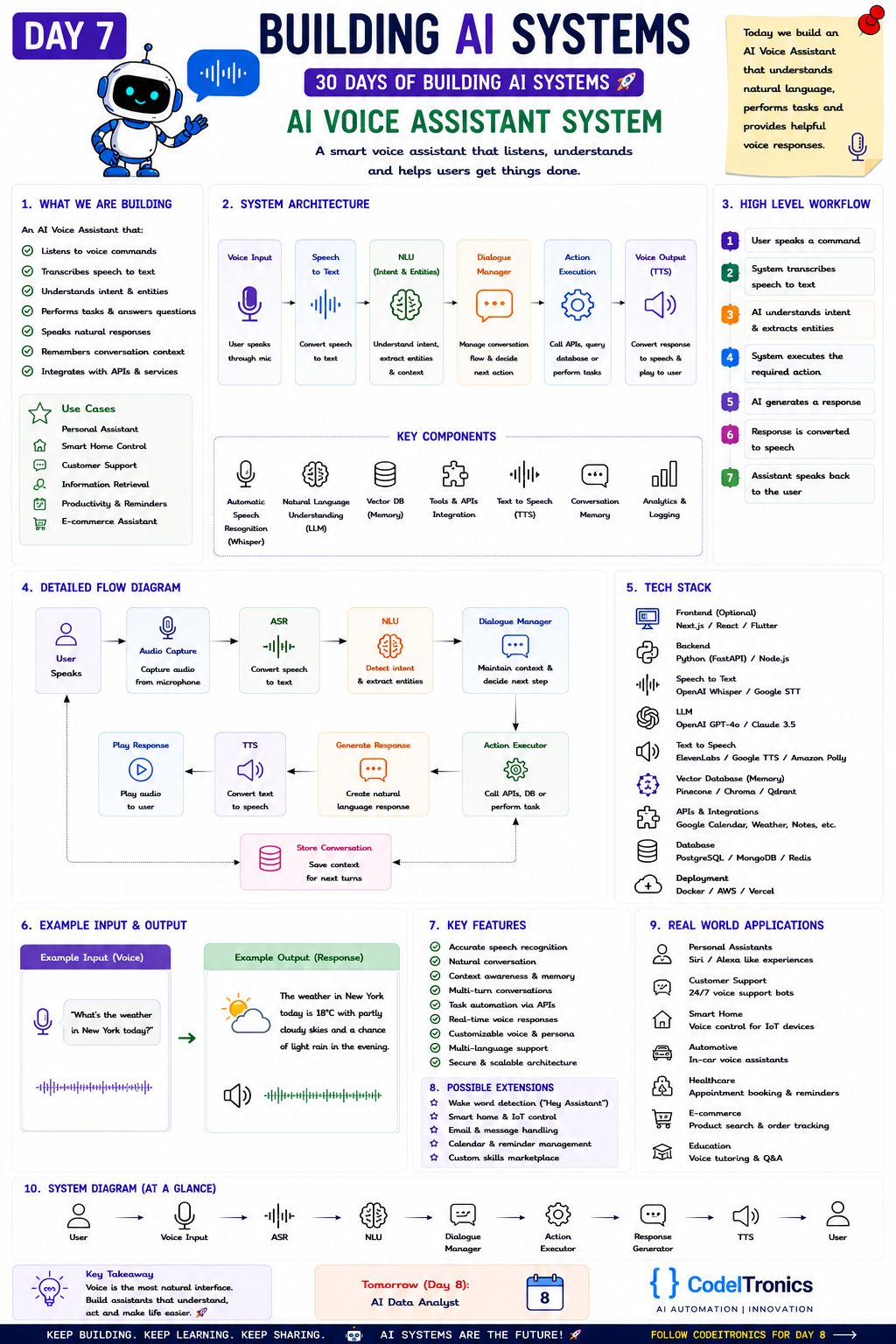
Save this sheet. The rest of this note walks through it section by section.
What We Are Building
The assistant listens to voice commands, transcribes speech to text, understands intent and entities, performs tasks and answers questions, speaks natural responses, remembers context across turns, and integrates with APIs and services.
Think personal assistant, smart home control, information lookup, productivity and reminders, or an in-app shopping helper. The interaction is one user, one device, short turns. Later in the series, on Day 26, we build a phone agent that handles calls, transfers, and compliance. Today is the core loop that both share.
The hard part of voice isn't any single model. It's that a conversation has a rhythm, and your pipeline has to fit inside it. Text chat users tolerate a few seconds. Voice users hear silence as failure.
System Architecture
voice input (mic)
  -> speech to text (ASR)
  -> NLU: intent + entities
  -> dialogue manager: context, next step
  -> action execution: APIs, database, tools
  -> response generation
  -> text to speech (TTS) -> play to user
  -> store turn in conversation memory
In a modern build, NLU, the dialogue manager, and response generation often collapse into one LLM call with tool calling. The model reads the transcript plus recent history, decides whether to call a tool like get_weather(city), and writes the spoken reply. The sheet keeps them as separate boxes, and that's still the right way to think about them, because each has its own failure modes and its own logs.
Key Components
| Component | Job |
|---|---|
| ASR | Speech to text, such as Whisper or Google Speech-to-Text |
| NLU | Intent and entity extraction, usually the LLM |
| Vector DB memory | Long-term facts and preferences (Pinecone, Chroma, Qdrant) |
| Tools and APIs | Calendar, weather, notes, smart home |
| TTS | ElevenLabs, Google TTS, or Amazon Polly |
| Conversation memory | Recent turns for multi-turn context |
| Analytics and logging | Per-stage latency, errors, and transcripts |
Data Flow Step by Step
- The user speaks a command.
- Audio is captured, and voice activity detection decides when the user has stopped talking.
- ASR transcribes it.
- The LLM works out intent and entities and decides on an action.
- The action executor calls the API or database.
- The LLM generates a short, speakable response.
- TTS converts it to audio and plays it, and the turn is saved for context.
Every arrow adds delay. Here's an illustrative budget for a turn that feels responsive. These are design targets, not benchmarks, and your numbers will depend on providers and network:
| Stage | Target |
|---|---|
| End-of-speech detection | A few hundred ms |
| ASR final transcript | Under half a second with streaming ASR |
| LLM first tokens | Under a second |
| Tool call | Whatever the API takes, so cache and parallelize |
| TTS first audio | A few hundred ms with streaming TTS |
The trick that makes the budget work is streaming at every stage. Don't wait for the full LLM reply before speaking. Send each complete sentence to TTS as soon as it exists:
import re

async def speak_streaming(llm_stream, tts):
    buffer = ""
    async for token in llm_stream:
        buffer += token
        parts = re.split(r"(?<=[.!?])\s+", buffer)
        for sentence in parts[:-1]:
            await tts.say(sentence)      # starts playback immediately
        buffer = parts[-1]
    if buffer.strip():
        await tts.say(buffer)
The user hears the first sentence while the model is still writing the second.
A Minimal Tech Stack
| Layer | Choice |
|---|---|
| Frontend | Next.js or React for web, Flutter for mobile |
| Backend | Python with FastAPI, or Node.js, over WebSockets |
| Speech to text | OpenAI Whisper or Google Speech-to-Text |
| LLM | A current OpenAI GPT or Anthropic Claude model with tool calling |
| Text to speech | ElevenLabs, Google TTS, or Amazon Polly |
| Memory | Pinecone, Chroma, or Qdrant, plus Redis for session state |
| APIs | Google Calendar, weather, notes |
| Database | PostgreSQL or MongoDB |
| Deployment | Docker on AWS, frontend on Vercel |
Use WebSockets or WebRTC between client and server rather than request and response HTTP. Audio is a stream, so treat it like one.
Example Input and Output
The user says: "What's the weather in New York today?"
The assistant recognizes a weather intent with a city entity, calls a weather API, and replies out loud with the current temperature, the conditions (partly cloudy), and the chance of light rain in the evening.
Two details make this feel right. The reply is short and written to be heard: no bullet points, no URLs, numbers phrased the way people say them. And if the API is slow, the assistant can say "Checking the forecast" while it waits, which is far better than a few seconds of silence.
Production Concerns
Evaluation
Test with real audio, not typed text. Record a set of commands across accents, background noise, and microphone quality, and score each stage on its own: transcription errors, intent accuracy, task success, and end-to-end latency. A wrong answer usually traces back to a misheard word, so look at the ASR output before blaming the LLM.
Cost
You pay per audio minute for ASR, per token for the LLM, and per character for TTS. Premium TTS voices can cost more than the LLM. Keep spoken replies short, which also makes them better, and cache TTS audio for fixed phrases like greetings and confirmations.
Failure Modes
- Barge-in. The user starts talking while the assistant is speaking. Stop playback immediately and listen, or the assistant feels deaf.
- Endpointing. Cut in too early and you clip the user mid-sentence. Wait too long and every turn feels slow. Tune the silence threshold on real users.
- Mishearing names. Contacts, places, and product names fail most. Confirm before acting on anything that matters: "Call Priya Sharma, right?"
- Unsafe actions by voice. Anyone near the device can speak. Require confirmation or a second factor for purchases, messages, and door locks.
- Privacy. Always-on microphones raise fair concerns. Process the wake word on the device and stream audio only after it's detected.
Extensions Worth Adding
From the sheet: wake word detection ("Hey Assistant"), smart home and IoT control, email and message handling, calendar and reminder management, and a custom skills marketplace. Wake word detection runs as a small on-device model, which keeps both cost and privacy under control.
Key Takeaways
- Voice quality is mostly a latency problem. Stream every stage and speak sentence by sentence.
- Keep ASR, reasoning, actions, and TTS logged separately, even if one LLM call does the reasoning.
- Write responses for the ear: short, no formatting, and confirm anything that has consequences.
- Handle barge-in and endpointing early. They decide whether it feels like a conversation.
FAQs
Should I use a speech-to-speech model instead of STT, LLM, and TTS?
Realtime speech-to-speech APIs can cut latency and sound more natural. The cascaded pipeline gives you transcripts, easier debugging, and more control over each piece. Many teams prototype on one and test the other.
How do I add memory?
Keep recent turns in session state for multi-turn context. Store durable facts, like a home city or preferred units, in a profile or vector store and load them at the start of each session.
Do I need a wake word?
Only for always-listening devices. A web or mobile app can use push-to-talk, which is simpler and avoids privacy questions entirely.
Up Next
Tomorrow is Day 8, the AI Data Analyst System. It takes a question in plain English, loads and explores your data, builds charts, and writes up insights, and the rule is that the numbers come from code, never from the model. If you're building a voice experience and want the latency right, reach out.
Letters to the editor
No letters yet. Questions and counterpoints are welcome.